Fancy Mansion: Waypoints
|
This week I’ll be discussing the use of waypoints as a method of pathfinding for our enemy AI. Taking last week’s CONCRIT into consideration, I’ll try to explain the how and why of my programming in a simplified manner that non-programmers can more easily follow along with. Rather than go with A* Pathfinding, which is an algorithm that calculates the shortest possible route between two points, we opted to go for a waypoint pathfinding system. Our programming lecturer recommended we take this approach, as it is simpler and more optimized for the nature of game we’re making with Fancy Mansion (basic 2d “sidescroller”). The difference between the two methods is that rather than assign every floortile as traversable or non-traversable and using an algorithm to search for the shortest possible route between two assigned coordinates, we simply define a number of coordinates as waypoints and instruct the AI to move directly between them. (Go ahead and read up more on A* if you’re interested: on Wikipedia, or here for non-programmers). To achieve this, I modified the text file that is used to tile our level to include waypoints. The additition looks like this: Waypoints This text file is read in by a function in our AI. Using a basic loop, we look through the 25 rows and 16 columns above, which represent the width and height of our level map in tiles. If the element read in is not a 0, we multiply the row and column position by the width and height of each tile, 128 pixels. We save these numbers in a 2d vector. This way, we produce coordinates for each waypoint plotted. For example: row 11, column 3 is waypoint 6. Since 6 =/= 0, the loop will record 11×128 and 3×128 and save it as the first element in the 2d vector. These are the x and y coordinates for waypoint 6: 1408, 384. Here’s a visual translation of these waypoints: 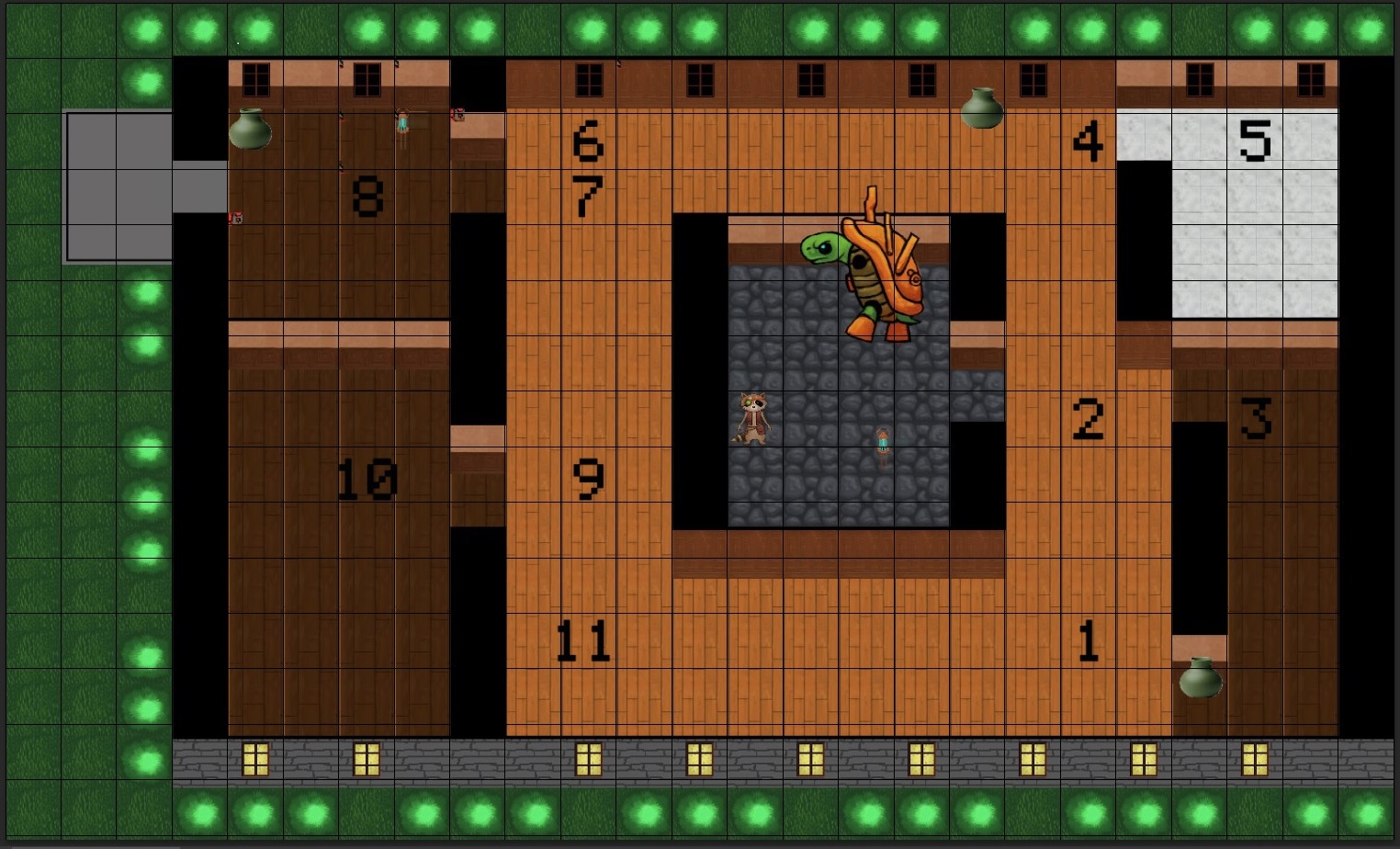
Wapoint visualization. Ignore the giant tortoise. But sir, I hear you ask, how does the AI know which waypoint is which since the vector is only saving sets of coordinates? I’M GLAD YOU ASKED We use a handy-dandy index variable for this, in our function that uses trigonometry and the pythagorean theorum to handle movement between the nodes. The function looks like this: void Otto::FindPath(sf::Vector2f vector2)
{
//Räknar ut avståndet mellan den spriten och target-positionen (delta-X och -Y), i detta fall en position i en 2d vector
pathDeltaX = vector2.x - GetPos().x;
pathDeltaY = vector2.y - GetPos().y;
//Räkar nu längden på vektorn med pytagoras sats C = roten ur(A^2 + B^2)
pathHypotenuse = sqrtf(pathDeltaX*pathDeltaX + pathDeltaY*pathDeltaY);
//If we are less than 5 pixels away from the target position, increase path index
if (pathHypotenuse 11)
{
m_pathIndex = 0;
}
};
//Om vectorn är 0 måste den bli 1, eftersom man inte kan dela med 0
if (pathHypotenuse == 0)
pathHypotenuse = 1;
// cosv = Närliggande / Hypotinusan
pathDeltaX /= pathHypotenuse;
// sinv = Motstående / Hypotinusan
pathDeltaY /= pathHypotenuse;
};
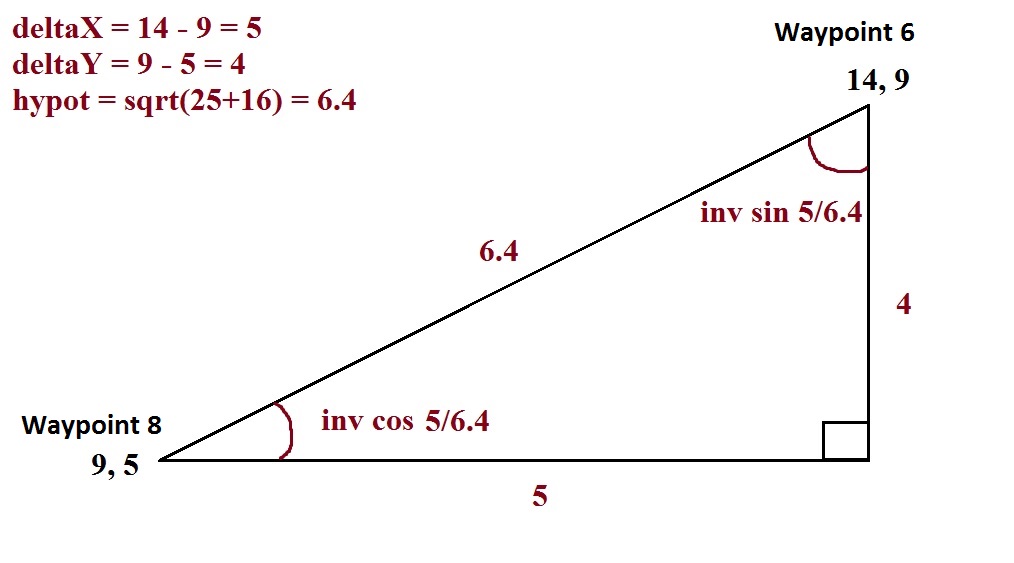
What this does is move the enemy along the shortest route between two waypoints (two elements in the vector). I specify the starting position in the enemy’s ctor, so we start at the coordinates for Waypoint 1. Since all of these waypoints are currently aligned with one another on either the x or y axis, trig is a bit redundant, but it will be needed later as I expand the locations of the waypoints. Here’s a visual explanation of how trig is used to figure out the angle at which to move along the shortest route between the two waypoints:
Anyway, back to the index. We move from our starting position, to the nearest waypoint using the method explained above. When we are within 5 pixels of the waypoint we’re approaching, we go into Idle State – a finite state used to make the enemy stop and “wait” each waypoint, to simulate a patrolling behaviour. Within the Idle State, we then increment path index. case STATE_IDLE:
{
//start timer
m_idleTimer += deltatime;
//enter patrolling state after 2 seconds
if (m_idleTimer > 2.0f)
{
m_pathIndex++;
m_state = STATE_PATROL;
if (m_pathIndex > 11)
{
m_pathIndex = 0;
}
}
And within the Patrol State, we set the enemy to move toward an element in the waypoint coordinates vector that corresponds to the path index, like so: //Patrol route FindPath(Patrol[m_pathIndex]); m_ottoSprite.move(m_speed*deltatime*pathDeltaX, m_speed*deltatime*pathDeltaY); So there’s a sort of simplified explanation of how the waypoint system I expanded upon this week works! Seeya next week.  |