Tether System
|
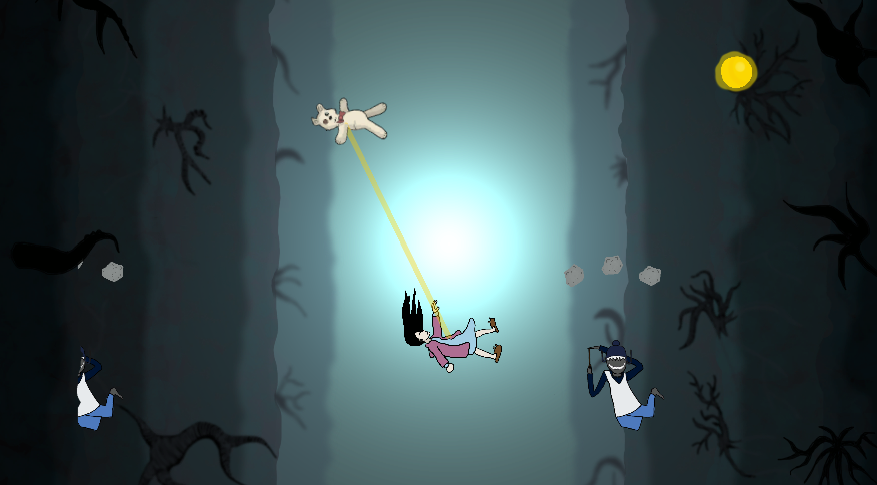
This week I worked on a ”tether system” between a teddy bear that is controlled with the mouse and a girl that is controlled with the WASD keys. The goal of the tether system is to render a tether between the two characters to visualize their connection to each other. The reason why we decided on having a tether between them is because of feedback from the playtest. Our testers didn’t understand why the teddy bear is shooting a projectile towards the girl, so we wanted to make it more clear that they are linked and that the player is supposed to position the girl and teddy so that there are enemies in between them that the projectiles hit. Our lead artist wanted a tether that bended when you moved the characters, so it looked less like a steel bar between them. I tried doing this using a particle system that shot a constant stream of particles towards the player. The problem was it didn’t look at all like a tether since when you moved the teddy quickly the particle would spread out. Unfortunately I deleted the script and didn’t capture any footage of it but rest assured it looked awful. After going to the coding session with Håkan, he told us that he had no idea how one would implement that and adviced us to scrap the idea of a bendy tether. So we did and I instead used the LineRenderer tool to draw a line between the teddy and the player.
It doesn’t look great right now but we are probably going to add a material that isn’t monocolor and some particle effects in the future. For now it communicates the link to the player and that’s what it need to do right now. The only problem I had was that Unity’s Line Renderer tool is a for 3d development. While it’s usable in 2d, it isn’t designed for this. This became apparent when the line at first was rendered behind the background. This was solved by the following code lines: lineRenderer.sortingLayerID = LayerMask.NameToLayer(”Default”); This sets the line in a ”sorting layer” in the 2d system, which makes it render at layer 6, which is above the background.
 |