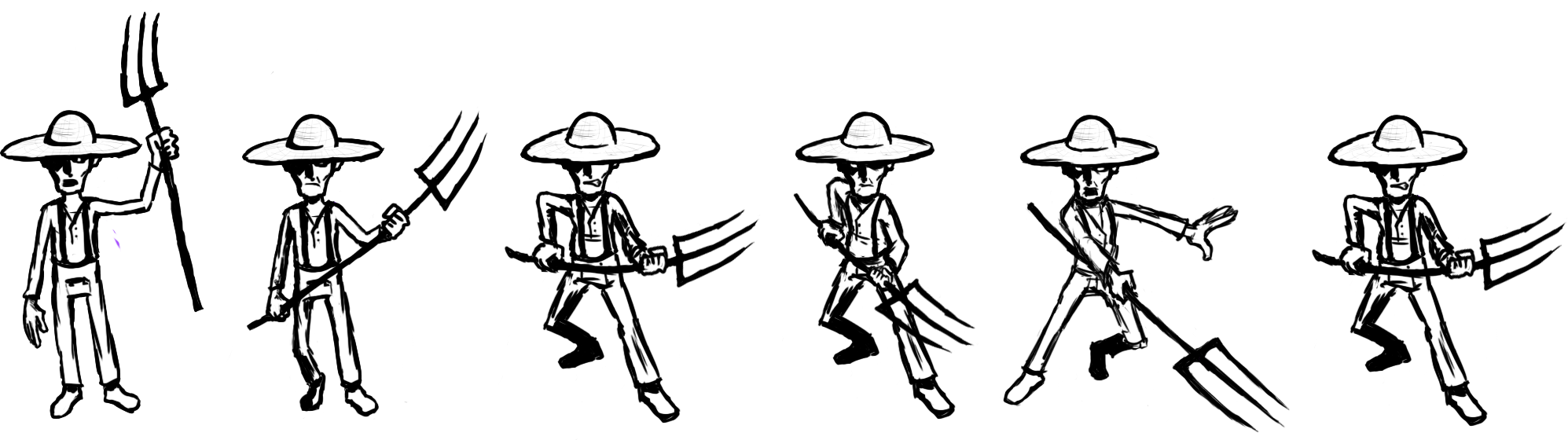
Animating a farmer
|
In this week’s post, I want to talk about an animation I made for “Burn Witch Burn” about two weeks ago (more info on the game in last week’s post and probably coming ones). For my first two animation cycles and their respective sprite-sheets, I opted to focus on the farmer-type enemy first, as they are the most prevalent enemies. Me being the only one in the graphics department of my team, I must focus on the most quintessential graphical elements of a shmup, the enemy design and the environments, so starting with animations for the most common enemy type seemed reasonable. The farmer is present in both phases of the game (the “Hunted phase” and “Hunter phase”, when the tables turn), trying to gang up on the player and poke them with their pitchforks. In the first phase, they will also appear in form of a “mob”, which comes with its own mechanics, but it will probably mostly consist of farmer assets. I gave walking and attacking animations the highest priority. The idle state of a character you can scrap if necessary (due to time constraints, etc.) and dying animations you can cleverly work around with effects, again, probably even in Unity itself – I will figure that out during the coming sprints. Point being, I should consider the worst-case scenario at all times. That is also why I chose to depict my farmer facing the player/camera – if everything would break down, we would at least have enemies with discernable faces and thus, personality. As a side note, while designing the characters, I decided to give all the different enemy types different types of hats, while keeping the protagonist deliberately “hat-free” to both break the boring convention of witch with black hat and at the same time create an intuitively perceptible contrast to the antagonistic forces that come towards the player. Both my walking and my attacking animation are kept deliberately crude, with walking counting 4 frames, attack counting 5-6 frames (depending if idle is in there or not). This may sound like an excuse, I realize, but I should consider that I have to work on at least two other directions for the same animation cycles (not even mentioning all the others), one facing upwards in-game (their back is turned to the player/camera) and one sideways, which I can then mirror for the opposing direction, if I run into time constraints. This is more of a problem for ¾ top-down games, which side-scrolling game projects for example may not encounter.
Implementing the frames into Unity and creating the animations worked fine after some initial technical hiccups (frame-PNGs not being able to be dragged into the Scene, or appearing as weird heaps of black tangled lines). In the “Animation” tool, I enjoyed playing around with the frames that I had. At some point, I figured out useful details like e.g. keeping the forward-poke frame of the attack animation in for a longer time (or double it) for a more impactful thrust or changing around the sequence of walking frames in ways that I did not consider before. Earlier, while painting the frames in Photoshop, I came up with the idea of using the enemies’ white eyes, which would pop out amongst the facial shadows created by the hat, to telegraph their incoming attack during the wind-up frames, so the player has a chance to teleport away in time. In practice, I feel that it did not work as intended and I will tinker with that in the future. Same goes for the character’s centers of gravity, which seems to be more the head right now than one of the feet – I still have to work on that and figure out a way to effectively implement that in my future production pipeline.  |