Blog week 3: The Arrow
|
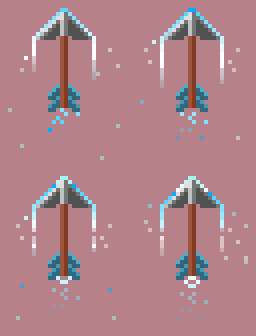
This week I’ve ben working on the projectile for our main character Camaron, this piece has gone through several iterations throughout the project. We got feedback about the arrow during the Alpha testing, there Marcus told us that we needed to make the arrow more visible, he recommended that we just made it bigger. As we based most of ur sprites on ”the power of two” making it bigger would lead it to become a lot bigger, more so than we wanted it to be. Thus we decided to think about how we could make the arrow more visible without actually making it bigger. The idea we came up with was simple; a trail. In the narrative the bow has mystical attributes, but visually the original arrow just looked like any ordinary arrow. Not very magical. By making a trail the arrow would seem more eye-catching and it also gave a deeper sense of speed. The trail is a blue and white gradient, this colour was chosen as it matches the sash Camaron has and it also stands out as the colour blue has been used sparingly, making it easier for the player to see it. Making the sprite for the basic arrow was simple, I already knew how an arrow looked like and because we use pixel art for our game it’s more important that you can see what the sprite is supposed to be like rather than what it actually is. I used Photoshop for the animation as it is the best software for animation that I have available. I made sure that the back of the trail faded out a bit by lowering the opacity of the brush I used. If we didn’t do this the trail would look weirdly cut-off. The pattern on the trail was incredibly simple to do actually, first I used a solid colour to make sure that the animation looked right, I also changed the opacity on some pixels as deemed necessary. After that I manually made a gradient covering almost the entire canvas on a separate layer, after that I simply used the clipping mask and made the gradient layer clip on to the trail layer. This made it so that I could ”scroll” the gradient on top of the trail independently making sure that the gradient is smooth.
-Image of the gradient- By doing this I can also easily change the colour of the trail in the future, as we’ve toyed with the idea of having it change depending on the power-up and this simplifies the process if we decide to follow through. The reason as to why the projectile is important speaks for itself, it’s one of the core mechanics of our game and the main way of warding off the enemies, thus making this sprite extremely important. The animation does jump for a bit as it is only four frames short as of now, the gradient doesn’t really follow the trail entirely and jumps back halfway through, so it’s not a perfect loop. Doing this animation is surprisingly time consuming because as soon as you change one thing, you need to change 10 other things that’s why it was decided to leave it like this now as it’s still fully functional and come back and make it smoother later on if there’s time during the refining period.
 |