Head First Into Making Sprites
|
These lasts weeks I’ve mainly been working on the main character. Last week I discussed how I designed the main character and showed the different stages she went through during the design process. This week I’m going to talk about how I turned the concept art into the sprite that is in the game at the moment. The sprite I’m mainly going to talk about is the level one sprite that you see when you start the game. I’m almost complete with both the level two and three sprites right now, but I think the process of making the level 1 sprite is more interesting as I had no experience making sprites when I started out.
The level one has her holding a a pistol with both her hands. The game is top down so the only things you see is the top of her head, her shoulders and her arms. Starting out I made a new 64×64 canvas in photoshop which I then sketched the the main character’s pose on to. I used a small brush tool with a lower opacity for this as I didn’t need to define the lines at this stage. In hindsight I should’ve probably started out with a bigger canvas and then scaled it down to 64×64 when I was happy with the proportions. When you are working in such a small size as 64×64 it is hard to make lines the way you want them to, which is why I think that starting out bigger would’ve been easier.
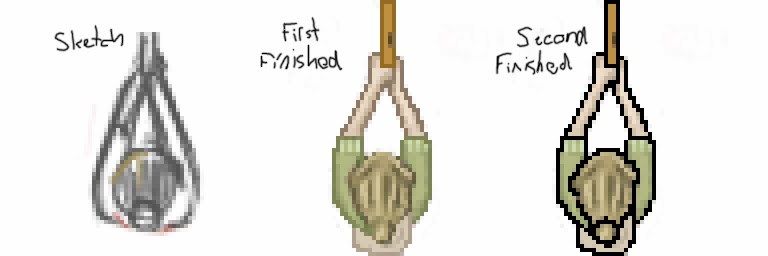 When I finished her pose I made a quick outline and started to put down color on her just to experiment with her color scheme. I may have done this a bit backwards as I put down the colors before I had a final outline to work with. Instead I put down the colors on top of the half-assed outline and then created the final outline by painting a darker color around the main color. E.g. to outline her green clothes, I took a darker shade of green and created a one pixel wide outline around it. At this point I was using a one pixel big pen tool in photoshop.
This technique of making an outline looked good in photoshop, but when it was put into the game it didn’t provide enough contrast to stand out. To fix this I made the outline pitch black which made everything much clearer in game.
It’s still not absolutely final as some group members still have some problems with the colors, but at this point I’m starting to feel I’ve put more than enough time on it and that my time could be better used on something that is yet to be created. That is something that I will have to speak with the rest of group about though.
|