Enemy and obstacle spawning!
|
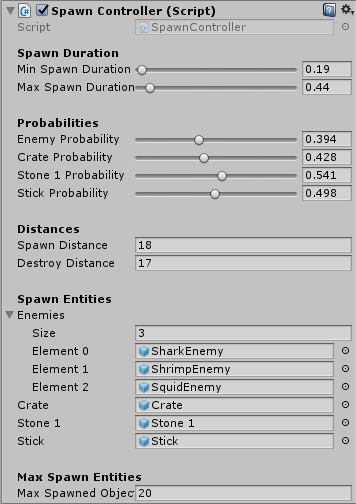
After creating the soundtracks I decided to create a script for spawning enemies. I chose to use C# because I have more experience with that compared to Javascript. My approach was to create an empty game object which holds the script called “SpawnController” as a component. This will game object will be placed in the game scene since that is where the enemies will be spawned. What the script does is spawn a random entity after a certain timeThreshold somewhere between minSpawnDuration and maxSpawnDuration. The user can control the probability of spawning a certain entity by changing the probability value of each type of entity. 0 means a zero percent chance and 1 means a hundred percent chance of spawning the entity. After the spawning, a new timeThreshold is generated and the loop starts all over again. There’s also a cap on how many entities can be spawned in the scene at the same time. So in this case, when there is 20 entities in the scene, there won’t be any spawning until an entity is destroyed.
In the inspector I organized the fields a little by using some simple tags like [Header(“Text”)] that creates a header, [Space(10)] that creates a 10 pixel space and [Range(0.0f, 1.0f)] which gives the user the ability to set a variables value using a slider. It looks good but it’s also very neat if you want to have a limit on the value of your variable. The script contains four functions. The first two are monobehaviour functions, Start() and Update(). Start() will run when the script is enabled and Update() will be called each frame. The third function is SpawnObject() and the forth is DestroyObjectCheck(). In Start(), I initialize all the necessary variables like the timeThreshold and the player game object. The float timeThreshold is the time it will take to spawn the object and is initialized to a value between minSpawnDuration and maxSpawnDuration. The player game object will be used to check the distance between each entity and the palyer game object itself in CheckDestroyObject(). In Update(), the function SpawnObject() is called whenever the accumulated time is larger than timeThreshold. If that’s the case, the accumulated time is set to zero and and a new random timeThreshold gets generated. SpawnObject() of course spawns one of the spawn entities. The spawn probability is taken into consideration so if the probability of an entity is set to 1, there is a hundred percent chance that the entity will spawn. DestroyObjectCheck() checks for each entity if it should be destroyed or not. If the distance is higher or equal to the float destroyDistance then it will be destroyed.
 |