Start Menu
Introduction
To start off this post I need to refer to our playtest session we had last monday. There I learned even more about our game and what flaws it had. One of the big flaws were that the players did not fully understand the controls of the game. We gave them a sheet of paper with all the controls but it was all still very confusing to them. One feature that did not properly communicate to the players were that they were not able to use the ‘heavy’ shot we had. The ‘heavy’ shot needs to be loaded up by holding down the space bar for three seconds. The game did not fully communicate that to our testers, how long you had to hold down and what would happen if you did.
Start Menu 1
This leads up to an idea I had to fix this issue with a smart design solution. The start menu. In this case, menus. Below you can see the two starting menus for the game I worked on. The first menu teaches the player how to shoot a light shot. By pressing the SPACE-button the Behemoth (the player character) fires a shot and lets the player continue to the next menu. Keep in mind that the images are a rough prototype of what will be later implemented.
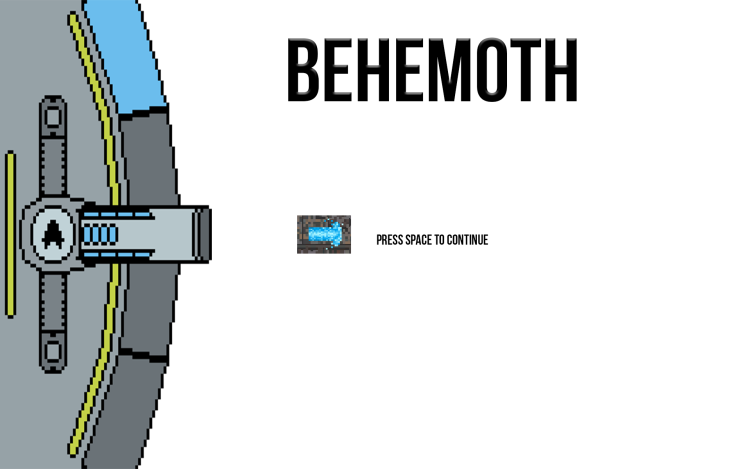
Image: Start Menu 2
Start Menu 2
The second menu gives the player two different options; Start Game or Quit. The cannon, in this case the cursor are in the middle of the screen. If you would like to navigate to the different selections the screen gives you all the information needed to go up or down (W and S). If the player would like to start the game it must first move the cannon, just like the game, up  to target the selected option. To start the game the player has to hold down SPACE-button to fire the ‘heavy’ shot aka the laser. Now the player knows how to navigate the cannon up and down (W and S) and how to do a light and heavy shot. to target the selected option. To start the game the player has to hold down SPACE-button to fire the ‘heavy’ shot aka the laser. Now the player knows how to navigate the cannon up and down (W and S) and how to do a light and heavy shot.
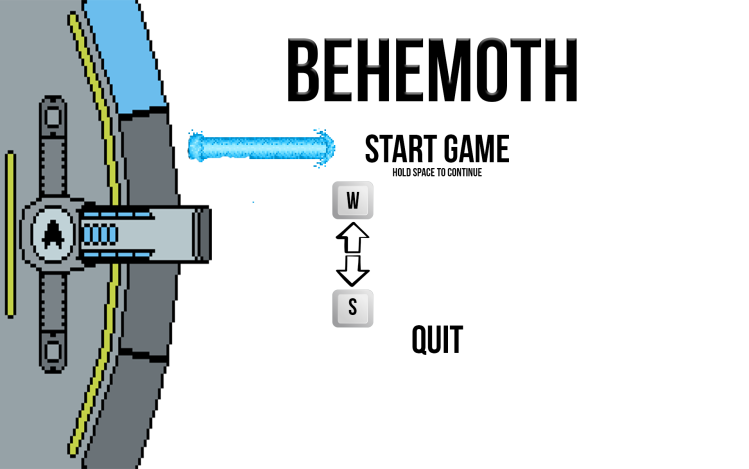
Image: Start Menu 2
By simply having the basics of game controls in the menus we could eliminate much of the frustrations testers felt with the cannon.
Joakim Malmström
Game Design Student
About Joakim Malmström
2017 Game Design
|
