Screenshakes
|
I created an asset where the player has to trigger a button to open a heavy stone door. To give it the player the feeling that the door is really old and heavy I decided to add screenshakes to increase the effect. Knowing that this probably won’t be the only situation in the game where screenshakes are useful I wanted the script to be versatile and easily modified for many different instances.
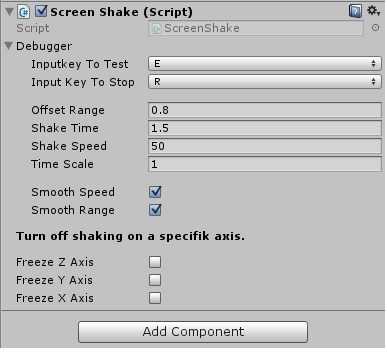
Basic function The script is added to the camera and modifies its position each frame. I use Perlin noise to get a randomized value on all three axes that is added on top of the cameras position. Optional settings To make it more versatile I wrote a method to trigger a single shake with three overloads each adding a little more options.
Offset range: This parameter specifies maximum values to be added to the camera position. To make fine tuning easier and faster I added a debugging method where you can assign a key that triggers a screenshake with the public variables in the inspector. Sometimes you don’t know exactly how long a shake should be since it might be dependent on some event that varies in length. That’s why also added a method that can be called on a frame-by-frame basis, and doesn’t take time as a parameter. A stop method was also made that cancels any currently playing screenshakes.
 |