Neiva programming blog 2
|
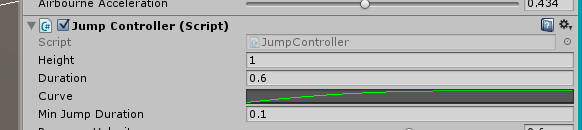
I’ve been working on the player character movement. That includes running, jumping, land on moving platforms, move WITH moving platforms and more… I’ll now talk about how I created the jumping movement. In the Neiva game we have the main character the player controls: NEIVA. It’s a two legged little creature that looks cute, colorful and non-realistic. In the game, we did not want realistic movement. A realistic jump would be a single jump force up from the ground and then gravity takes over and pulling the character with a constant force downwards. The result would be a perfect sine curve that has the same shape in the upwards as downwards. For Neiva we wanted the shape of the jump be more asymmetrical, where the jump has a longer hangtime than the fall. We are working with Unity3D which has a lot of tools to offer when programming games. One of those are the AnimationCurve (http://docs.unity3d.com/ScriptReference/AnimationCurve.html). AnimationCurve is a data type that works as a curve with multiple points that shapes all different kinds up curve shapes. What’s so good about AnimationCurve is that it appears in the Unity inspector if you give it the keyword ‘public’ (or using Unitys ‘[SerializeField]’ for ‘private’ variables to show up).
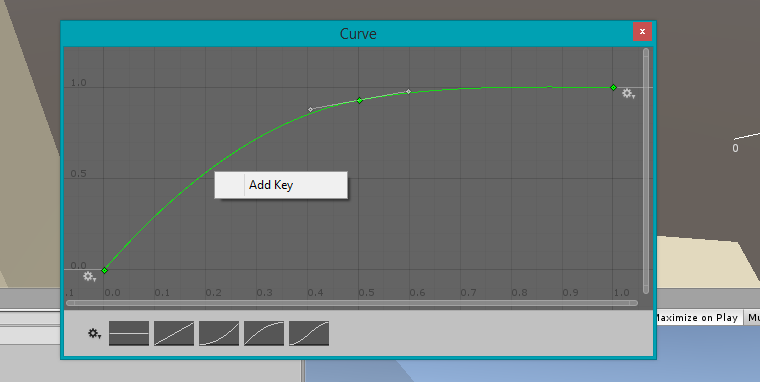
If the curve is clicked in the inspector you get a new window showing just the curve. Inside that window you can edit the curve, add more points and shape the curve however you want (except making loops.).
The curve above, you see, sort of flattens out at the end. This is sort of the behaviour we would like the jump to be. It becomes an extra hangtime. To implement this I used the method AnimationCurve.Evaluate(float). The method takes a float value that represents the x-axis of the curve and returns the y-value at that perticular point. The x-axis goes from 0 to 1 and has to be considered (actually, you could make it extend even further, or even higher). I divided the current time in the jump with the jump duration and used that in Evaluate(). I multiplied the result with the desired jump height and used that to move Neiva in y-axis (up-down in world space). I used Unity’s gravity settings handle the falling after the jump.
A jumping capsule. It’s evident (in my eyes) how it ”hangs” in the air at the end of the jump. Especially clear when you’re controlling the jump by yourself. The result is what we wanted. Our game designer can now tweak the shape and the ”feeling” of the jump, simply by open and edit the AnimationCurve. I like the result! // Joha2nes  |