Bomberman Clone, Input Manager
|
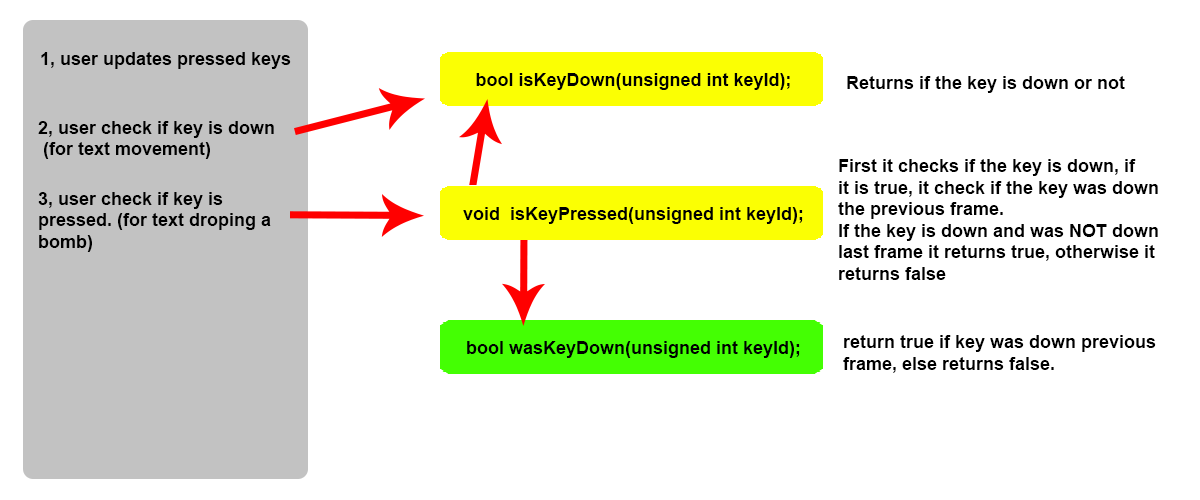
Hello dear readers! Today I will talk about my input manager, I will go into how I decided to make the things in there, how it works and why I decided to make it the way I mad it. Input ManagerThe input manager is the one handling all of the input keys, it stores them if they are pressed or not and also stores the mouse location on the screen. I wanted a simple way to store the key if they were pressed or not and choose to go with a map, this due to a map has a key and a value, all the key that could get pressed would be a number that SDL would send in, I could then use that as the key and store a bool value if the key were pressed or not. When choosing if I wanted a map or a unordered_map I looked a bit on how they worked and on their speed. A normal map works like a binary search tree where instead a unordered_map use hash values and have way faster speed than a normal map. The advantage of a map over a unordered_map is that a map keeps it data ordered, however because I didn’t care if the data were ordered or not and speed were more important to me I went with a unordered_map. When first using the input manager I had the problem I wanted for example when I pressed space it to only do its action once, because of this I wanted a “IsKeyPressed()” function that would return if the key had just been pressed and would next frame return false even if the key were still pressed down. I fixed this by making another unordered_map called m_previousKeyMap. I would then check keymap and previousKeyMap to see if the key had been pressed the previous frame. That made me able to check if the key were just pressed. The picture below shows an example of how it all works;
As shown in the picture above, if I would only check isKeyDown() only one function would run, however if I would check isKeyPressed() it would run 2 other functions, first it would check so it is actually down, then it would check if the key was down the previous frame. All code in the Inputmanager is not really too advanced and is mostly simple code, however it does its job quite well. If anyone is interested how it works or have their own problems with it (or maybe just want to see how mine works) then you can download it with this link. Thank you for reading! If you have any question or anything specific you would like me to go into in more detail, just leave a comment and I will see what I can do.  |