Bomberman Clone, 2D Camera
|
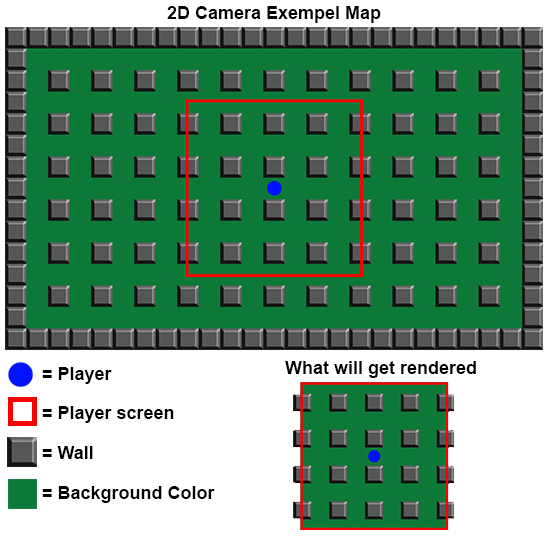
Hello dear readers! Today I will talk about my 2D camera class, why I created it, why I don’t really use it and why I chose to keep it. The 2D camera class was first created as a solution for having bigger maps than would fit on the screen (I had plans to make big challenge levels that you could play alone against AI “zombies”, similar to the first original bomberman). It would allow the camera to move around the map and make sure to only render things that were actually shown on the screen, so if the map was bigger than what could be displayed, it would not render things outside of the screen (as it can’t be seen anyway by the user). In the picture below you can see the whole map, while the red square is what the player can actually see on their screen. The camera class main job was to tell the draw manager what was inside the red square, to ensure the renderer only rendered a small portion of the map.
Later in the making of bomberman I chose to simply scale the level so as to make sure it would always appear within the screen, meaning bigger screen = bigger object, smaller screen = smaller objects. This was to make quicker progress in development . However I chose to keep the camera class in the engine simple if I would later like to make another game that would have use of it (maybe a Mario clone or something similar). And I still use the camera2D class, though I don’t really depend on it as much.
Thank you for reading! Next post I will probably go into how the input manager works. If you have any question or anything specific you would like me to go into in more detail, just leave a comment and I will see what I can do.  |