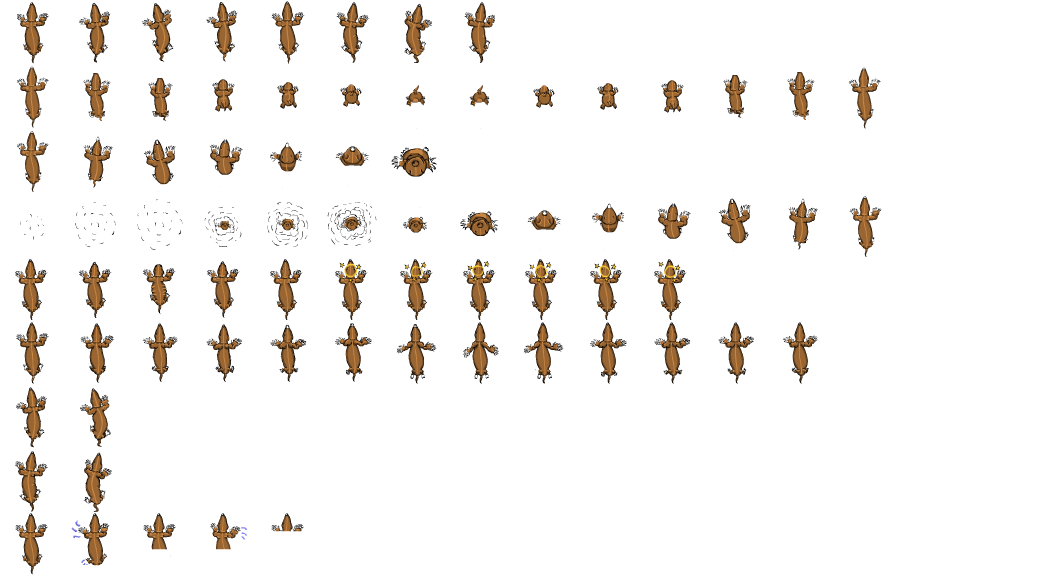
Week 8 Mole Atlas
|
This week is the final Beta presentation. I Made the whole sprite atlas for the Mole this week.
Every animation was made in 64X64 as requested by the programmers. First i made the sprite sheet as compact as possible as the programmers were going to do the collision by pixel collision but then they changed their mind and i had to redo it. Lets go down trough the animations from top to bottom. 1. Walking Animation 2. Digdown transition ( this animation will be played when the player decides to dig a hole to the underworld.) 3-4. dig up transition ( this animation will be played when the player starts digging up from the underworld to the topworld.) 5. This is the stunned animation (it should be played when the player runs into a rock in the underworld resulting in a mini stun.) 6. This animaiton is the top level animation. (it should be played when the mole walks around on the topworld.) 7-8. This is the turn animatio 7 = left 8 = right 9. This is the drowning animation and should be played when the player touches water that the gardener filled your tunnels with. So how did I do this? I made every animation in Adobe Flash because of its support for vector graphic. The main benefit of vector graphic is that I can resize the animation when ever I want and how ever I want. This made the size testing really easy and Flash is so much smoother to animate in then Photoshop. (personal preference). Then when I was done with the Sprite atlas in Photoshop I made the Atlas for when the Mole got the invincible powerup as this required the mole to blink in different colors. Thank god I made every frame a separate layer here because now I could just select every second frame and put a color overlay of yellow. The result looks like this:
This gave the player a visual feedback that something happen when they got the power up. This animation atlas will then be accompanied with a change in music. Kind of Super Mario star power up. This worked great when it got set into motion in the game. The benefits of having an atlas instead of multiple sprite sheets is to reduce the work load for the program. It makes it easier for the programmers to use the animation as they do not have to have one million different pictures. Thank you for reading!
 |