Update #5 On Project Mole Munch
|
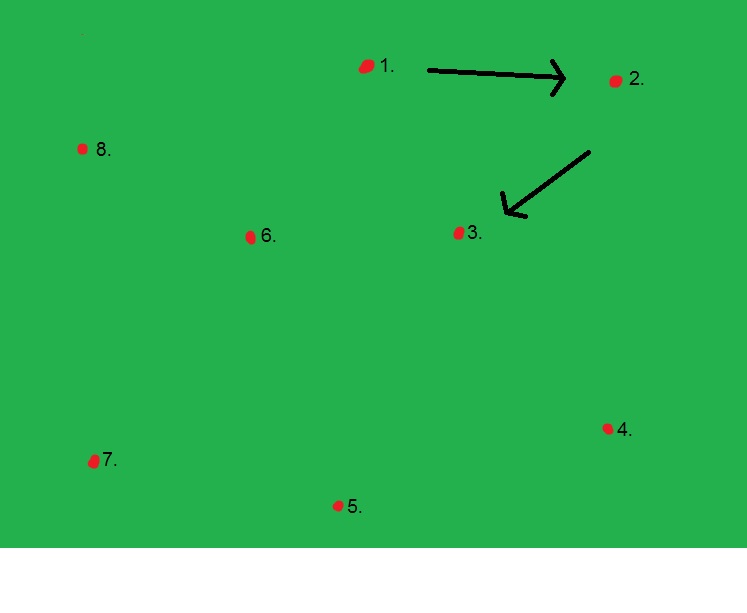
Since we last week managed to get all features and objects implemented in the game, this week have mostly been about cramming sounds and general bug fixing. I’ve been struggling a bit with finding some artifact interesting enough to write about, so I decided to describe two of the things I’ve coded this week that could potentially be useful for other programmers. If you would like to read more detailed posts, here is what I have previously written about: One of the things I finally got around to do was fixing the Gardener’s (main antagonist) movement. At first we just made him walk towards the player by increasing or decreasing his values on the x- and y-angles depending on where the player’s current position was. But this resulted in a stuttering motion since the float values are rounded and he will never reach the perfect value. First I made him walk a path instead of following the player. This path currently consists of eight nodes (small rectangle shapes) placed around the map. This crude image below shows the simple idea. The nodes are defined in an enum. The gardener then checks for the nodes with m_node. As an example, if the gardener starts with m_node = NODE_1, he moves toward node 2.
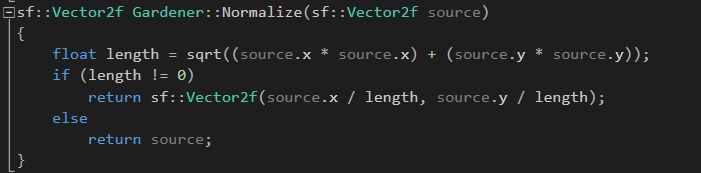
The parameter source is the subtraction between the node position and the gardener position. The next thing I needed was to rotate the gardeners sprite so it faced towards his current direction. This was also easily solvable with a mathematical formula: 
The +90 is to account for the gardeners initial angle on the sprite sheet. The angle value is then used in the SFML sprite-function SetRotation(float angle). Now to the implementation of the sounds. In SFML, sf::Sound is somewhat the equivalent of sf::Sprite. And sf::Soundbuffer is the data you load into the sound, kind of like how a texture is applied to a sprite. So it’s not a difficult concept to grasp but still tedious to implement since it requires little focus. But someone’s got to do it! Thanks for reading!  |