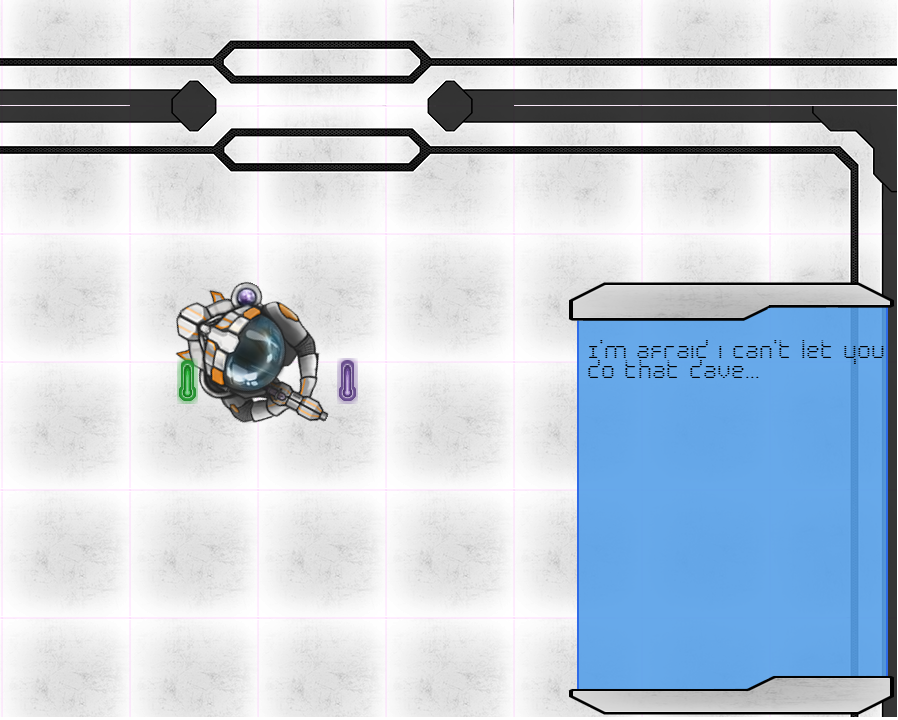
Companions need to speak or in this case write.
|
So this week I have worked on our games A.I companion. That is a type of display or small PDA. This companion is meant to help the player through the game by telling current objectives and other useful information. Most of the companion works but the important part was the text it displays on it’s display.
So SFML is really handy when it comes to these sorts of things. As it already have classes for fonts and text. First off all I created member functions for sf::Font and sf::Text. And I also found a proper font to use within our project. The font I’m using is called byte police and is free to use for noncommercial uses. I found it at Dafont (http://www.dafont.com/) which is a great site to find free or inspiring fonts. So to start font loads the font from file m_font.loadFromFile(“bytepolice”); and so we have a font to use whit our text. And after that it really simple sf::Text have functions to declare the font to use and other things like size, color and style. So we just set the preferred size and color and after that we draw the text using window.draw(m_text);. For the A.I companion we read the text from a file but the thing about sf::Text is that it only accepts sf::String and not std::string. So to begin whit we us std::istream and then open the file we want to load from. First we get a single line that contains a number for the amount of lines the document contains. We then loop through these. For this I created vectors one for sf::string and one for sf::Text. As we read the lines in the file we push these back into the sf::vector but converting them to sf::Strings as we do it. We the set m_text to the newly created sf::string and push it back into its vector. What we are left whit is a sf::text vector whit all the text from the file. We then loop through again and print them to the screen using window.draw(). After this in Update we loop through the vector of sf::texts and set their position relative to the PDA thing that they are supposed to be displayed on. But we shift their text downwards for each loop so they appear on new lines.
 |
 the A.I display.