Week 4: Actual UI implementation, Alpha Presentation
|
The Alpha has come and gone , its presentation over. Feedback mainly centered around difficulty in determining which player is where and doing what, indicating our placeholder art needs to be replaced ASAP. But that would not make a very good blogpost, so here instead the project UI and where it derives its statistics are obtained. Remember that all art here is placeholder at the moment, meant only to represent what each player should see, not what they WILL see. The UI itself would not make for a very interesting post either: The main health bars of a player on the game client would be placed in a Unity Canvas, with a masked bar moving from left to right across the screen to indicate a change in health. The bar’s position is determined based on screen size and its length on the amount of HP, to reflect characters with greater health as appropriate. What is interesting is how the entities in a multiplayer game are created, their data obtained and sent to the controller of the bars themselves.
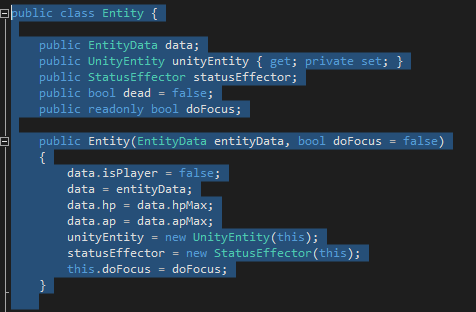
As seen in the code above, each entity is defined with certain characteristics that need to be instantly accessible: If it is dead or alive, controlled by a player, what its maximum action points and health are and if it is affected by any statistic effects. Beyond the struct of EntityData, which provides temporary values, these co-incidentally are all the values we need to depict on the screen at the start of the game, sans Initiative for movement which is chosen after the player is created. Both players and enemies have their data pre-defined in json files, loaded on creation of each scene as they are not meant to change between sessions. And here is an early revision of the game UI , sans current player values.
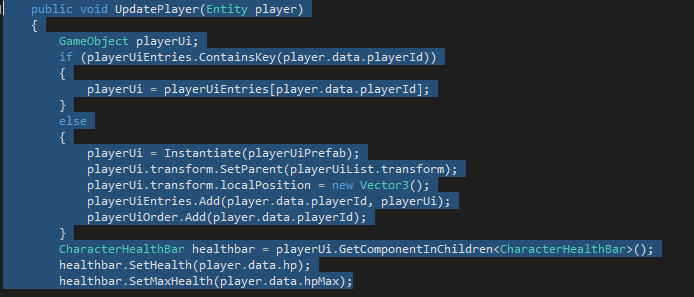
Not much to look at, as mentioned. The Entity Data itself is located on the server, not the client however. Therefore that data needs to be updated via the network, which contains a list of entities , both players and not, as well as data on what playerID active characters have. All health and actions are altered on the server, not the client, so these numbers are forwarded through server updates when applicable. Before that can happen, the UI itself is instantiated, then updated as needed. If the playerID given at connection and creation of the player entity is the same as the one being updated the client recognizes this and either sets the bars of the player to their correct numbers, or creates the UI if it does not as of yet.
This data is not the only instance being accessed of course, given that this is a multiplayer game, but this represents our solution for obtaining player data for a single entity. Next week’s post should see information on how the Unity Animator tree works and early iterations of how our group got it running.
 |