Zagam
|
So – moving on to the next character! Let me introduce to you; Zagam! *intense music* 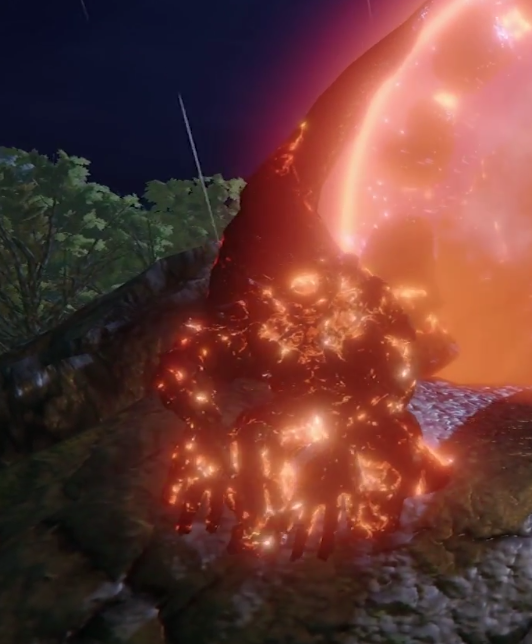 This is the first enemy that we produced, simply because our Lead Artist thought it was the most fun to model. The ‘race’ Zagam is created by the evil sorcerer that is terrorising the country, who wakes all killed men and turns them into Zagams, a creature of stone and fire who bulldozes everything it sees.
So – with that in mind, the animations needed to feel heavy, since it is basically a big boulder that is walking around. There is only so much an mocap actor can do (but he did it very well), so it was up to me to make the animations reeeally heavy. To do so, I slowed some parts down and speeded some parts up, using the Story mode in MotionBuilder. For example, one of Zagam’s attacks is to dig up a big rock and throw it, so the whole digging and lifting part is slowed down, but when he throws the rock, it is much faster, to create a dynamic feel (I’ve got a new computer and all files are on a hard drive so I can’t actually show you what it looks like, so use your imagination).  A recurring issue with combining mocap skeletons with modelled characters is that the body types does rarely match (at least when producing indie games where you take whatever actor is available, or in my case you make the Lead Artist act). Zagam is big and broad while our actor was quite lean. This means that the skeletons only match length wise, and not width. The legs matched fine since Zagam’s hips aren’t to wide, but his shoulders are twice the size compared to my actor’s. To solve this, I simply rotated the arms upwards and outwards a bit, and thankfully it worked! So I started with adjusting the Idle pose and saved it, so or every animation I just started the work by adding the new pose and plot the take, and then the movement looked fine and dandy! I hope this made some sort of sense without GIFs and images, sorry bros!  |

