Filling in the SCRUM backlog.
|
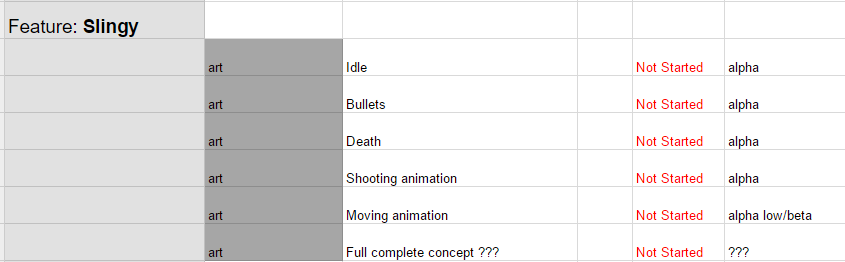
The first week of the course we were assigned with the task to fill out a scrum template. A scrum template is a list of assets/artifacts which should be worked on in order to complete the project. Since I’m the project manager/producer of my group I took the responsibility of being in charge of making sure the product backlog was easy to understand as well as selecting a priority system. As this was our very first time applying scrum theory into practice it was a challenge for us. The information we had been given prior to the assignment was not enough, we had some very brief knowledge of it which was a good start. I started by asking my team members to enter as many assets/artifacts as possible into the product backlog. During the second week we had to read the first four chapter in the ‘Agile Game Development with Scrum’ book. After we read the chapters we quickly realised my mistake. The backlog was not supposed to be filled in individually, it is supposed to be a group effort with brainstorming around a table with design goals. The “correct” way is to put a goal/user story on the table and then each person breaks down what is required to complete said goal/user story. For example, you take “the player can jump” and break it down into assets/artifacts of what needs to be done in order to achieve the player can jump. I did not know this and our backlog was nearly completed, we did it in a reverse order instead but the end result ended up being satisfying.
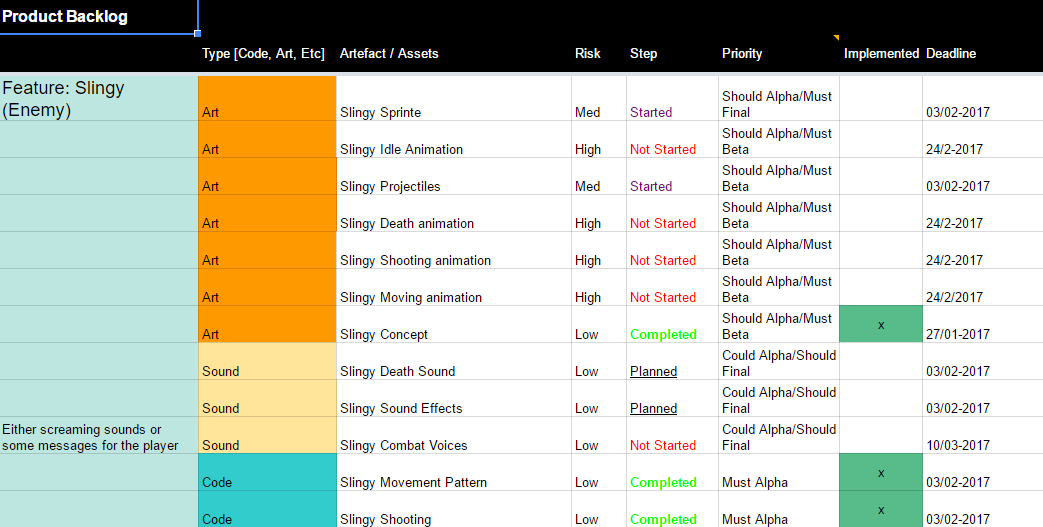
My responsibility was to make sure the backlog was easy to understand. I used the MoSCoW system to define artifacts with: should,could or must for alpha/beta/final release. I picked the MoSCoW system because I thought it would be easiest to understand, also I looked at the requirements for alpha/beta/golden and appointed their priority according to them. In order to make it even easier to read I changed most of the descriptions of the assets and added a note if something was not clear. For example “Death” does not give you enough understanding what it is supposed to be, I changed “Death” into “ death animation/sound” to make it more clear what it means. Here is the same picture from before but with the latest updates as of today.
 |