|
This week I’ve been working on the end of beta presentation and some death animations as well. I’ve also worked on fixing the design document, level design and game balance, but that didn’t make an equally dramatic title.
So let’s start with the end, death animations.
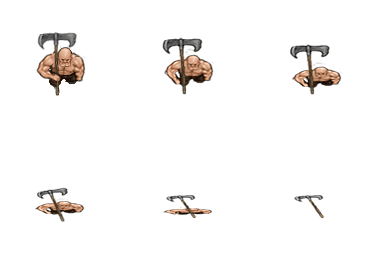 
The character designs, Huge logger and Archer respectively, was created by my lead artist Nisse Lindblom. Starting with the Archer, let us go through the process of animating it in Photoshop.
The first frame is the basic image that the lead artist created. I duplicate it, move it to the next frame in sequence, use the lasso tool to outline the character, without the bow, and then use the transform tool to make the character slightly smaller. After that, I duplicate the layer, and without removing the outline from my previous transform I move the duplicated layer to the next frame. I then use transform again to make it smaller, duplicate the layer, and repeat the process until the archer is almost gone.
I then move on to the bow. The bow I also used the transform, duplicate layer and move to the next frame method on, but in this case I also had to redraw the blank space where the arm used to be used to be on the original sprite, as well as paint over where the bow overlapped the arm of the archer. I repeated until the bow was in position to be on the floor, where I had to redraw it so that it didn’t look warped.
I then went frame by frame and changed the hat with a combination of the brush and the transform tool so that it slowly enveloped the archer until there was only a red pile on the final frame, mirroring the previous death animation I made.
The huge logger was a lot easier than the archer. I simply cut out the axe, redrew the chest and shoulder it had covered, used the transform tool to move the arm and shrink the character downwards, duplicated the layer and moved the new layer to the next frame and repeated the process until the logger was as flat as a pancake. I then pasted in the axe, used the transform tool to move the axe in a somewhat realistic manner, including an angling of the axe blade that I am quite proud off, made with the warp mode.
I decided that the axe laying on the ground should get an extra frame, so that it looked like the body had disappeared.
Level design, Design document and Game balance will be next weeks topic, since that is what I will work on next week as well.
About Pontus Hassis
2014 Graphics
|

