GAME DEV WEEK#3; DESCRIBING STATES AND MODES PLUS PROGRAMMING OBJECTS
|
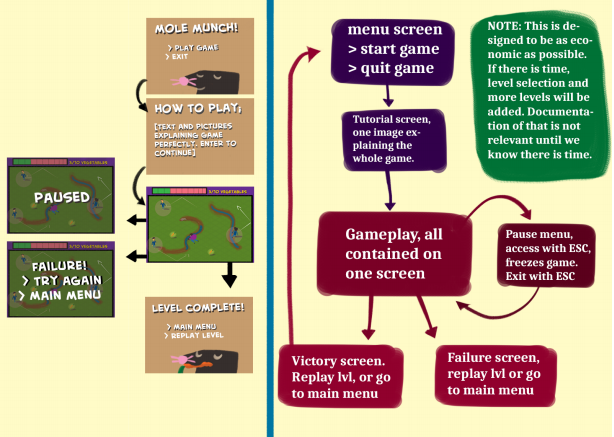
Hello! My name is Daniel Granqvist and I´m right now working with two courses called ”Introduction to game development” and ”Game Programming 2” at Uppsala University. In the past course we described a game and now we have chosen a game described by another group in order to realize it and program it as a real functional game within 10 weeks. Our group is called no 13 and consists of six persons. My role in the group is Lead Sound, which means I´m responsible for all sound effects, besides this I’m also a programmer and will code some parts of the game and finally I will also help with some of the the Design Document. In this week I have worked with two tasks: 1. Describe States and Modes in the game. The first state in the game is the Starting State where you will chose from the main menu if you will start the game or quit the game. After that you will come to the Tutorial State where it´s explained how the game works and how you win the game. The next state is the Game State where you play the game and win or lose. If you lose you can choose to try again. If you win the game you will come to the Victory State and you will only have one option to return to the start menu. If you lose the game you will come to the Game Over State where you can chose to try again or return to the start menu. I have also described optional States as Level States if we decide to have several levels and High Score States if we decide to have this functionality. The picture as below will describe the different states as a flow-chart. I made the first picture but another group-member improved it visually.
2. Some programming related to the objects (vegetables) My task was to place the objects which are vegetables. I managed to do this, at first they were too large and surrounded with a white frame which didn´t looked good. I edited the pictures and removed the frame, maybe you could solve it by programming but I did choose this solution. The objects were at first to large so I had to downsize them. After getting the objects in right position and rotate them next step is to solve the collision and make them disappear when the player hit them. I have started to understand how this can be programmed but I´m still not finished, however my goal is to make this finished by tomorrow as the pre-alpha version should be ready then.  |