How I designed and implemented NPC behaviors and quests in two days
|
Two days left until the project deadline for Yomi’s Bubble Adventure, four character models are fully textured, animated and ready for implementation. One problem, the system doesn’t work. In the following post I will explain how we worked with the external editor Artifex Terra 3D which is, except for the loader, closed source. In Artifex Terra you can create terrain, edit terrain and place objects. Artifex Terra 3D have the option to give object-specific properties for each mesh placed in the world(described in image A). The strings set in custom-properties can be used in our own modified loader to create, for example, game objects. In Yomi’s Bubble Adventure one of our goals was to create a large world that felt alive. One way to achieve this was to have NPC creatures running around with scripted behaviors. We also wanted the player to be able to interact with some of them by giving them fruit. Giving a fruit to a creature would reward the player with a golden leaf. We decided early in project to implement waypoints that would define the path for each NPC. The code for this did indeed work in the beginning of the project, so what happened? 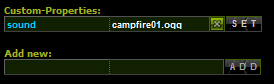
A: Sound is the property and the sound file to play is campfire01.ogg When I looked through the code for waypoints I noticed that every NPC was looking for an object “Waypoint” with a specific identifier. Waypoints was also loaded through Artifex Terra custom-properties settings. This means that each NPC needs to have that specific waypoint object already created when being loaded. 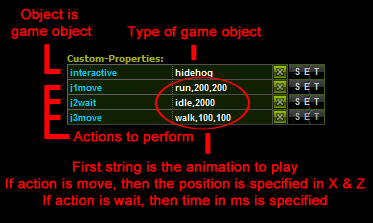
B: My Object property system This was never going to work because we don’t know when our objects are loaded, so we can’t guarantee that specific waypoints will exist when loading NPCs. This needed to change, so I made a new system as described in image B. In order to make a quest based NPC you simply write “questhidehog” and add an “item” below the same row as “interactive” followed by either “cherry” or “berry”, which specifies what type of fruit the creature wants. One problem with my implementation is that Artifex Terra creates an “std::map By simply placing “j1,j2,j3,j3…k1,k2 … ” in front on the action to perform, the list will be sorted in the way each action is added from top to bottom. This crude way of sorting the list from the editor wouldn’t be necessary if Artifex Terra instead used, for example, an std::vector Below is a couple of code snippets from my modified Artifex Terra loader and my object property system.
//From DBManager::Init()
attributemap::iterator j = i; //typedef for std::map
Abstract class “AIState” used for all AI States
//AI states are based on mealy machine model, similar to state pattern
class ComponentMessenger;
class AIState{
public:
     AIState(void){}
     virtual ~AIState(void){}

     virtual void Enter() = 0;
     virtual void Exit() = 0;
     virtual bool Update(float dt) = 0;
     void Init(ComponentMessenger* messenger) { m_messenger = messenger; }
     int GetState() { return m_state; }

protected:
     int m_state; // the type of AIState (move, or wait)
     ComponentMessenger* m_messenger;
};
Implementation of “AIStateMove” class which inherits from base class “AIState”
void TottAIStateMove::Enter(){
     AnimationMsg msg;
     msg.id = m_animation;
     msg.loop = true;
     m_messenger->Notify(MSG_ANIMATION_PLAY, &msg); //play the animation registered to this AI state
}

void TottAIStateMove::Exit(){
     Ogre::Vector3 dir(0,0,0); //set character controller walking direction to zero
     m_messenger->Notify(MSG_CHARACTER_CONTROLLER_SET_DIRECTION, &dir);
}

bool TottAIStateMove::Update(float dt){
     AnimationMsg anim_msg;
     anim_msg.id = m_animation;
     anim_msg.loop = true;
     m_messenger->Notify(MSG_ANIMATION_PLAY, &anim_msg);
     m_messenger->Notify(MSG_NODE_GET_POSITION, &m_current_position);
     Ogre::Vector2 pos(m_current_position.x, m_current_position.z);
     float distance = pos.distance(m_target_position);
     if (distance <= 1.0f){ //a very simple way of checking if the waypoint has been reached
          return true; // if we return true then we change to the next AI state
     }
     Ogre::Vector2 dir = m_target_position - pos;
     dir.normalise();
     Ogre::Vector3 new_dir(dir.x, 0.0f, dir.y);
     m_messenger->Notify(MSG_CHARACTER_CONTROLLER_SET_DIRECTION, &new_dir); //make sure the character controller is always walking in the direction of the waypoint
     return false;
}
Declaration and some implementation of the AIStateComponent which works like a manager for ai states
class AIState;
class TottAIComponent : public Component, public IComponentUpdateable, public IComponentObserver {
public:
TottAIComponent(void) : m_current_index(0){}
virtual ~TottAIComponent(void){}
virtual void Notify(int type, void* message);
virtual void Shut();
virtual void Init(const std::vector
|

