ConfigManager – Reading from files
|
Hello dear readers, Today I am going to discuss some about my latest contribution to our game project. The ConfigManager, which is a part of the program which keep in mind all the files that have been read and what lines they contain. I will illustrate how it works with an alteration of the picture above.
PSEUDO CODE Red lines are ignored. The lines that are stored in the vector is then split at the “=” sign. With the different sides of the “=” sign being different variables. CODE PART
To properly initialise (red boxes) the ConfigManager, I want to set a default directory, from which the files are retrieved. Invalidating any stray files and keeping a clear structure. To do this we look at the blue boxes, where a std::string² variable is declared in the header file and then given a value through the Initalise parameter.
This is the main function (Red) of the ConfigManager, a function for reading a file and store the important parts of it in a dynamic array. Then there is not anything interesting until we reach the purple box, where we check if the ‘=’ sign is the last character. If it is not, then we add the Key and the Value to a std::map³. Both which are of type std::string.
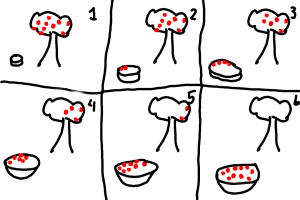
The last part is how to retrieve the different values. This is done through std::map’s own find() function. Where the blue box see if the search went through all the keys and did not find the specific key. Though if it did, then it returns the value that is associated with the key. This is a basic ConfigManager that reads simple input through a file. However it is limited to this exact syntax. Where there is no spaces between the Key and its Value. WORD EXPLANATIONS 1. A std::vector is a dynamic array of objects. For example, if you have a basket (which would be the vector) and an apple tree with a lot of apples (the objects), and you tried to fill the basket with the apples. The basket would then change its size according to the number of apples in the basket, never allowing you to fill it completely. Illustrated in the series of pictures below.
2. A std::string is an array of characters, forming a text string. Like “Hello World!”. 3. A std::map is a dynamic array that stores 2 values, a Key and a Value. Where you can retrieve the Value through finding the Key. Like an normal lock, if you do not have the Key, you can not open the lock. |