Game Programming III – Blog Post 3
|
Gah! I just remembered that I forgot to write this. Oh well, I’ll just get right to it, I suppose.
The main thing that was accomplished this week was the completeness of the binary search tree. While the linked list wasn’t too difficult and the logic wasn’t too strange, the binary search tree was something different. The creation of the tree was probably the easiest as it simply followed a somewhat basic logic and most of the work was to make it reliable. The more difficult ones to solve were the size, traversal, and the erase methods.
The size method was supposed to return the size of the tree, that is, how many objects there are in total in the tree. It was made use of a recursive element to count every single leaf in the tree. The actual method was very short and looks like this:
template <class T>
int Tree<T>::size(){
if (m_xpRoot == NULL){
return 0;
}
return count(m_xpRoot);
}
The count() method is where most of the action happens and where the recursive element comes into play.
template <class T>
int Tree<T>::count(Leaf<T> *p_xpL){
int _iC = 1;
if (!(p_xpL->GetLeft() == NULL)){
_iC += count(p_xpL->GetLeft());
}
if (!(p_xpL->GetRight() == NULL)){
_iC += count(p_xpL->GetRight());
}
return _iC;
}
To illustrate what happens, here’s a brief flowchart:
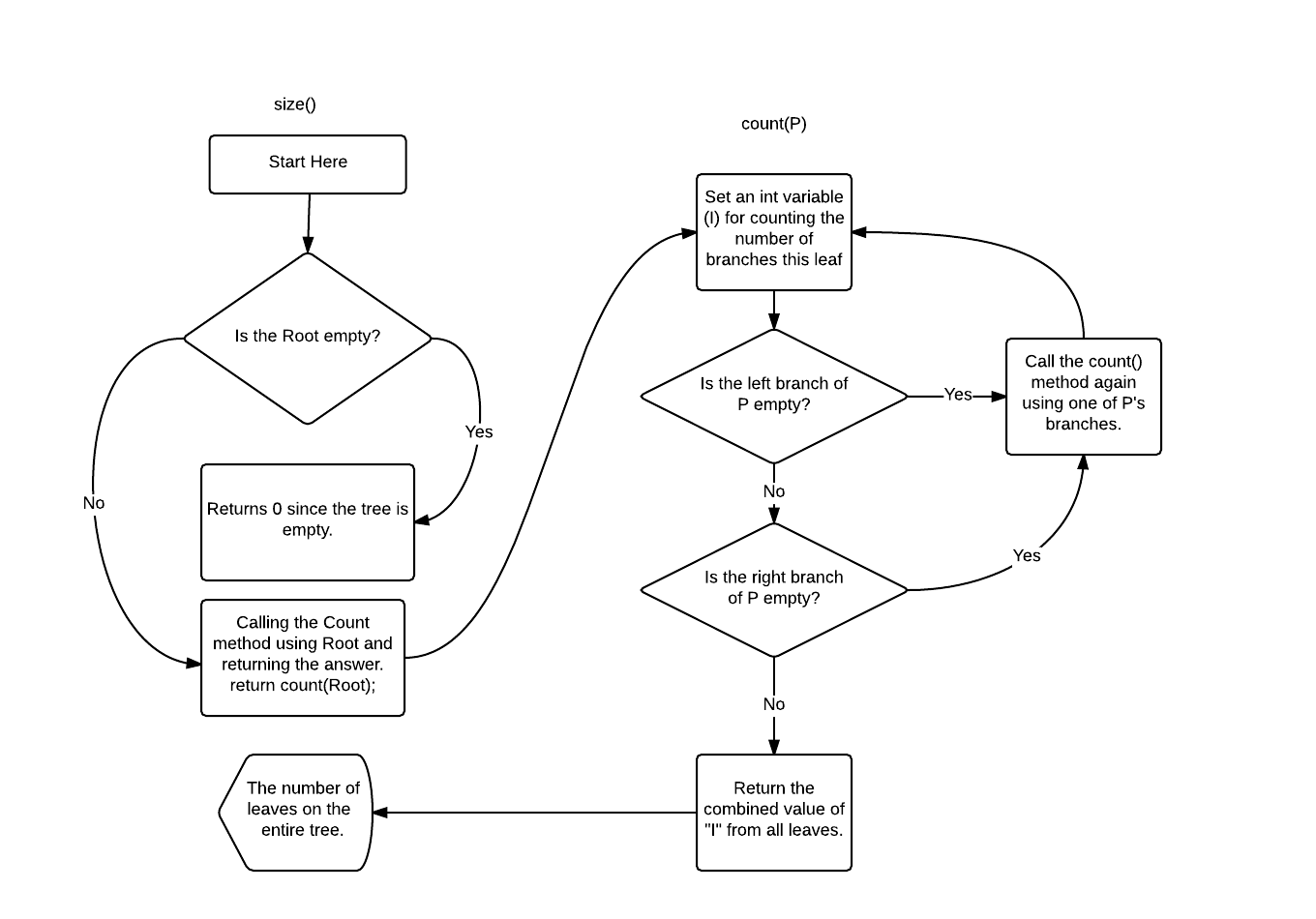 (I apologize if this isn’t the best flowchart but it should give a general idea of how the size method was built)
Now, the traversal methods was a little bit trickier but they work in pretty much the same way. The traversal methods are supposed to print out all of the members of the tree in a specific order. There’s in_order, pre_order and post_order. Pre_order writes the current node first, then everything in the first branch and then everything in the second branch. In_order writes everything in the first branch first, then the current node and finally everything in the second branch. Post_order writes the first branch first, the second branch second and the actual leaf last. Just like the size method they make use of a recursive system. Because I am lazy and because it’s 2 AM at the time of writing I’m not going to provide a flow chart for this method. I am however going to provide the code from the pre_order method for reference.
template <class T>
void Tree<T>::traverse_pre_order(){
if (!(m_xpRoot == NULL)){
traverse_pre_order(m_xpRoot);
}
std::cout << “n”;
}
and…
template <class T>
void Tree<T>::traverse_pre_order(Leaf<T> *p_xpL){
std::cout << p_xpL->GetLeaf(); // <- (This is where the current node is written)
if (!(p_xpL->GetLeft() == NULL)){
std::cout << ” “;
traverse_pre_order(p_xpL->GetLeft());
}
if (!(p_xpL->GetRight() == NULL)){
std::cout << ” “;
traverse_pre_order(p_xpL->GetRight());
}
}
The main difference between the different orders in this case is when the current node is being written, the rest is pretty much the same.
As an example the tree down below would be written in pre_order like this:
8 5 12 11 16
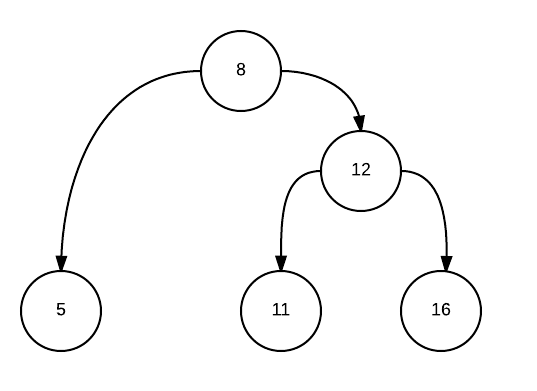 In_order:
5 8 11 12 16
Post_order:
5 11 16 12 8
By the way, this one is counting from left to right but it is entirely possible to do it right to left instead.
Finally, we have the erase() method. This was probably the hardest of the bunch and the one that took the most brain power to figure out. There are three kinds of erasing in a binary tree: when a node has no branches, when a node has one branch and when a node has two branches, it goes without saying that it becomes more complicated the more branches you have. The code for this method got quite long so I’m not going to post it here, but I did prepare some sample trees like the one above.
For solitary nodes it’s very easy, all you have to do is remove their connection to the root and then delete it completely (the node that is, not the root).
 For nodes with one branch it becomes a little bit more tiresome but all you really need to do is to make sure that the root and the node and the root are connected the same way the node and the branch originally was and then you just delete the node.
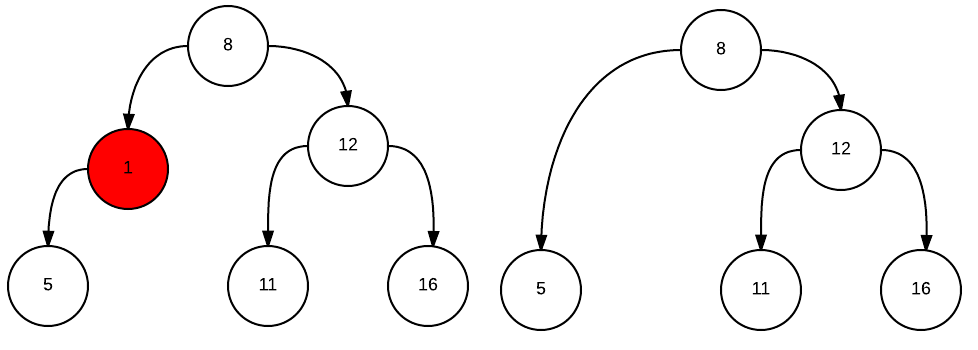 The final one however, stumped me for quite a while. If you have two branches it instantly becomes several times harder to erase it properly. However, after some thought on the matter I eventually came to a rather elegant solution. it doesn’t really matter what the node is pointing at in the end since it’s the value that the nodes contain that are important, right? So the first thing I do is to find a proper value in the tree, I do this by going right and then left until I hit a stop (or left and then right until I hit a stop, both works). By stop I mean a node that doesn’t have any more than one branch.
Once that node is found I take the value of that node (Node B) and save it to a variable and then I delete node B using the erase method. Since node B doesn’t have any branches, erasing it is extremely easy. Once that is done I change the value of Node A (I guess that’s what it is now) to that of node B and presto:
 It’s done! It works without any trouble as far as I can see. I guess if you had something like an infinitely big tree then this method wouldn’t work so well (because there may not be any solitary nodes) but that’s a different head scratcher entirely.
Anyway, that’s the most of it. There’s some stuff I might’ve glossed over but I’ve got the basic thinking down at the very least.
~♪
|