Moth game: Extending the editor
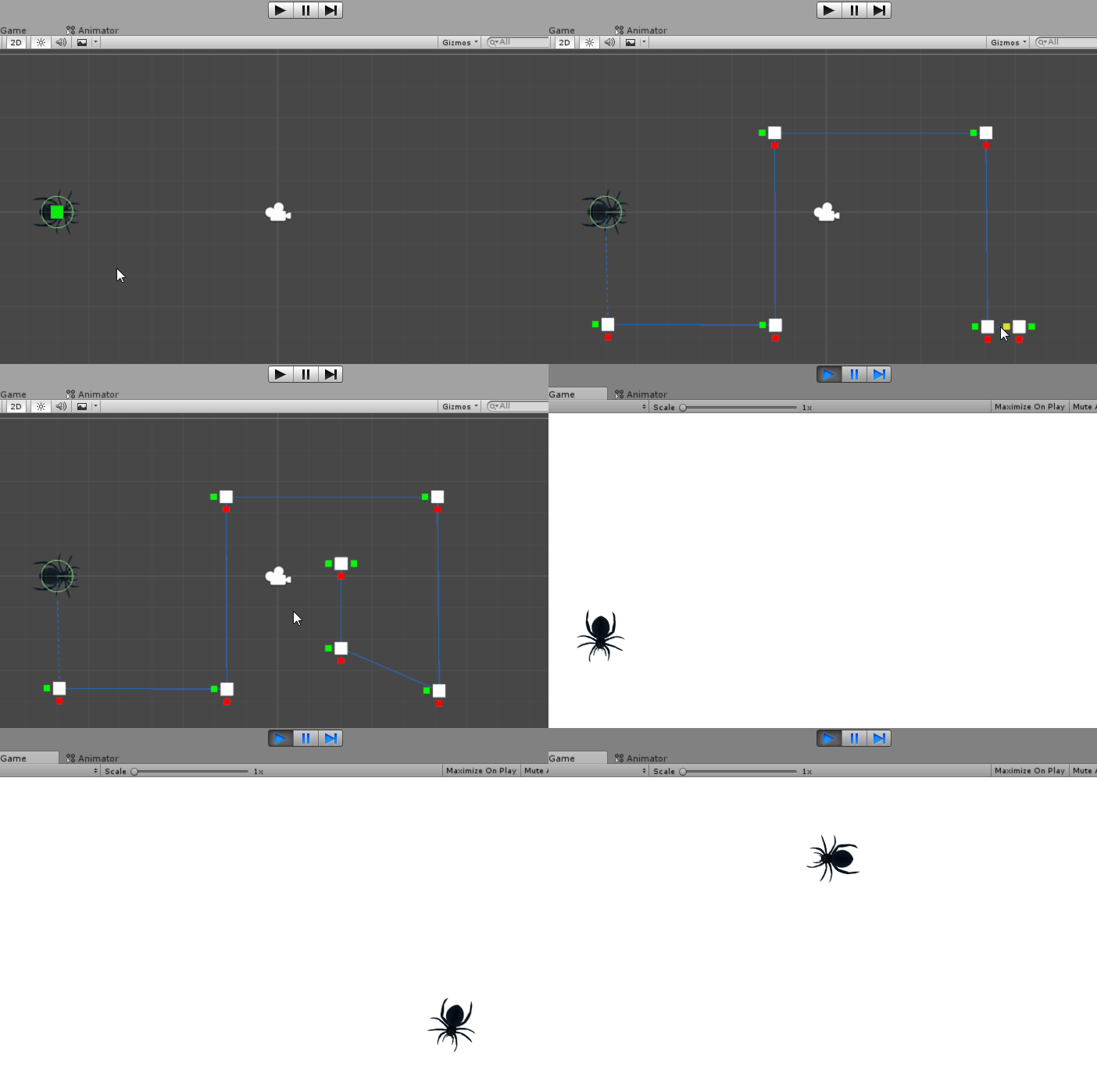
Ineffective solutionsWe’re getting dangerously close to reaching the beta milestone of our game, meaning all the features should be done. To show off all the amazing features we need a level. One of those amazing features is a spider that walks along a path and jumps at you if you get too close. One of the problems I set out to solve this week was the difficulty of actually defining the path a spider follows. Until now, the way we made the paths for spiders was using animations. For every spider placed in the level, an animation had to be created, and a trigger had to be added to that animation’s controller, so that a script could start it when the player wandered into a web. Making a good animation in Unity is a tedious process of recording keyframes, fine-tuning the spider’s position and rotation on those keyframes, and making sure the timings aren’t off. As a result, after adding one spider to the game, nobody dared to touch it, much less add more spiders. A more convenient solution was needed. The solution comes in two parts: The underlying system of movement along a path, and a means to easily redefine the path. Part 1: Walk through this list of coordinates…First, the path animation needed to be replaced with a script. The idea of the new script is simple: It holds a list of coordinates, and it moves the spider between them. When the spider reaches the last coordinate it switches direction, traversing the list backwards. To achieve this effect, I needed two things other than the list of coordinates: The current target coordinate, and a flag (true/false) for whether or not the spider is following the list forwards. The current target coordinate starts out being the first one in the list. The spider will walk towards it until it reaches it, and then it will switch the current target to the next one in the list. I made the spider always walk the way it’s facing, rotating it towards the target coordinate at a fixed speed. This was done so that it will look smooth in the turns. Part 2: Drawing the pathWith the path following system in place, the spider was happily strolling through the level, passing through all the coordinates I added to the list. These coordinates however, are all just a bunch of numbers, and nobody wants to figure out which numbers correspond to where. I had seen others get around this problem in Unity by creating one game object for each coordinate, and adding those to the list. The problem with doing that is that it adds clutter to the scene hierarchy, and creating new game objects and moving them into a list really isn’t all that convenient. I had also seen scripts that extended parts of Unity’s inspector, so I figured maybe Unity would let me do that with the scene view too. A quick search revealed it was indeed possible. Unity lets you create custom editor scripts for any component you can add to your game objects, so I created one for my path following system. In the editor script you can then define handles and buttons you want to appear in the scene view. Handles can be moved/scaled/rotated to control the parameters of your component, and buttons can be clicked to perform an action on it. I added movable handles for the coordinates, and buttons to add and remove coordinates. The result:
 |