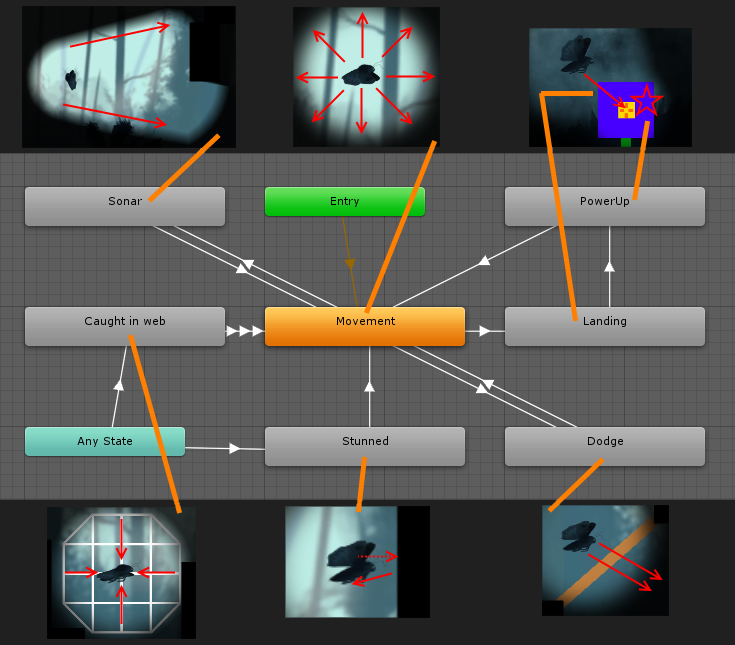
Moth game: Animator controller as a state machine
IntroductionIn my previous posts about this project I’ve been discussing specific features that had been implemented in a short time window prior to the post. The features have then been declared done, only requiring minor tweaks and fixes after the fact. This post is going to be slightly different, discussing a system used to implement several features related to the player. Because the player feature set has been expanded on over several weeks, and is in some areas still being developed, this system has been (and is still) continually growing. In the beginning, there was only movementWhen the game was starting its development cycle, we wanted to get a first working prototype up and running as soon as possible. One of our main motivations for this prototype was to get a feel for what moving around in the world would be like. Considering the time constraint (one week) and the simplicity of what we wanted to test, it made sense at the time to just throw all player code into a single script. It worked out well too, the player could move around the world, and if they collided with an obstacle, Unity would make sure there would be no passing through. And then we wanted more… “It’s a moth, it should bounce and get stunned when it hits things!” “The player should stop when they use the sonar!” “We need a dodge mechanic!” All these new features introduced new movement behaviour that clashed with the basic controlled directional movement. Conditions would need to be added all over the code, making it long and unwieldy. A new structure was needed, and since the problem is one that programmers have faced since the ancient ages of game development, there’s a design pattern that solves it: The finite state machine (FSM)
An FSM is simply put a way to organize a finite set of behaviours. The way it can make a large chunk of code easier to manage is that you split up each behaviour into its own script. Each script then deals with the specifics of its respective behaviour, with no confusing conditionals giving you a hard time working out which line of code does what. The movement state lets the player have all the control, and as soon as they bump into a wall, the stunned state is activated. The stunned state takes all control, moving the player away from whatever they bumped into, until a certain time (0.5 seconds) has passed. The movement state is then reactivated. If you’re familiar with Unity, then perhaps you noticed that the image above is a screen capture of an animator controller. Yes indeed. But what does that have to do with FSMs? Secrets of Unity’s animator controllerIt turns out that the developers of Unity also knew about the power of the FSM, and they used it as a foundation for their animation system. Each animation in Unity is treated as a state, and an animation controller dictates the transitions between these states based on a set of triggers and parameters. What’s more, is that in addition to only attaching simple animations to these states, you can attach behaviours. And those behaviours are defined by scripts. What this means is that you don’t even need to write the code for an FSM; Unity already provides it for you! A neat feature of Unity’s animator controller is the way you switch between states. In the simplest type of FSM you would just tell it to switch to any state at any time, but the animator controller gives more control over when it’s possible to do what. Between states you can add transitions, and let the transitions depend on certain triggers. For example, the only transition to the landing (on a power-up) state is from the movement state. That means that if the player touches a power-up while stunned or dodging, the trigger to launch them into the landing state isn’t going to do anything. This has provided an extra layer of control over the game’s mechanics, while keeping the code clean and understandable.  |