Wave spawing
|
Hello! I Am Christofer Mattsson the lead coder in team Leviathan. We are now under ten weeks working on a game called Draxl’s journey. We are now in the end of the fifth week of production and the our game is now in a alpha stage but soon in a beta stage. This week:This week I have mostly worked on a single script and that being a wave spawning script. The biggest thing we don’t have in our game yet is waves, so you started the game with three enemies on the screen and that was the whole level. So I took on the task to fix that. I started to think about what I wanted the script to have, and what I came up with was to have three classes, WaveSpawner, Wave and Enemy.
Array of wave. Int for time between waves.
Array of Enemy.
Gameobject for the prefab of the enemy. Int for spawn delay. Vector2 for spawn position. Transform for movement prefab. So in WaveSpawner you decide how many waves it will be in the level and how many seconds it will be between the waves. Then in Wave you decide how many enemies the wave would have. Then in Enemy you decide which enemy to spawn, how many seconds from the waves start it should spawn, and its spawning position. Then you also need to give every enemy a movement prefab. The movement pattern is some local positions that we can assign to the enemy so it moves in that pattern of our choice. So now when I had an idea how to do it so I started working. But I got a problem right in the beginning because I wanted to be able to assign all of the variables from unity and not only from the script. That gave me a problem because I had an array of a class and the variables in that class didn’t show only the variables from the first class. The solution I later found was to us attributes that unity adds. Attributes is a small piece of text that can change how a class or variable behaves. You put the text in [] right above the class or variable you want to use it on. “ [System.Serializable]” That one I just on the classes and that gave me access to the variables from the Wave and Enemy class directly from unity’s inspector. Another think I just the attributes for was that I needed to have some variables public so I could access it from the other classes. But I didn’t want it to show in unity’s inspector. So I put “[HideInInspector]” above the variables that i didn’t want to show in the inspector. 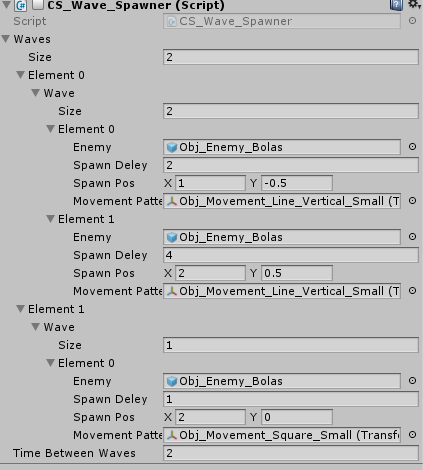
That was a really quick run through what I have done this week and I hope is not to hard to understand. Good luck on your journey!  |