Blog Post #2 – The creation of my very first sound file
|
Hello and welcome to my 2nd Blog post entry. This week I will talk about how I created the sound effect for the pitchfork swing and it hitting its target. The Pitchfork is the prefered weapon used by one of our enemies in the game we are currently creating and therefore, we needed a fitting sound for the attack animation. As mentioned in my first Blog entry last week I am also the sound designer of my team Amarok and I am creating every sound in our game, aside from a few soundtracks which we outsourced. Since I had no experience in creating sound files, just like the other members of my team, I asked my friend and dear colleague Mikael Sukoinen for advice in terms of which program a beginner like me should use. He advised me to use the program Reaper a very potent software, which is available for free as an evaluation version. Since Mikael has worked as a sound technician prior to studying at Uppsala University, I trusted his expert opinion and acquired the software. NowI just had to familiarise myself with Reaper`s UI and basic functions. I did this mainly by watching video tutorials on YouTube. After the initial tutorials and a bit of playing around in the software itself, it was time to create my very first sound file. It was important to me, to create as many sound files and effects by myself, without relying on free externally produced sound files, as possible. Therefore, I tried to figure out how to create the sound of a pitchfork hitting the protagonist, who is a Witch flying on her magic broom. Another important point I had to take into consideration was that I had to make the sound effect last roughly as long as the animation i was creating it for, otherwise it would sound out-of-place by not being synced to the motion of the enemy character. After a session of brainstorming I came to the conclusion that a normal fork would be a perfect substitute for a pitchfork and poking it against the wall of my room would create the perfect improvised sound of it hitting the Witch on her broom. I then captured several iterations of said sound with my headset microphone until I was satisfied with the captured result. Now, the only thing missing was the sound of the enemy actually swinging the pitchfork towards the Witch, which is basically a sound of air being pushed away. This kind of sound I created by simply blowing into my microphone and then adding some additional effects to it with the help of the FX (sound effect) modifiers in Reaper. I mainly changed the pitch of the swinging sound by heightening it. 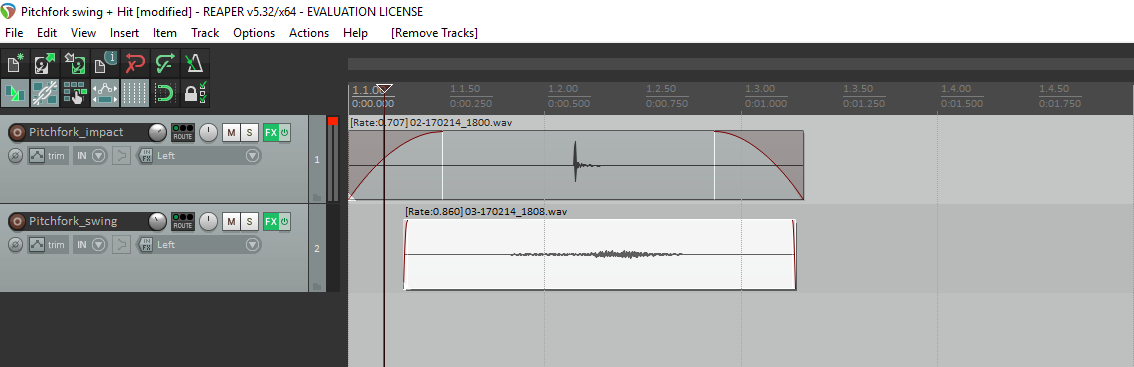 All that was left now, was to cut, align and sync the two sounds, in order to have one coherent sounding effect. After a view different alignments and listening to the rendered outcome, while looking at the attack animation created by my lead artist, I finally had created a sound effect that I was satisfied with. I am quite happy with the outcome and so was my team. It can of course still be improved and iterated upon, but I tried to judge my result based on the fact that i didn´t have any prior knowledge or expertise in creating sounds. For the future I plan to get more comfortable with Reaper and it´s additional functions in order to create higher quality sound files or even iterate on old projects such as this one. This concludes my blog post for this week. If you want to find out how my adventure with team Amarok continues, just revisit the blog next week !
 |