Parallax scrolling background
WhatMy first task in the first sprint plan consisted in the creation of the parallax effect for the background of our game. The parallax effect could be easily noticed for example when moving with a car and see that the farthest environment moves slower than the nearest. The technique to realize the parallax effect is creating different layers and make them scrolling with different speed to give at the player a felling of deepness in the screen. The farthest layer should, of course, move slower than the nearest. The image #1 shows the representation of the layers and how they are rendered in the screen: the “color layer” has the highest priority in the rendering and define the main color of all the other layers because is in the front. The “front object layer” has an higher priority then the “back objects layer”, so his objects will be shown in front. 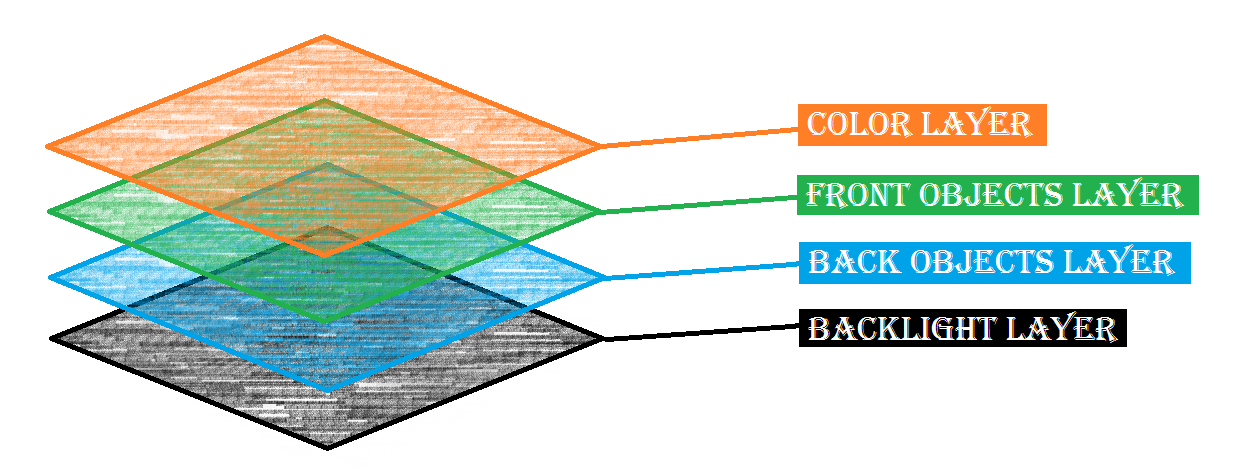 HowThe goal was to give the player a sense of falling in a deep space with objects floating in the screen. In order to accomplish this effect, I have made a script that is able to generate randomly different objects, randomly define their speed and rotation and make them scrolling towards the top of the screen. In order to give flexibility with the settings after the play testing, I have implemented in the inspection section in Unity some variables that can define for example the minimum and maximum speed of movement and rotation of the objects. Furthermore some fields where is possible to drag in different prefabs that represents the objects that we want in the background. The objects are spawn in different positions that are placed in the scene, outside of the camera view, as shown in the image #2. Each spawn point has his own script where is possible to define the settings mentioned before. The objects are spawn in two different layers in order to render the back objects behind the front ones. The back object layer contains small objects in order to give them more distance in the space and they move slower than the front objects. The front objects are bigger then the back objects and they move faster. When an object reach the dead line, it is destroyed and a new object is generated from the spawn point. The movement of the objects is vertical towards the up side but I have also implemented the feature that when the player moves down or up, all the objects increase or decrease their speed respectively. As well as, when the players move right or left, all the objects move in the opposite diagonal direction respect of the player. This is the reason why further spawn points are necessary on the right and left parts of the camera, as shown in the image #2. 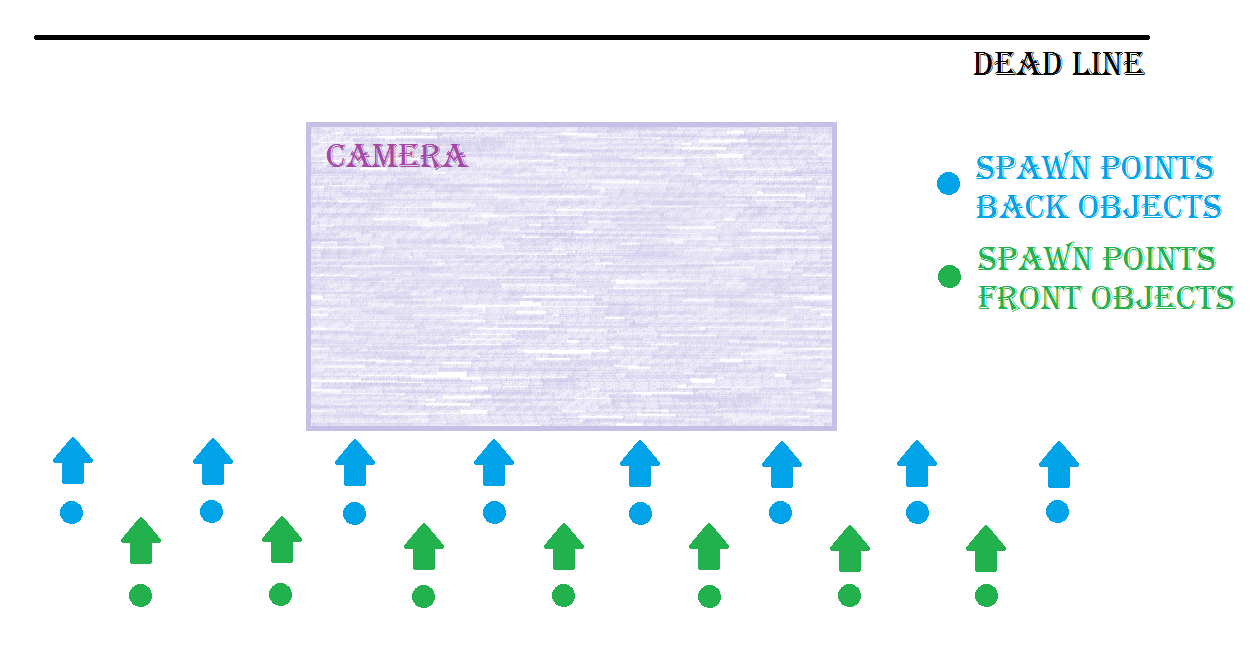 WhyThe reason of the creation of a a parallax scrolling background is to convey at the player a sense of deepness and to simulate a 3D space even though the game is actually 2D. This would be much harder or even impossible to represent if would be used just one scrolling background moving at just a single speed. The movement of the objects in different directions, depending on the movement of the player, give a felling of falling in a space full of of objects.  |