Adding Fullscreen
|
So, just like last week I’ve done a lot of different things this week. Reworked how we handle owlets, changed how to camera work, etc. however I’ve decided to write about the implementation of fullscreen to our game. To start of, I guess I should mention that it might not be real fullscreen, it’s more like windowed borderless since I stretch the window to cover the screen rather than changing the windows actuall size. It’s still the same effect as regular fullscreen and serves its purpose well.
So the things I had in mind when I begun on the implementation was:
Changable is a no-brainer, you want to be able to switch between fullscreen and windowed. Same size ratios because we want the player to see same things when in fullscreen and windowed, not more, not less. And lastly, savable. That the program remembers the setting you had when you start it up again after quiting.
Just making the game fullscreen is pretty simple, you select that as an option directly in the window creation function using “sf::Style::Fullscreen”.
However just doing this did not work out for me, I got problems with the ratios and saw part of the screen I was not suppose to see . So first of all I wanted to make sure that the ratios stayed the same. I create the window in our engine class initialize function where we also initialize a lot of other functionality in our game, mostly different handlers. I found out that if I hardcoded the fullscreen window before all the other things where loaded in, the ratios screwed up and if I loaded it after the handler it stretched. Important note! If I didn’t create a window at all before I load all the handlers, the game crashed because the code that got launched was depended on a working window. I fixed this by creating a windowed window in the begining of the engines initialize and creating a fullscreen window at the end of the initialize. Now I got a verision with good ratios, where the game elements stretched to fill the screen correctly in both fullscreen and windowed. The reason I had to do it this way is because the code in our program is not just dependent on a window, a lot of parts a also hardcoded in size and position. Therefor it require a window with the size 1280×720 when loading in order to be stretched nicly. If we had made our code more dynamic the ratios would never have been a problem to begin with.
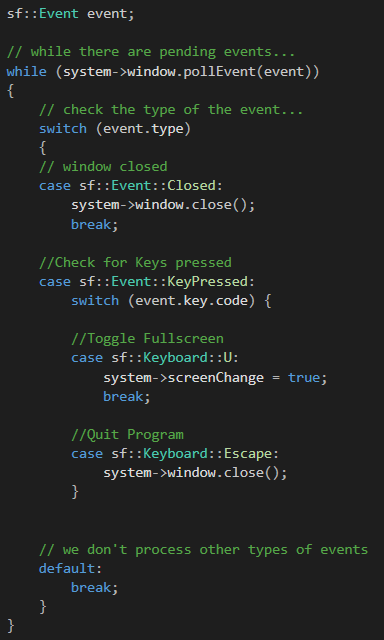
Second task was to make it changable. Since the window is used by the whole program I decided that it was best to deal with the toggle option in the engines update function. We already had a pollEvent switch case state in the update that currently only dealt with closing down the game so I could just use that to make the program detect wheter or not a button is being pressed. I decided on using the “U” key because why not?
This image is the end result of what I made however it was not like this when I got it working the first time. Under “case sf::Keyboard::U:” is the functionality for pressing “U” and this is where I made a if statements to check wheter the game was in fullscreen already or not. If it was, I created a new window that was in windowed mode and if it wasn’t I made a fullscreen window. I checked if it was in fullscreen or not by temporaly creating a bool called isFullscreen in engine and set it to true if it created a fullscreen window and false if it created a windowed window. Whola! A working togglable screen mode.
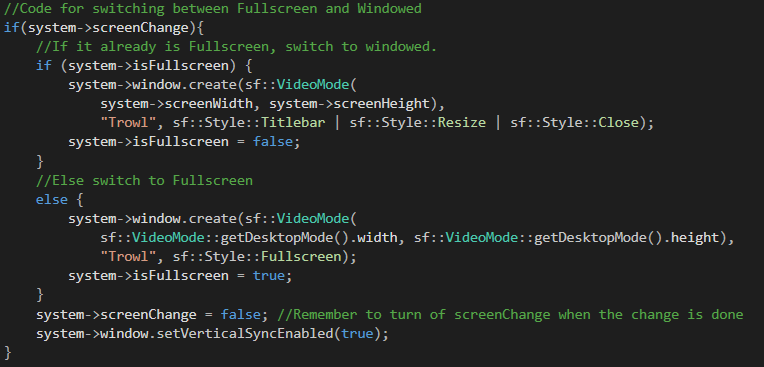
Now, I obviously wanted to be able to change this within the options menu of our game so just checking for a keypress would not work and it had to be changed. That is where the variable screenChange, viewable in the image above, comes in. First of all I want to explain “system” that is in front of almost everything. System is a struct used to store information that is used all over the program and allow easy access to different components and variables. Within it we store information about our window as well as player and all of our games different managers and more. I moved the isFullscreen bool to our system struct as well as created a bool called screenChange and set them both to false. This was because we wanted to start the game in windowed to make sure the ratios are correct and since the screen was not being changed. I then made a if statement in engine update checking if screenChange was true or not. In it where a if else statement checking if isFullscreen is true or false and then create windows accordingly, turning screenChange to false when completed. Now, with the screenChange variable I could easily toggle between fullscreen wherever I wanted in our game. All I needed to do was to make sure that the class switching between the modes had access to the system struct and then just switch screenChange to true whenever I want to toggle. Like in the activation function of a pressed ingame button. (eg. “If()system->screenChange = true;”)
Something I noticed quicly was how much screen tearing there was in fullscreen. I fixed it for me by enabling vertical sync (see second last row of code). I did this in engine initialize though and it worked for me, however when my group members pulled that verision they still had a tremendous amount of tearing, not knowing what caused it, since I could not recreate that, I tested to re-enable vertical sync everytime the screen is changed, just like in the image above, and it seemed to do the trick.
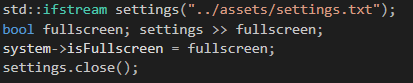
Now on to the last part of the fullscreen, saving the setting. If I had fullscreen when I turned off the program I wanted it to start up in fullscreen mode. I made this possible by reading and writing to a text file I called settings in our assets folder. In engine initialize I, first of all, read the text file and check if isFullscreen is supose to be true or false and then set it to whatever the file sais it should be.
I then create a windowed window to make sure the ratios is correct and that the rest of the code can be launched, and then in the end of the initialize i have a if statement that checks if isFullscreen is true and if it is then I create a new window that is fullscreen. To save the setting I make sure that the program writes over the same text file in the engines shutdown function that is called on whenever we close down the window.
So with this code I was able to create a little system that toggle fullscreen on and off and that can be changed from anywhere in the program as long as it has access to the system struct.  |