|
Week 2 of the Big Game Project is done and with it I’ve encountered more than enough of various quirky/unexpected behavior from Unity and community plugins. What I’ve learned from my endeavors I’ve decided to share. It mostly encompasses things which may not behave as one would imagine at first. I’m surprised that I didn’t encounter these while developing CoBots but I guess changing the workflow significantly enough (for the better) is the primary cause.
Script Execution Order
During the development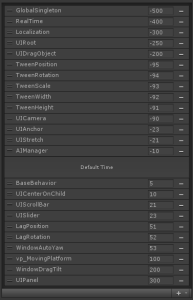 of my static singleton class which holds reference to object needed to be accessible anywhere, I encountered a weird order behavior. Unity has the feature within the editor to specify which script(s) should run ahead or behind others (for example, if one script requires another to already be initialized before it, as with the case of the singleton). I implemented a custom delta time function (which turned out to be a bad idea, but whatever) but it lag behind one frame every time, which caused a lot of stuttering using the UFPS plugin. Even though I set the singleton script to execute first, it fell behind other scripts. What I later realised was that you specify a script file when adding to the order but the order only affects a Monobehavior within the file with a matching class name. I had previously designed the singleton with a class wrapper inside the same file and thus the Monobehavior wasn’t named correctly either. After the edit the execution order behaved correctly. of my static singleton class which holds reference to object needed to be accessible anywhere, I encountered a weird order behavior. Unity has the feature within the editor to specify which script(s) should run ahead or behind others (for example, if one script requires another to already be initialized before it, as with the case of the singleton). I implemented a custom delta time function (which turned out to be a bad idea, but whatever) but it lag behind one frame every time, which caused a lot of stuttering using the UFPS plugin. Even though I set the singleton script to execute first, it fell behind other scripts. What I later realised was that you specify a script file when adding to the order but the order only affects a Monobehavior within the file with a matching class name. I had previously designed the singleton with a class wrapper inside the same file and thus the Monobehavior wasn’t named correctly either. After the edit the execution order behaved correctly.
Custom Time Management
We decided early on that we wanted to have our own custom Time Management separate from Unitys
Time
class. The reason being that we wanted to have a more control over certain behavior, e.g. implement separate time scales so that we could run certain scripts at a slower pace (think slow-motion, flexible pause etc.). After much work however it was determined that (for now) implementing custom time management would be impossible as too much of the underlying system relies on it. One specific reason was that
Time.DeltaTime
in Unity returns either the
DeltaTime
or the
FixedDeltaTime
depending on how it is called; a behavior we can’t replicate without access to the engine source. Too much of UFPS utilities would have to be changed so for now our custom time just wraps Unities own, with a few helpers (such as delta time relative to 60 fps, and an accurate framerate counter).
In addition to those more in-depth points above I’ve also learned several new behaviors and properties of Unity:
- “Merge” with scripts with Unitys Asset Server doesn’t actually allow you to specify what is merged. It performs some kind of automatic merge (for better or worse, mostly worse).
- Using more than one monitor causes “too many threads” crashes constantly, most likely due to our graphics card. Solutions include switching to our integrated card (big performance hit) or switch primary monitor (strangely works).
- There is no support for nested prefabs, and plugins are expensive and potentially broken (very likely).
- The editor adds significant overhead (mostly related to rendering of the editor). Creating a build and attaching the profiler to it gains a major performance boost (from ~300 to ~900 FPS in an empty scene for me).
- VSync adds significant stuttering in the profiler.
- Unitys framerate counter is terribly inaccurate. It just is.
About Kenth Ljung
2012 Programming
|

