Fixing and Tweaking and… Stuffs!
|
So, this is a hard one. Since we are suppose to focus on just one thing we’ve worked on during the week I guess I’ll have to talk about what took the longest time since I have worked on a lot of things this week. I didn’t really implement anything new, just fixed on what was already there. Added to it, removed from it and reworked it. But what took most of my time this week was according to my notes the work I did on the inside of our train carts.
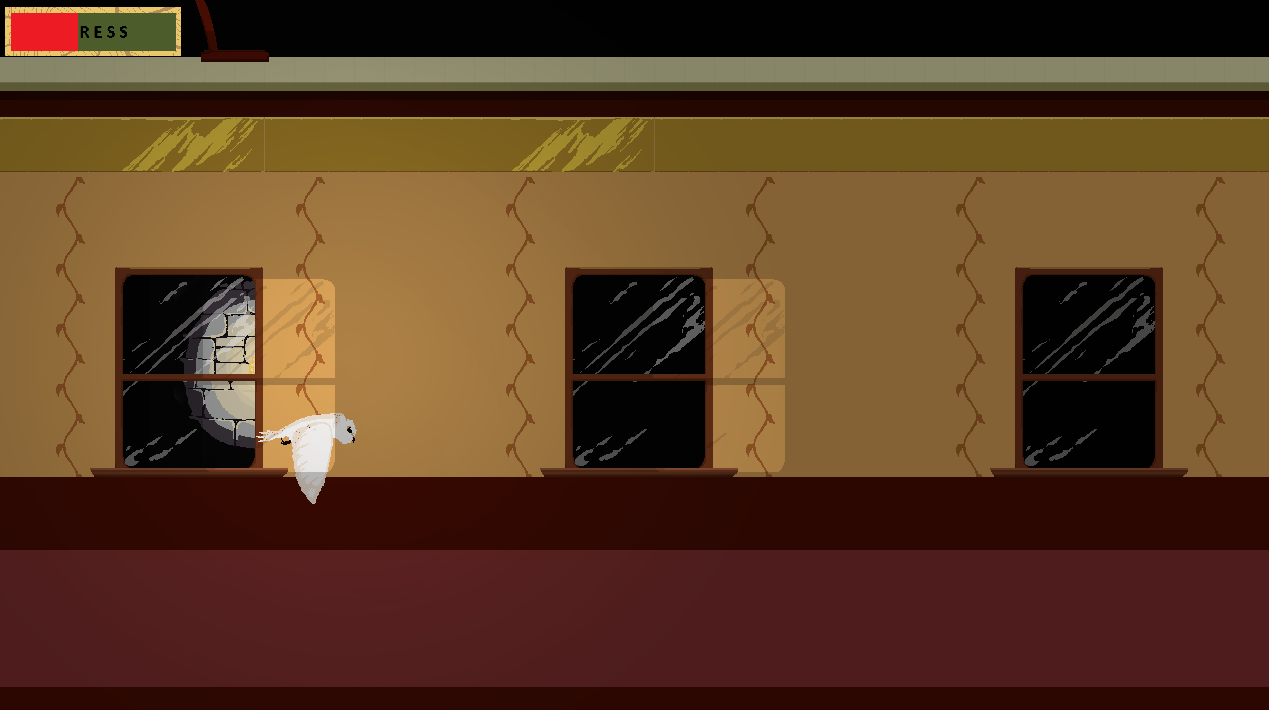
So this is what I got, might not look like much but it took some work and is still not finished. So before it looked like this, the only thing that existed in this state was a dark green screen with the owl and a hatch floating in the world. Not very intressting, right? So I was tasked with fixing it so that it looked like the inside of a traing cart that was passing trough a tunnel. Since I’m a programmer I didn’t do any of the art, I just simply used the systems we had made to add in the art. I haven’t writen about it before but I did make our tiling system in our engine. Unfortunately for Tommi I couldn’t get Tiled to work and our Art Designers didn’t quite enjoy using it either, or so I felt, so I decided on making my own. It works well but not great but is enough for what we need. I used that system to draw the background wall as seen on the image. Behind the wall is a image of a light that flies past the window now and then. This image is sent to the front of the cart whenever it has passed it instead of deleting and creating a new one everytime. To create more of a effect that you are inside a tunnel with lamps swishing by I wanted focus on lighting and create a effect out of that. What I then did was ask if one of the art students could create a big black sprite and then make a big hole in the center of it that had feathered borderds. I then assigned this sprite to follow the lamp to make it look like it lit up the area around it. By it self it looked good but wasn’t enough, thinking that there probably was a light on the other side of the train too I copied the tiles from the background, changed the sprites color to black and drag down the alpha to a desirable level. Then assign it the same way I did with the first overlay and I got a nice lighting effect that made it look like the lamp actually did something. Note that these two overlays are actually overlays and drawn ontop of everything else making “things” (such as the player, owlets, and in the future, humans and whatever they throw) brighter where the light is.
This wasn’t all I did with the inside. As I tested it with the rest of the game I noticed that both the background and the camera didn’t follow the player (which it shouldn’t), or rather the player spawning way outside the playable area if the player entered the state at another location then what I had planed for. I easily fixed this though by adding in a offset in the x-axis that I applied whenever we entered the state. the offset was a calculation of where the player was and how wide the screen is. Doing this made the camera and sprites spawn at the right position, however a new problem then appared, the HUD didn’t follow to the right position. This was even simplier fixed by adding back the HUD camera that I had removed earlier since I didn’t think I’d need it however as It turned out I did.
I’d love to add a gif to show of how it all looks together however as mentioned in previous posts it just doesn’t work… And I don’t know why. It also feels a bit empty on images but uploading more would not really add anything to this post since they would all look alike…
Oh well. Have a great evening! Or morning, day, night, whatever the time is.  |