Adventures in multithreading
|
In our current course “Advanced C++ for games 2″ we have been working on a software rendering engine using windows GDI were no other abstraction layer or libraries are used. The latest feature is to implement and understand multi-threading, so for this we received the following homework:
Basically, a lot of initialization and temporary variables are still in the main function which was moved into a Singleton class “Globals”. Simple.
This was a challenge, and I am not sure I got the signaling correct but found a solution to implement threads doing whatever work you tell them to do. A good read on this subject was Keith M’s article which gave me some great idea’s on how to implement tasks and manage threads better. A lot of my code is based on his article but also heavily modified to fit our Thread class and base systems.
Got this working pretty fast after I could manage thread tasks properly, could be further improved though. This is what we are currently rendering, a couple of funny triangle cats. But we want to render this using multi-threading, so in order to achieve this I first needed a way to manage threads. The thread pool pattern provides an example of the thinking behind this system. So first we need a thread pool that can manage threads and tasks. It is iportant to differentiate threads and tasks because what we want to do is to have a couple of running threads and give them tasks(if any!). If we don’t have any tasks, the threads will be idle(or we can pause them). But the most optimal way would be to always having the threads work on something. In this case, I want to render my cat triangles faster. Here is a thread pool header:
class ITaskFunc;
class ThreadPool{
public:
static ThreadPool& Get();
void Init();
void Shut();
void AddTask(ITaskFunc* p_task,ITaskData* p_data);
bool IsProcessing()const{return m_process;}
Task* GetTask();
int GetNumRunningThreads()const{return m_runningThreads;} //returns num of currently running threads
int GetNumFreeThreads()const{return m_freeThreads;} //returns num of threads that are running but arent doing anthing at the moment
void IncrementNumFreeThreads(){Thread::InterlockedIncrement(m_freeThreads);}
void DecrementNumFreeThreads(){Thread::InterlockedDecrement(m_freeThreads);}
private:
ThreadPool();
~ThreadPool();
ThreadPool(const ThreadPool&);
ThreadPool& operator=(const ThreadPool&);
Queue
The Queue container is taken from Keith M’s article and is a lightweight linked list but thread-safe. This is because of the GetTask() method which could be called asynchronous by multiple threads. It is also a singleton like the thread pool pattern suggests, mainly for convenience. As we aren’t allowed to use stl containers our own DArray is keeping track of our threads. The implementaion follows…
void ThreadPool::Init(){
//We get number of cpu cores available minus one since one of our threads is the main thread
//In my case I will get 7 threads.
int numThreads=Thread::GetCPUCount()-1;
m_threads.SetSize(numThreads);
int i,iC=m_threads.GetSize();
for(i=0;i
The important part of Shut() is how Quit() works for threads.
void Thread::Quit(bool p_bWaitForFinish){
     m_bQuitRequested=true;
     if(p_bWaitForFinish){
          while(m_bIsRunning){
               ::Sleep(1);
          }
     }
}
As the main thread is calling Quit() on our thread it will wait for it to finish. If we quit suddenly and then delete the memory allocated for the thread we might get corruption of the heap or similar error. The implementation for our thread Run looks like this:
void Thread::Run(){
     ThreadLock threadLock;
     ThreadPool* threadPool=&ThreadPool::Get();
     Task* task=NULL;
     while(m_bIsRunning){
          ::Sleep(1);
          if(task!=NULL){
               threadLock.Lock();
               ITaskFunc* taskFunc=task->GetTask();
               ITaskData* data=task->GetData();
               if(taskFunc&&data){
                    threadPool->DecrementNumFreeThreads();
                    taskFunc->Call(data);
                    threadPool->IncrementNumFreeThreads();
               }
               delete task;
               task=NULL;
               threadLock.Unlock();
          }
          if(task==NULL&&threadPool->IsProcessing()){
               task=threadPool->GetTask();
          }
          if(m_bQuitRequested){m_bIsRunning=false;}
     }
}
As each thread will be given a task in the form of a function object and some data, this is where the thread will look for and get what is available in the thread pool. If quit is requested the thread will no longer continue looking for tasks and exit properly. The way I handle function objects can be done through a method pointer or a function pointer, implemented the following way:
class ITaskData;
class ITaskFunc{
public:
virtual ~ITaskFunc(){}
virtual void Call(ITaskData* p_taskData)=0;
};
typedef void (*TaskFuncPtr)(ITaskData*);
template
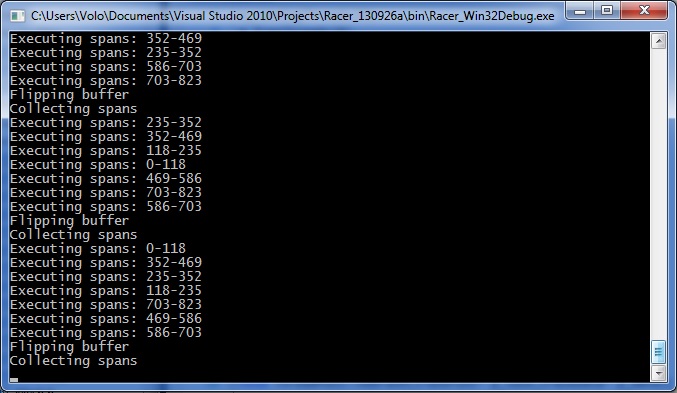
The “Task” object holds both our task function and the task data. Since all task functions inherits from the interface ITaskFunc we can use both method pointers and function pointers and simple run Call() to run whatever we have chosen. Since task functions and data is created on the heap, the Task object is also in charge of deleting that memory when we destroy it. So now we have a thread pool and threads that look for tasks queued in the pool. How do we go about to render our cat triangles in a multi-threaded fashion? My implementation is done through getting free threads and dividing our line task list depending on available threads. This is done through my Renderer class which I use certain methods from as task functions.
//Starting point
void Renderer::StartRendering(){
ThreadPool::Get().AddTask(new ObjTaskFunc
In CollectSpans we do a bit more than is detailed here, like position and rotation for our cats, but the important part is where we queue our tasks. I take the size of the line task list(which is the entire screen in pixels) and divide it into the ammount of threads available. Since we most likely get a rest on the division this is added onto the last task. This data is sent into our threads which will start and end the loop at different positions but ultimately executing all of our spans. This is what the console is telling us: In this case the rendered texture is hard-coded so this is obviously not the most optimal way to do multi-threaded rendering, but it takes care of the assignment we had for now. The next thing I will look into is to come up with a more generic way of rendering textures, possibly through TaskData and having thread tasks running at all times, syncronizing them through events. Download project and source files |