5SD064 – Blog Post 4 : Dying
|
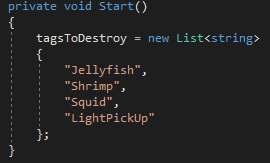
Death is a big part of “Depth”. When you die, and you can only die from getting eaten by the monster chasing you, you have the choice between returning to the main menu or restarting the game at the last checkpoint. Restarting the game means that every enemy and power-up has to be removed from the scene, every enemy and power-up spawner has to be reinitialized, the player has to be teleported back to the last checkpoint (which, in “Depth”, are naval mines), the monster has to be returned to its original position, et cetera. In the main scene, I already had a “GameController” object. It had a function, aptly named “GameControlling”, which basically handled quitting the game and switching scenes. This was more of a good practice than a useful thing, but it turns out that script would become the basis of the game’s restarting script. Enemies and power-ups are not placed on the scene. Instead, I place spawners which then spawn what they were assigned to spawn when the player crosses an “Edge collider” (think of it as just a line). After they’ve spawned their enemy, they can’t be “activated” by the player anymore. This means that there are less enemies on the scene at any given time and that enemies aren’t spawned in paths that the player does not pass through. It also means that I have an easier job respawning enemies : I just need to destroy every enemy and reset the spawners to their original state. In code, this means that I create a list of tags which I want to destroy.
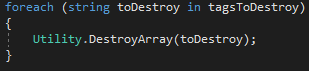
At restart, I iterate through that list and FindGameObjectsWithTag for every tag. I then iterate through those objects, destroying them.
Utility is a class which contains generic static methods which I might use in other contexts. Again, this is more of a good practice kind of class, since at the moment it only contains these two methods :
As you can see, “DestroyArray” is an overloaded function which takes either an array of GameObject or a string. In essence, it iterates through an array of GameObjects and destroys them. I have now successfully destroyed every enemy and power-up in the scene. However, I still have to reset the spawners. This is done in the “ResetSpawners” function, which finds every object with the “Spawner” tag and then accesses the “SpawnHandling” component of said object to reset the individual spawner (aka set a boolean called “hasSpawned” to false again).
Voilà. Now the enemies in a scene will get destroyed at the death of the player, as well as respawn properly. I won’t go into details about every single thing I have to reset, but I think resetting the position of the player can be tricky and deserves further explanation. In “Depth”, the player respawns where the last naval mine exploded. Firstly, this means that I can’t just reload the same scene at the restart, since the player would respawn at the start of the level every time. Secondly, in code, this means that the “GameController” object needs to keep track of the last spawning position
When a mine explodes, it changes “lastMinePosition” like so :
At the start of the game, “lastMinePosition” is set as the position of the player.
When the game restarts, I find the player and its “PlayerMovement” component, in which there is a function called “ResetPlayer” which basically resets every attribute of the player. It takes a three-dimensional vector representing the spawn point of the player. I call this function, giving it “lastMinePosition” as a parameter, plus a variable called spawnOffset which can be set by the mines so as not to spawn the player inside the mine. That’s about it for resetting the game. There’s more, of course, but it follows the same patterns and wouldn’t be interesting.  |