Communication
|
Communication is a broad topic, the importance of which can not be understated no matter the circumstance. Good communication is also a vital component of a successful game development team. A game development team needs to communicate many different things of differing nature. Requirements, progress, feedback, bug reports and much more is part of the daily communication in a game development team. Channels of communication are set up specifically for the project or are defined from the outside (company standard, university requirements). Making a game includes people of a multitude of crafts that need to join their forces to collaboratively create a game. Cross disciplinary communication and coordination is necessary. There are a billion things to think of. Different technical fields need to work together to achieve a creative vision, how can you possibly effectively communicate? As a project manager, but especially as a Scrum Master, one should be mainly focused on designing, tailoring and fostering the work environment, culture and communication of the team. A team, as a fact, is made up of humans, which have the distinct characteristic to be quite individual. This turns the task of designing, tailoring and fostering said environment, culture and communication for the team as an abstract entity, into the task of doing this for the specific individuals within it. With this principle in mind, the question of effective communication becomes more approachable. We do not need to solve the needs of the team all at once, we can focus on solving the needs of the individuals in the teams and their roles and responsibilities. Doing this is a strategy known to programmers as “divide and conquer”. Break a system down into it’s components, build those and piece them together to create a fully functioning system. This is how I propose one should approach the establishing of communication for a game development team. To better understand how effective certain channels of communication are for a game development team, we need to first understand what game development team members need to communicate to each other. The main disciplines present in a game development team are: Programming, Art, Sound and Design. Designers come up with the game, it’s mechanics and features. Artists produce visual feedback of the game’s systems for the player, sounds add auditory feedback. The game’s systems are created by the programmers. This poses some problems when it comes to the needs for the team’s channels of communication. The team needs a platform where it can communicate collectively, while members of each discipline need to be able to communicate with each other. Additionally there needs to be a way of sharing and showing one’s work with and to the team or specific team members who might concern themselves with that work. Team members also need to be able to see or know of the status of the work of other team members to plan their work more efficiently. The game design department solves problem number one for us, by offering a Slackn(https://slack.com/) “workspace” for the students in the education. Slack offers personal as well as group messaging, that greatly simplifies the team’s communication.
For Slack to be efficient, there needs to form a team culture around the use of Slack for official team communication. But what if that fails? What if no one ever checks Slack? Then adjust to the individuals in your group. What is their preferred method of digital text-based communication? Use that! Having your messages read and answered beats any ever so useful feature of team communication tools. Problem number two, the sharing and showing of work can easily be solved by nowadays cloud storage technology. The university’s student account includes Microsoft OneDrive storage, but GoogleDrive Problem number three, in my opinion poses the most difficulty. Effectively sharing the status of each other’s work without terribly complicating or interrupting the workflow of team members is difficult to near impossible. One or more physical Kanban or Scrum boards in a team office room would be ideal, but teams at Campus Gotland do not have that luxury. Most of the teams do not even work the majority of the time together in one room but rather from home (maybe a sign of times to come?). There is a plethora of project management, planning, kanban-board and scrum-board tool available but most cost money, a resource quite scarce within the rows of university students. Trello, one of the programs that can be used for free longer than 30 days, did not work for my group, but can work great for others. The game design department at university requires the Scrum documentation to be done within google sheets. Even though google sheets are easy to collaboratively work on, they are not made to handle the ever changing backlog of a game in development. It can almost be considered torture for team members to go through spreadsheets for multiple hours each week. This is especially due to the fact, that everyone is always confronted with the complete mass of tasks required for the entire project. Ideally, I wanted a solution that could show tasks filtered by discipline. This all ads to the idea of making this process as unintrusive as possible for the team members and their workflows. Thanks to the Global Game Jam 2018 “game jam toolkit” list that detailed software tools that can prove handy in the creation of a game, I stumbled upon Hack ‘n Plan (http://hacknplan.com/ | I know, the name is horrible!). Hack ‘n Plan ist a project management tool tailored for game making and offers kanban boards that can show the tasks of the different disciplines. It also has an integrated documentation tool, that allows for simple game design information to be included. We have been using it for almost two weeks now and it has proven quite useful. 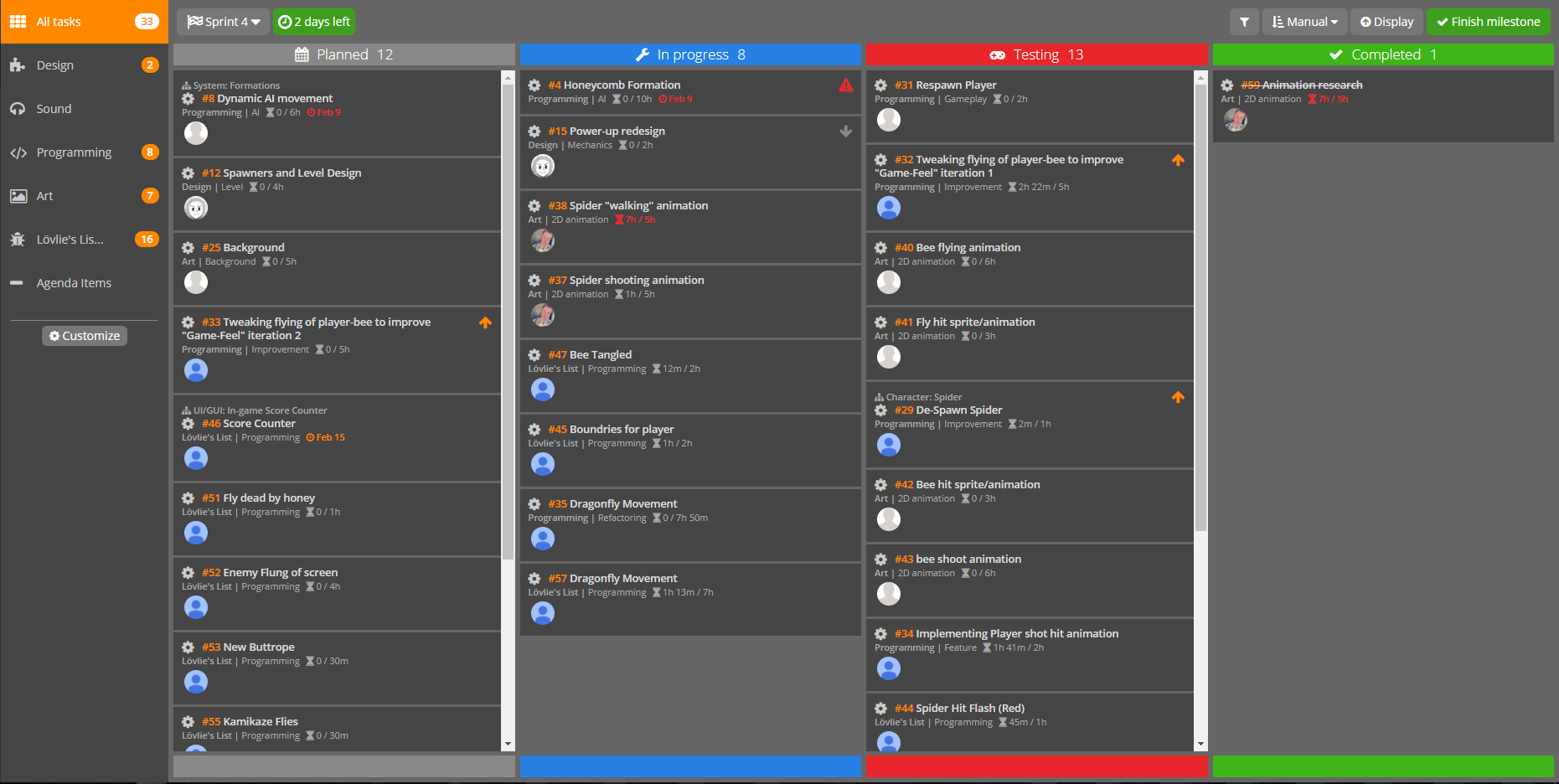 Choosing and evaluating channels of communication should be, like everything else a project manager does, mainly be influenced and determined in the best interest of the teams members. This is most easily done by including the team members in the discussion and decision about what channels of communication should be established and what purposes they serve. If team members have a say in the tools they have to work with everyday, they become invested in the success of those tools and make sure they are used as intended. This, after some time for fighting, accepting and adjusting to the change should lead to the tool and it’s use and features fading into the background making way for efficient and purposeful communication by the team.
 |

 and it’s GoogleDocs can not easily be beat when it comes to collaborative work. By sharing a folder on a cloud service with team members, we can make sure that work is shared in a common place, where everyone has access to everything. This streamlines the process of for example giving feedback on a sprite an artist finished recently. The artist always uploads the sprite to the cloud, and can notify team members of this if necessary. The team can easily look at the work and give feedback. The programmer now always needs to go to the same place to find assets, without having to scroll through days of Slack chats to find that one sprite.