Topic: How to create a basic “chasing” A.I. (i.e. stupid zombie like  ) )
Why this is NOT pathfinding!
Simply put pathfinding implies obstacle avoidance, which this method doesn’t do. In other words, using the method described below, your enemies will be running head first into obstacles and do so until they are killed or they are destroyed.
Why it is a working placeholder solution for our game?
Considering the enemies in this game are wedding-attendees who transformed into zombie-like demons, the player expects them to be dangerous but not particularly intelligent.
Vector3 vs Vector2 – Chasing the player in 2D vs 3D environment
In a 3D environment, we could have used Vector3.MoveTowards. However, the transformation will also be applied to the Z-axis, which will either:
- not work in a 2D environment; or,
- create some unexpected/unwanted behaviors.
So, what are the solution in a 2D environment? Well we came up with 2 different ones.
Solution 1 – Vector2.MoveTowards + RigidBody2D.freezeRotation + Quaternion.identity
void Start () {
 _player = GameObject.FindWithTag("Player");
 _body = GetComponent();
 _transform = GetComponent();
 _currentMovementSpeed = _movementSpeed;
 }

public void FollowPlayer()
 {
 _body.position = Vector2.MoveTowards(_body.position, _player.transform.position, _currentMovementSpeed * Time.deltaTime);
 _transform.rotation = Quaternion.identity;
 }
Vector2.MoveTowards allows the Non-Playable Character (NPC referenced to as NPC from hereon out) to find the target’s position. The function itself returns a point between the target’s position and the maximum stepping distance of the NPC which means the NPC will never reach or overshoot the player’s position.
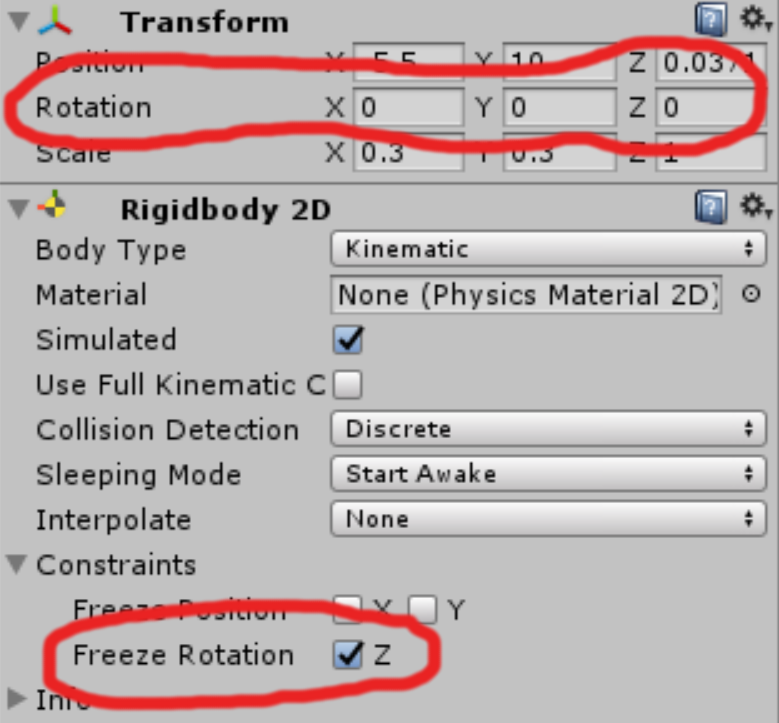 Now that the NPC is moving, however, the Ridigbody2D will be interacting with other objects in the scene. While we want the NPC to be stopped by objects in its way, colliding with corners or edges would result in the NPC’s Ridigbody2D to rotate around its Z-axis. Therefore, it is important to deactivate the Rigidbody2D’s rotation in the Z-axis. Now that the NPC is moving, however, the Ridigbody2D will be interacting with other objects in the scene. While we want the NPC to be stopped by objects in its way, colliding with corners or edges would result in the NPC’s Ridigbody2D to rotate around its Z-axis. Therefore, it is important to deactivate the Rigidbody2D’s rotation in the Z-axis.
This can be done by either check the “Freeze Rotation Z” in the Ridigbody2D’s Constraints tab; or by adding this line of code to the script attached to the GameObject:
rigidbody.freezeRotation = true;
That solves part of the issue. Another place where rotation can occur is the GameObject’s transform.rotation. To lock this one down, we simply reset it using Quaternion.identity as shown in the FollowPlayer() function.
Solution 2 – Using math to calculate angles and transform.up
So let’s start off with a piece of code (written by my fellow programmer Alex’):
 public GameObject _player;
 public float _speed = 5;

 private Transform _target;
 private float _angleOffset = -90;
 // Use this for initialization
 void Start () {
 _target = _player.transform;
 }

 // Update is called once per frame
 void Update () {
 if (_player == null) return;
 Vector3 dir = _target.transform.position - transform.position;
 float angle = Mathf.Atan2(dir.y, dir.x) * Mathf.Rad2Deg;
 transform.rotation = Quaternion.AngleAxis(angle + _angleOffset, Vector3.forward);

 transform.position += transform.up * _speed * Time.deltaTime;
 }
In this solution, we first calculate the distance between the NPC and the player by subtracting the NPC’s position from the player’s current position. Then we calculate the angle at which player is situated in respect to the NPC and rotate the NPC’s transform by it. This way the NPC is facing the player and we can now use the transform.up to translate the NPC’s movement.
Solution 1 & 2 results and caveats
Solution 1 is great for our regular enemies. Having been drawn in 2.5D, they are always facing the front of the camera regardless of whether they are moving up or down. Therefore disabling their rotation works great. Furthermore both the shooting and melee NPCs have a certain range (yes, even the melee is ranged because of the “arm”‘s reach  ). ).
That being said, the Vector2.MoveTowards function is limited since it cannot be used to ram a NPC into the player if the enemy was some sort of kamikaze for example.
Solution 2 allows NPCs to catch-up to the player, which is why we have used on the monster which chases the player from the bottom of the screen. This monster also hovers over obstacles, meaning we do not have to worry about weird collision reactions or rotations other than for its orientation.
On the down-side the NPC would always rotate towards the player, which could look odd depending on the overall animation and movement of the NPC it is attached to.
TL;DR:
Not all follow behaviors are created equal and you should consider the overall aesthetic of the object/enemy/NPC you will be attaching it to when writing it.
MDA application to our scenario
=> Mechanic: Chase Player
- Enemies follow the player as soon as they discover him and continue until they either die or are in range to shoot at him.
- The bride monster pursues the player until it can catch him
=> Dynamic: Running away from threats (regular enemies and bride).
=> Aesthetic: Stress and constant pressure.
About Timothée Engel
2017 Programming
|
