Enemy Spawn Controller
|
This week I worked on making an enemy spawn controller object which allows me to implement the different levels we want to have in our game, the levels being waves of enemies varying in size and in the types of enemies that spawn. Using this object I can spawn as many of each type of enemy as I want at different locations on the screen, but for the purpose of our game I only needed to make them spawn from the right side on the screen.
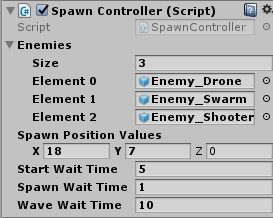
The way this was setup makes it very easy to add new types of enemies to the spawn controller just by simply increasing the size of the Enemies array(of type GameObject) and dragging the new enemy prefab into the new slot, and this makes it easy to integrate newer enemy types through out any stage of production . It is also easy to change the positions where they spawn by changing the “Spawn Position Values” X, Y, and Z values as shown in the image above, which are world space coordinates and not pixel positions. For my spawn controller, I use the X component of the “Spawn Position Values” vector3 as is, but use the Y component to choose a random elevation to spawn the enemies, and the Z component is ignored because the game is in 2D, but is still needed because the Instantiate function I am using takes a vector3 parameter to determine the position where it creates an instance of the object. These values can also be changed at any time through out the game which allows us to create specific spawn patterns that can be used in the tutorial phase or when we want to introduce a new mechanic to our player. Some other variables that can be changed easily are the wait time before the spawning starts, the wait time between each enemy spawning, and the wait time between waves. The way these delays can be added to code is by using a coroutine which is a function that can suspend its execution until a certain provided time has passed. This allows us to manipulate the spawning times and create spawning rhythms that help in invoking different feelings in the player, for example, we can make the spawning time between the enemies very fast to make the player feel stressed, or slow it down in the tutorial phase or during the first few waves to allow the player to get used to the different mechanics. Internally this script keeps track of the wave number and the number of each type enemy to be spawned in that wave. There are some initial values for the number of each enemy type and depending on what wave you are on these values are changed, for example, on waves 1 to 3 you start with only the one enemy type spawning but increase to number that spawns each wave, on wave 4 you introduce the second type of enemy, and increase the number of that type of enemy for the next 3 waves while decreasing it for the first type. When the numbers for each type of enemy in the wave are decided, the corresponding index for that enemy(reminder that the enemy game objects are stored in an array as mentioned earlier) is added to a List of type integer which then has its components shuffled around to randomize the spawning order of the enemies using the a variant of the Fisher-Yates shuffling algorithm, and I do this to add replay value to the game and make it a bit unpredictable. After that the List gets iterated upon and the enemies get spawned, and also I have to mention that the List is cleared of its data after every wave. I am generally happy with this artifact, but it can be and will be improved to make it more easy for my game designer to use without having to edit the code.  |