Potato Pirates of The Prohibition – GUI / Start Menu
|
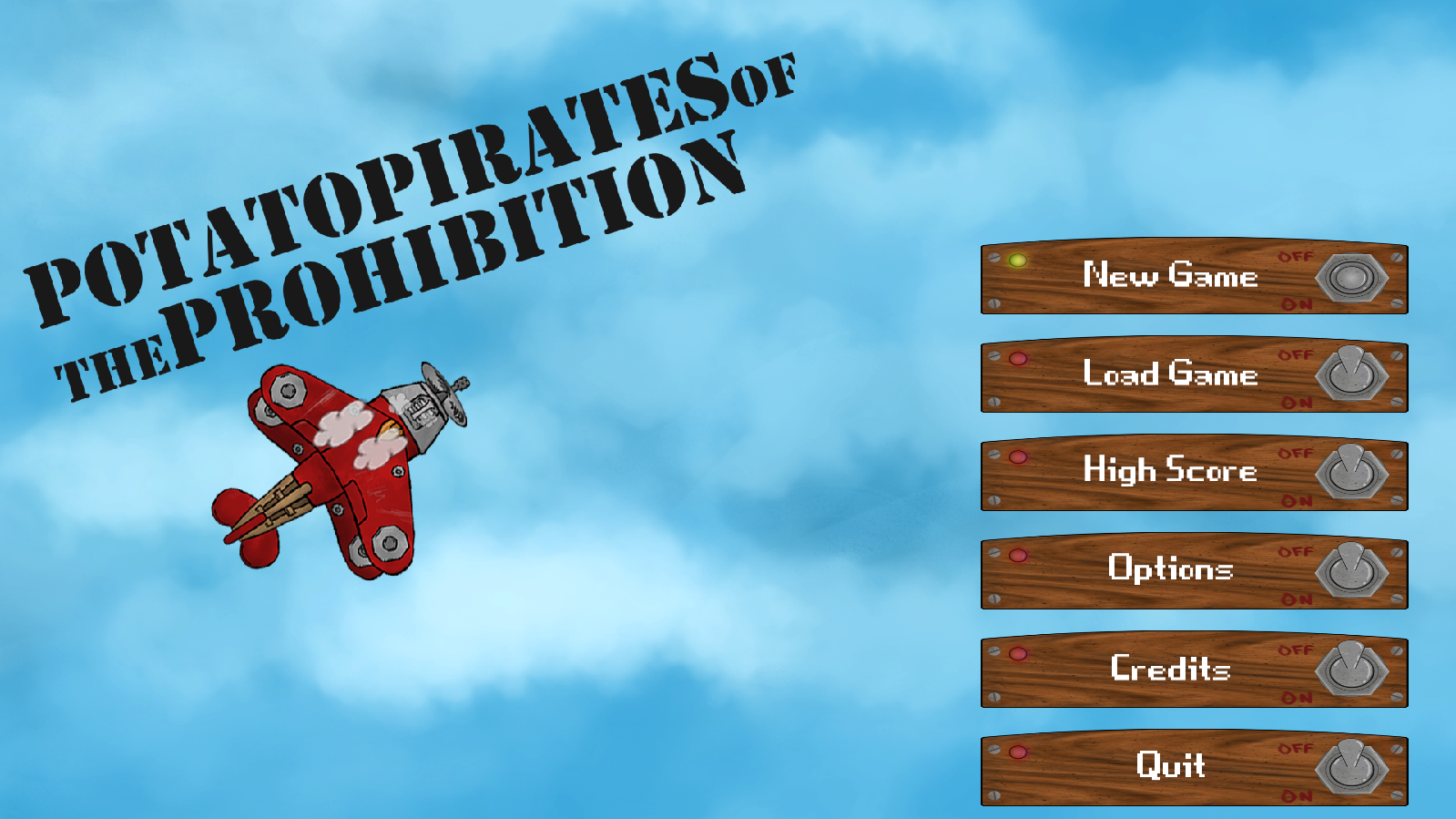
Hello dear readers, my group is currently in week 3 of making our game based on another group’s concept document, the game is called Potato Pirates of The Prohibition, and it’s a space type shooter game where you must complete different waves of enemy’s using different tools to complete the level. My role in the group is lead coder and my blog will mostly be about different code related things I have done to get the game working! So let’s get started, this week I will talk about the GUI and the start menu that I have been working on. Let’s first check a screenshot from how it ended up looking before getting too much into details!
(click here for bigger version) When you first start the game you will see 6 different buttons, New Game, Load Game, High Score, Options, Credits and Quit. If you also have a “latest loaded game” you will also see a “Continue” button over the “New Game” button. If you are doing nothing the button will have a red light and have their lever pulled upwards, when your mouse is over the button the light will turn yellow and the lever will be in the middle, when you finally click the button it will turn green and the lever will go to the bottom. The GUI objects are currently built-up of 3 different components that are all children of a class called “GUIObject”, the GUIObject has all the basic components the 3 other objects need, like function for getting and settings its positions and size, it also has a virtual function called draw that each object must override. The other 3 objects are GUIButton, GUILabel and GUIImage. GUIButton is used for the buttons on the start menu and handles all code with the 3 different states. The GUIImage simple just shows an image and the GUILabel prints out a label text that can be changed. I will mostly be talking about the GUIButton as it’s the more interesting one. The GUIButton uses an update function that will be called each frame,
if (inputManager->getMouseCoords().x > GUIObject::position_.x &&
inputManager->getMouseCoords().y > GUIObject::position_.y &&
inputManager->getMouseCoords().x < GUIObject::position_.x + GUIObject::size_.x &&
inputManager->getMouseCoords().y < GUIObject::position_.y + GUIObject::size_.y)
{
if (inputManager->isMouseDown(LEFT) && status_ != 2 )
{
status_ = 0;
pressFunc_(deltatime);
}
else
{
status_ = 1;
}
}
else
{
status_ = 2;
}
As seen in the code above it first check if the mouse is inside the button, if it’s not it will just set status_ to be equal to 2, (2 is the “default state” where the light is red. If the mouse is inside, it will check if the left mouse button is down and the status_ is not equal to 2, if both statements are true it will set the status_ to be equal to 0 (the pressed status where the light is green) and it will run the buttons pressFunc_, wish is a pointer to a function that shall be called when the button is pressed. If both or one of the statements are false however, but the mouse is still inside the button, it will set status_ to be equal to 1 wish is the “hover state, when the light is yellow”. I then simple in the draw function just check what the status_ is equal to when I do the drawing when I get the uvRect sf::IntRect(0, buttonImage_->getSize().y / 3 * status_, buttonImage_->getSize().x, buttonImage_->getSize().y / 3) The 3 different states of the button is on the same image, but separated by the Y axis, where the pressed state is in the top, the hovered state in the middle, and the press state on the bottom. This make it so it’s quite easy to work with and also make it easy for other people to later change the button design if they would want to. I won’t be going into too much how the other parts of the GUIButton works, however if someone wants to know more let me know and I see what I can do! Well other than that the work with the game is going quite nice currently and we are getting more things done each day, all GUI components are not quite down but for the alpha this will be enough, we were talking about having sliders for audio volume in the beta, however that is something that has to be developed when we get to that point of the game. Other than that, thank you for reading and be sure to leave a comment!  |