Bomberman Clone, Music manager
|
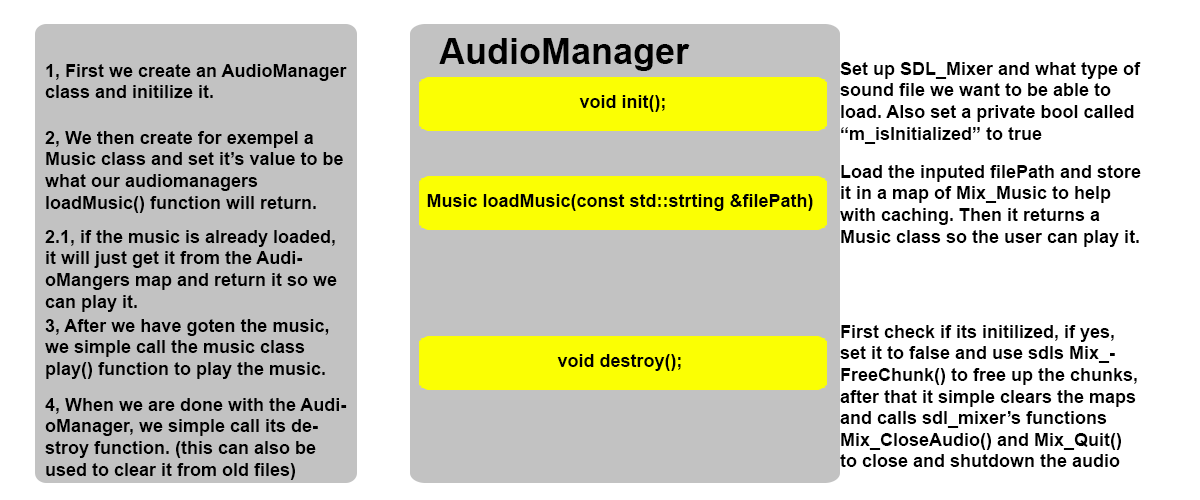
Hello dear readers! Today I will talk about the music manager as some people have had problems with it; the music manager in itself is very simple, so let’s get right into it! First the music manager itself is built-up of 3 classes, first the AudioManager itself, then one called SoundEffect that is used for sound effects, like explosion sounds. Then last we have Music wish simple control the music class. The AudioManager main task is to first set up sdl_mixer and also at the end shut it down. It also store all the different music’s and sound effects, it is also the one handling the loading of sounds and music files. The following picture is an example of how the music manager could be used;
(If picture is to small, click this link to get bigger version) As seen in the picture above one of the first thing we have to do is creating our AudioManager, we then call its init function that will set up sdl_mixer. If we then want for example play a music file called “exempel.mp3” we would simple create a Music class and do like following;
AudioManager audioManager;
audioManager.init();
Music exempelMusic = audioManager.loadMusic("exempel.mp3");
exempelMusic.start()
exempelMusic.stop();
audioManager.destroy();
The following code would create an AudioManager set it up and load its music file. Some explaning and bitwise combinationWhen I created the AudioManager I wanted to be able to play and load different files, this was done by using a bitwise combination when calling mix_init();. By using a bitwise combination I could put in more than one argument and make so it can load different types of files instead of just mp3 for example. For example if you would like to be able to load both mp3 and ogg files you would do the following Mix_Init(MIX_INIT_MP3 | MIX_UNIT_OGG); Another problem that got in my way was that sdl_mixer can only play 8 channels of sound effects on the same time, after that it full. I fixed this by doing a simple approach doing the following in the SoundEffects play function:
void SoundEffect::play(int loops)
{
	if (Mix_PlayChannel(-1, m_chunk, 0) == -1)
	{
		Mix_PlayChannel(0, m_chunk, 0);
	}
}
What the code above does is it is first trying to play the music at the first free channel, if it returns -1 it means there was no free channels. If so, I simple overwrite what’s in channel 1. This could probably be made better but it works for me. Anyway that’s most of the AudioManager explained, if you would like a download version of it just write a comment or send me a message and I fix and upload copy so you can download and check it out. Thanks for reading! That was all for today, be sure to leave a comment if you have any question and I will try to answer them.
EDIT: Download link added after requests  |