Memory – the abundance of memory an Illusion
|
Memory a subject approached with caution. 
Without fixing memory leaks your program will continue to use more and more memory. DANGER! Sometimes you do not have a real choice though and have to approach it, unfortunately I had to approach the subj ect and try and find all the memory leaks in a project I and five others are making. This is because the program needs to be optimized in this way and as an assignment we need to remove all the leaks. Memory leaks are memory that is allocated but not deallocated, in other words you make space for something but never removes it, this is a real waste. If you start a game and it has memory leaks they will continue to grow, the rate and way differs from game to game, in our game the main leakage was in the gamestate and if you go back to the menu and then start anew the leakage will double, since the memory from before was not freed new memory still needed a place, therefore it increases. The same amount of memory was created but the old was still there (kinda like your normal storage, old things tend to stay there while still new things are put in). This will continue to build on it self until the program or computer crashes which makes it essential to fix. In our project there was about 4000 and now there are none (according to the program, visual leak detector that tries to discover leaks in your program). This is quite a progress but an tiresome one and should not be necessary to this extent. The deallocating of memory should happen as soon as you allocated something, this however was not the case due to bad forethought and not enough experience but now more of that has been gained. With experience this kind of memory leaks will hopefully not happen and you only have to look for other ones (since there will always be some leaks before you fix it). The memory leaks was small in bytes but it is still a lot in my opinion. Most of the memory leaks were due to an object of an class was created and not destroyed. In this case it was objects of the class animation mainly, its objective is to make an sprite move (rather to give the appearance of it) and it contains a pointer to an image and all the frames of the animations (frame a piece of the image or rather the texture and coordinates on it). The game contains many of these and as such there were many leaks. Well the thing to do was to delete them, though this needs to be done in the right place otherwise you will get errors or bugs, deleting removes the memory for that object. The animation variables in the entity (character, enemies etc) classes where deleted when the object was deleted.
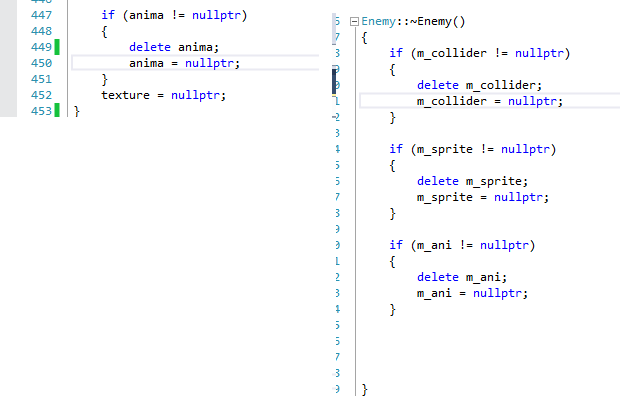
To the left an animated sprite is deallocated. This is done through checking if the variable is pointing to a value/memory or if it is nullptr (NULL for pointers). If it has a value we need to deallocated it by deleting it, that deletes the memory but leaves the variables, as such we need to make it point to nullptr to indicate that it is empty. The same is done on the right though with different variables when the enemy class destructor is called. Our code when creating it:
Visual leak detector is just like most program, it takes time to get used to and understand. How does it work ? What does the results mean? Did I forgot to include something ? etc. The visual leak detector demands that you include many things to get it work in your (IDE) integrated development environment, library files and includes and a few more things needs to be done before you can use it, for more info Visual Leak Detector. Overall it is much easier to get up and running compared to other programs, though a bit annoying to have to do for each project you want to use it on. The real difficult part is interpreting the result and understand how it works. Vld will scan the program at runtime and at closing calculate how much memory you used and how much was leaked. The leaked memory is “explained” in blocks where it says how much memory just that part took up and then it shows the user the object causing the leak, then it goes back though the call hierarchy as shown below: 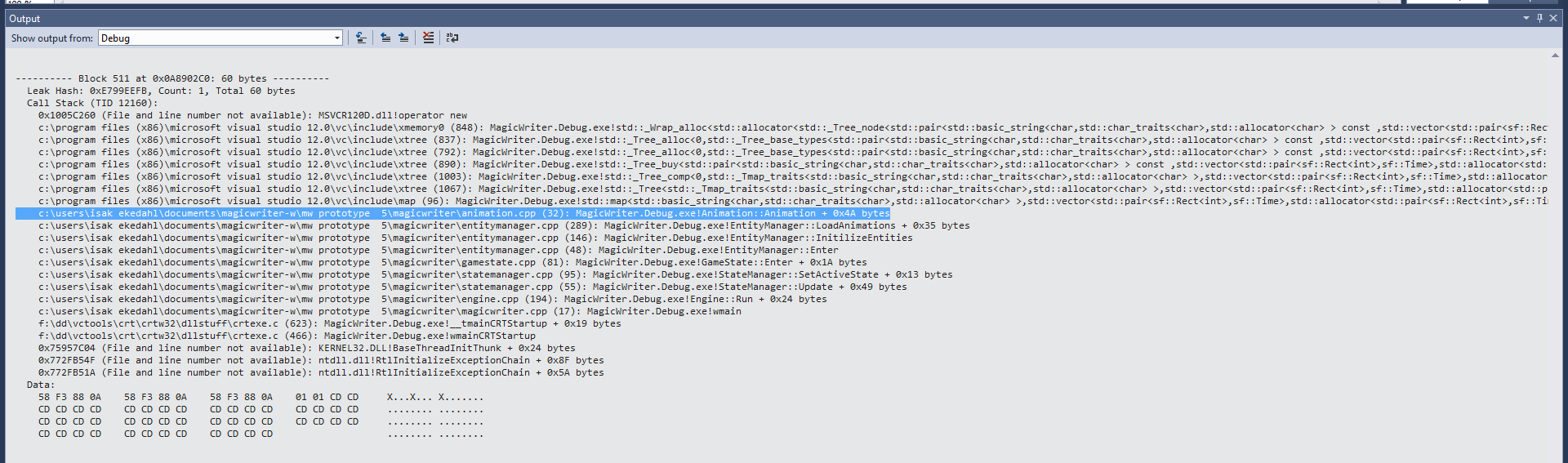
Output from visual leak detector. The marked line is when the object in question starts its constructor, the above lines go deeper following the process that creates the leakage (the process of actually allocating memory for the object). Bellow on the other hand the process goes the other way, just below is where in my code I initialize the object (object = new Object). The reason for the explanation being like this is because the part above the line are practically unnecessary since that type of code are hard to follow and in this case ain’t needed since it is about an object being allocated but not deallocated as such all one needs to do is find the object and delete it. It would make it easier to read, but if one is experienced this will let you see if is about the deallocating or something else about the object. Since I am not experienced it took some time to understand the output and program but now I understand more but still have a long way to go in understanding visual leak detector. I also need to get into the habit of deallocating memory allocated, though with going through all of our project I have gotten a bit into the habit of doing so.  |