Game Production: Feature 4
|
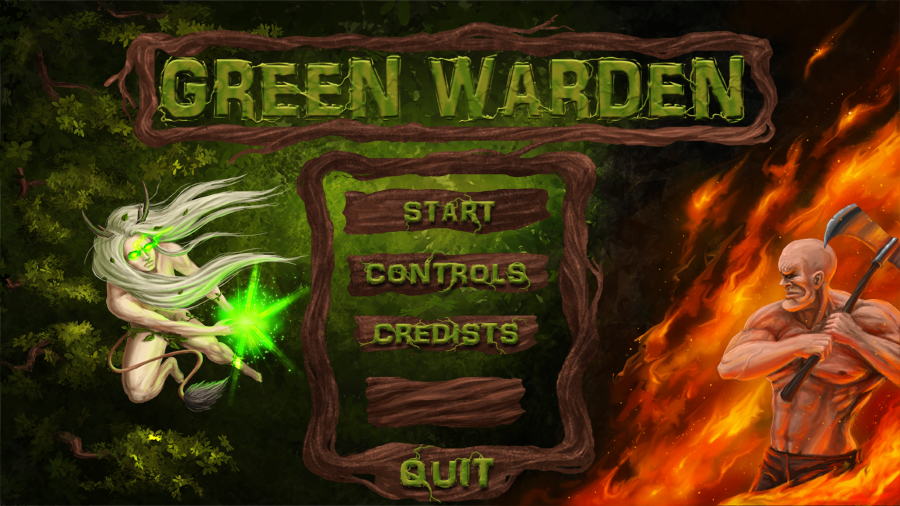
This week I am working on some different things, but the feature I will be talking about in this blog post is the menu screen. It is a background painting that I have put a lot more hours in than I had initially planned, but I think it’s important that the artwork is good enough to give the player a nice first impression. It also serves as a way to set the theme for the game and introduce the main character. And in just this one picture you have kind of the whole scenario of why you fight. The image is depicting the main character on the left side, leaping forward and using her magic attack, and on the right side an enemy ready to swing his axe. Behind the enemy there is flames and a slight desaturation of the otherwise green leafy background. This shows the enemy’s intentions and goal of burning the forest. Behind the main character, there are branches to show her coming from inside the forest. In between these two characters is the menu, with the title on top. The menu will look like it’s made of wood, like the HUD elements I wrote about last week, with green letters that have an organic look to them. The way I make my images is firstly a sketch layer, marking out where I want my characters and other elements of the picture. Next is the background, I pick a colour that will set the mood and base for the drawing. in this case I made a dark green background with a highlight in the middle. Then I put some textures on the background with different texture brushes, in this case leafs. Then I start with the the characters, first laying down the base colours, with highlights and shadows, at this stage it looks very rough. then I start to blend the colors and add details. At the same time blending in some more light sources like the fire or the green magic light. This is followed by more layers of details and some effects, fire and magic again getting a rework to make them look more realistic, this is done with several layers and blending modes. When I am satisfied with the characters and effects I start working with the menu parts, using the same method of base, highlights and shadows, and then I will add some extra light sources to make it feel like it is in the same environment as the rest of the picture. And lastly I will merge all the layers and do some last touches and colour correction to get the whole picture coherent, and the mood just right.
 |