Parsing text files exported from ‘Tiled’ software
|
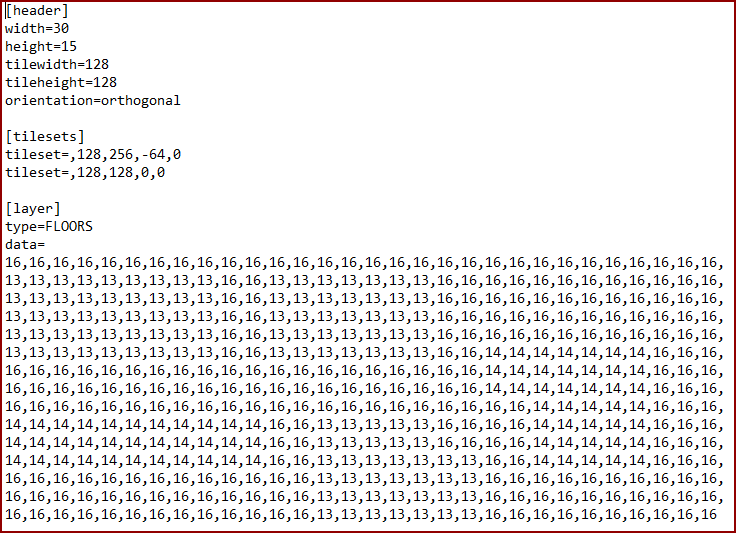
This week was the week we decided to use the Tiled map editor software after all. Tiled is a level creator that exports data that can be read by the program to place the correct tiles at the correct places. The main advantage of this is that levels can be edited easily by someone unfamiliar with the code, and coding in general. Our first means of editing levels was to just write numbers manually in a text file, which kind of sucks, but is easy to read with code. We had previously decided against using Tiled because writing code for parsing the exported xml files seemed like more trouble than writing the level data text files manually; but then a wise man taught us how Tiled could also export normal text files. These text files contain more data than we need and it also seemed like a good idea to split the data and save all we needed in different variables. It was up to me to write the code. The code we had simply read one text file (in which every tile was represented by a single character) and created the level immediately, which means the level was never copied from the text file which would have to be read again if the game was to revert to that level. The new system would also mean that three layers of tiles would be acquired, one for floors, one for walls, and one for all other objects like furniture and pickups. (We will possibly add a layer for patrol pattern nodes.) The text file structure can be seen in the picture below:
I cropped it for obvious aesthetic reasons; the missing part only contains two more “[layer]”s with different numbers in the map, and type “WALLS” and “Objects”, respectively. The method LoadLevel() does the following:
The complete method LoadLevel() with detailed comments can be found below. The main difficulty with this code was to make it look organized, which I think I partially failed. It would have been better to put the text file management in a new class with some operations having their own methods, to be able to reuse them and get a better structure.
{
    // All variables we need as parameters for Level
    int index = 1; // "Level 1"
    int width; // Level width, in number of tiles
    int height; // Level height, in number of tiles
    std::string floorData, wallData, objectData; // These will contain the tile map for each level

    // Read the map from the text file and put everything in a string
    std::ifstream levelFile(filepath);

    std::string str, levelData;
    while (std::getline(levelFile, str))
    {
        levelData += str;
        levelData.push_back('n');
    }

    // Variables that will be needed
    std::size_t foundAt; // Data type "size_t" is a position in an std::string. It's used pretty much like an integer
    std::size_t position; // Will be the main position, only increasing in value since we start from the beginning and never go back
    std::size_t tempPos;
    std::string target;
    std::string tempString;

    //Start parsing levelData
    position = 0; // Beginning of string
    target = "[header]"; // Why don't I just search for "width=" ? I presumably planned a different, shinier approach for the parsing, that would work with slightly different looking text files.
    foundAt = levelData.find(target, position); // Search for the string "[header]" starting at the beginning of the string.
    position = foundAt + target.size() + 1; // Set position to the beginning of the next line. (foundAt is where the target string was found. target.size() is the length of target. + 1 is for going to the next line
    tempPos = levelData.find_first_of("n", position); // Search for next line break
    tempString = levelData.substr(position, tempPos - position); // Create a temporary substring from the current line

    // More variables needed
    std::string strMain;
    std::string strResult;
    std::size_t pos;

    // Parse the substring for the value
    strMain = tempString; // Copy substring to new string. (Probably because I first planned to do this in a separate method.)
    pos = strMain.find_first_of("0123456789"); // Find the first digit
    while (pos != std::string::npos) // While not at end of string
    {
        strResult += strMain[pos]; // Add the digit
        pos = strMain.find_first_of("0123456789", pos + 1); // Find the next digit
    }

    if (!strResult.empty()) // If there are digits in the string
        width = stoi(strResult); // Save the string as an integer
    strResult.clear(); //Clear strResult for next use

    position = levelData.find("height", position); //Go to the line with "height" in it

    tempPos = levelData.find_first_of("n", position); //Search for next line break
    tempString = levelData.substr(position, tempPos - position); //Create a temporary substring from the line with "height" in it

    // Here is the same parsing stuff as for width
    strMain = tempString;
    strResult.clear();
    pos = strMain.find_first_of("0123456789");
    while (pos != std::string::npos)
    {
        strResult += strMain[pos];
        pos = strMain.find_first_of("0123456789", pos + 1);
    }

    if (!strResult.empty())
        height = stoi(strResult);

    for (int i = 1; i <= 3; i++) // Once for each layer. This will be increased if we add more layers to the level
    {
        target = "data=";
        foundAt = levelData.find(target, position);
        position = (foundAt + target.size() + 1); // Go to beginning of the tile map

        tempPos = position;
        for (int i = 1; i <= height; i++) // Set tempPos to position, plus height number of lines down. This will encompass the whole map.
        {
            tempPos = levelData.find_first_of("n", tempPos + 1);
        }

        tempPos++; // Get the last line break, too. Can't remember why...

        tempString = levelData.substr(position, tempPos - position); // Create a temporary string from the map

        // Loop through the map and delete all line breaks, as these will be an annoyance when reading this string and creating tiles based on the numbers
        for (std::size_t found = tempString.find("n"); found != std::string::npos; found = tempString.find("n"))
        {
            tempString.erase(found, 1);
        }

        if (i == 1) // If at first layer...
            floorData = tempString; // ...save in floor layer data container
        else if (i == 2) // If at second data layer...
            wallData = tempString; // ...save in wall layer data container
        else if (i == 3) // If at third data layer...
            objectData = tempString; // ... save in object layer data container

        position = tempPos; // Jump to the end of map, so the loop will search for the next "data="
    }

    Level* level = new Level(1, width, height, floorData, wallData, objectData); // Save level data in an instance of the Level class

    return level; // Return the pointer to the newly created Level instance
}
 |