The Last Signal. Post #2: adding multiple bullets
|
So far we were only able to have one bullet in the game at any time. One of the most important tasks I was working on during this sprint (16 Feb – 20 Feb) was to implement “overcharge” item which temporarily increases rate of fire. When palyer’s rate of fire is increased, there will definitely be more than one bullet on the screen. So this post is about how I added multiple bullets to the game. This is going to be a moderately technical post intended mostly to programmers. Before we would dynamically allocate exactly one instance of a bullet object in the GameState. The bullet would be placedin location (0;0) and when the player presses fire, the bullet will be moved to player position, assume player’s rotation and velocity and continue going infinitely in that direction. When the player presses the fire again, the bullet is immediately returned to the player position and starts moving the new facing direction. The first to do is to dynamically allocate more than one bullet, say 10. Since we have 10 instances of the same object, it would be really nasty to copy over the same code 10 times, especially when our current code isn’t all that pretty either. So I added a for-loop and added an
for (int i = 0; i < 10; i++)
	{
		m_bullet = new Bullet(&m_transfer.bullet, 0, 0);
		m_entities.push_back(m_bullet);
	}
I additionally added a bool The logic that makes bullets active is when the player is in overcharge state (has consumed the overcharge item) and has pressed fire, i.e. left mouse click in our game.
if (Transfer::GetShoot())
	{
		m_shoot_time = m_shoot_delay.getElapsedTime();
		if (m_shoot_time.asSeconds() >= m_cooldown)
		{
			m_shoot_delay.restart();
			for (int i = 0; i GetType() == ENTITY_BULLET)
				{
					Bullet* bullet = static_cast(m_entities[i]);
					if (!bullet->IsActive())
					{
						bullet->SetState(true);
						bullet->SetPosition(m_player->GetX(), m_player->GetY());
						bullet->SetAngle(m_player->GetAngle());
						bullet->SetDirection(m_player->GetDirection());
						bullet->SetRoom(m_room_active);
						break;
					}
				}
			}
		}
		Transfer::SetShoot(false);
	};
Currently it is the Engine that checks for user input, so GameState class has to have some way of accessing the information if fire button has been pressed. The current solution is temporary, to create a static class The processing occurs as follows. We first check if the cooldown betwneen shots is over in line 4. If we’re still under cooldown, we skip processing and set 1. we reset the timer to begin the next cooldown Potential problem is that when we break the loop, the Next, we need to run Update functions for all active bullets. Here is this code:
for (int i = 0; i GetType() == ENTITY_BULLET)
		{
		Bullet* bullet = static_cast(m_entities[i]);
		if (m_room_active->EvaluateCoords(bullet->GetX(), bullet->GetY()) != CONFINED)
			bullet->SetState(false);
		bullet->Update(1.0f);
		}
Most of this code chunk is similar to the one above — it scans the vector, picks out bullets and static-casts them. It then invokes a special Room class function for the active room instance which checks if bullet is not outside the active room. If it has just crossed the room boundary, it should be removed so what we do we set their state to inactive. As a result, they won’t be drawn in the Draw function. We then run Update for every bullet; this needs to be fixed to include the check if a bullet is active and skip remaining iteration if it is. Next comes a very important and difficult piece of code which has tripped me up for hours and hours until I figured out what was wrong. Here’s what we are doing now. We have deactivated bullets that are outside the current room (the one the player is in), we have updated all bullet positions. But that’s positions of bullets as abstract objects (see my previous post, #1 for a short coverage of abstract objects), the sprite of every bullet has to be updated as well. Since we’re using the same sprite for all 10 bullets, updating it once will update it for all bullets, since all bullets are using that one sprite. We have to create an individual copy of that sprite for every bullet as we go and modify it individually for that bullet, seeting sprite position and rotation to bullet object position and rotation. Here is the correct code:
for (int i = 0; i GetType() == ENTITY_BULLET)
		{
		Bullet* bullet = static_cast(m_entities[i]);
		sf::Sprite temp = *bullet->GetSprite();
		temp.setPosition(bullet->GetX(), bullet->GetY());
		temp.setRotation(bullet->GetAngle());
		bullet->SetSprite(temp);
		}
We still scan the vector, pick out and static-cast bullet objects and then we create a new sprite, set its position and rotation to corresponding bullet properties and apply that sprite ot the bullet object (line 8). This requires that the sprite be copied not referenced, so I made it so in line 8 the sprite itself is passed and accepted on the other side (in the bullet object). The problem here was that I was passing a reference to the modified sprite; the same sprite was getting modified in every iteration of the loop, leaving it with values applicable for the last bullet. So all the bullets would behave as the one fired out last. The remaining code is easy: draw just the active bullets:
for (int i = 0; i GetType() == ENTITY_BULLET)
		{
		Bullet* bullet = static_cast(m_entities[i]);
		sf::Sprite* temp = bullet->GetSpriteFull();
		if (bullet->IsActive())
			m_draw_manager->Draw(*temp, sf::RenderStates::Default);
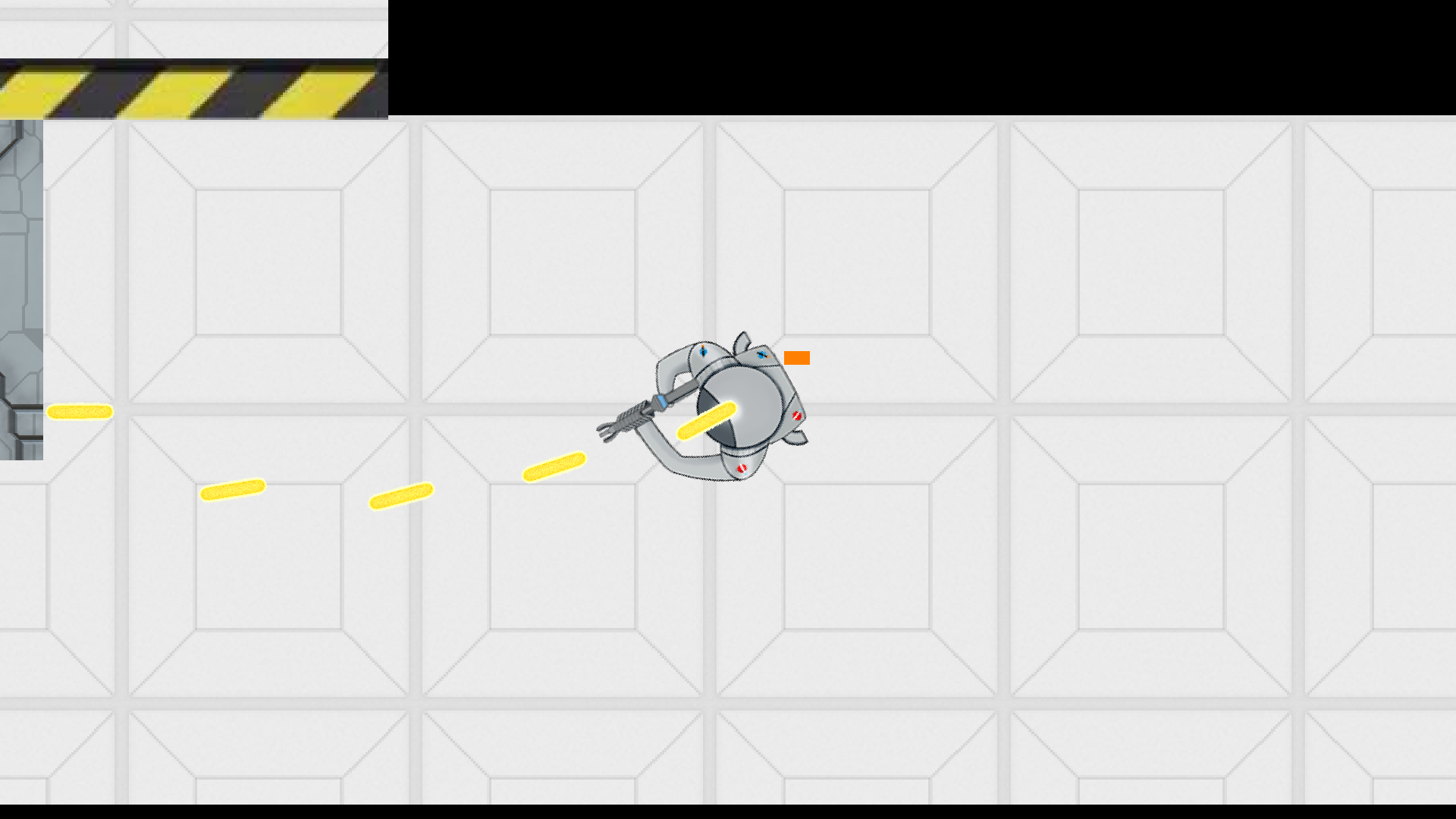
And here is the result: our player shooting out several bullets with very little cooldown due to overcharge state:
 |