Big Game Project: post 2, Problem solving
|
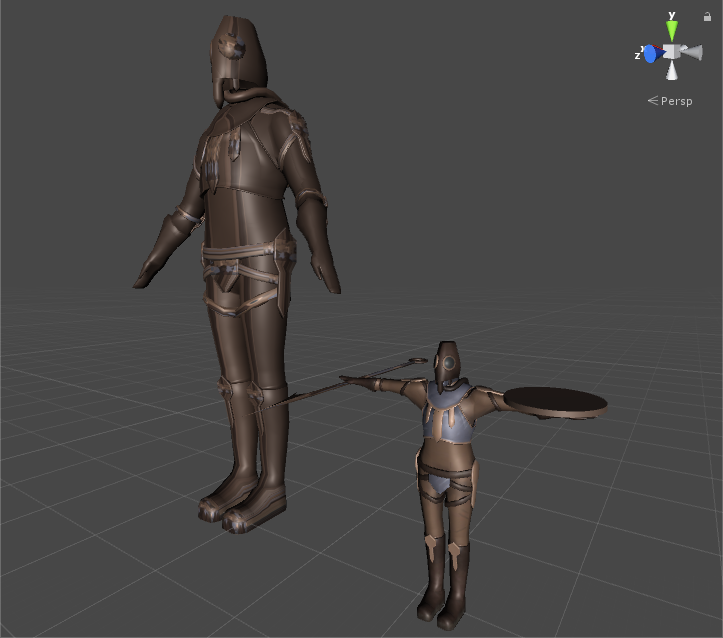
This should have been posted last week but was delayed due to the lack of content to post and procrastination. Eighter way, week four turned out to be mostly problem solving. I started out with trying to importing the mesh, rig, and animations into Unity as seperate files rather than bake it all into a single FBX file after hearing from a upperclasmen that it was better. Problem was that I could not get it to work even though I connected the files to eachother in Unity while the single baked file worked properly. After asking a teacher about this I was told to just simply use the baked FBX file instead of overcomplicating things. As I working with this I also realised that something had gone wrong with the mesh, apperently people in the group had been using different units when working with the characters. This resulted with our first playable character being 6-7 meters long instead of 2 meters. Because of this we had to redo the mesh, rig, and skinning of the character before animating it. See below for comparison between the old and the fixed model. Next up was getting the materials and textures in Unity to work. Once again things weren’t working the way they should. We found that the problem lied with the UW-mapping of the character as they somehow had just disappeared, luckily the previous version of the character still had its mapping intakt so we used that one. Here’s a picture show the size and texture difference of the models.
 |