Programming: Binding Object Rotation to Mouse Movement
|
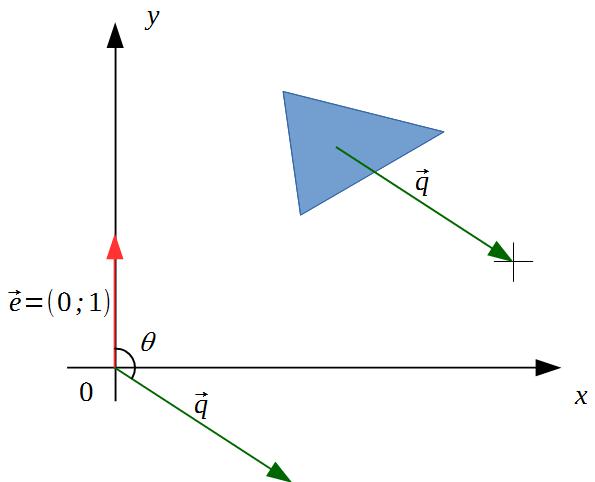
A new term started on Monday this week. Now we are going to have two simultaneous courses, “Game Programming II” and “Introduction to Game Development”. Over a span of roughly two months we will make a game based on one of the concepts produced by student groups in the previous course, “Introduction to Game Design and Analysis”. Our group has already started working on our game, “The Last Signal”, but at the moment we’re mostly doing decision stuff – what we should do, and how. In this game, the player should be able to change character facing angle by moving the mouse. The player can move the character forward by pressing the up arrow on the keyboard (according to current design, though I will push for changing it to left mouse click, as I believe such movement control feels more harmonious). In my opinion, making the character’s facing angle track mouse movement is one of the biggest challenges in this game. So I decided that this feature needs to get out of the way as soon as possible. This post is dedicated to the implementation of the said feature using the SFML library. Mathematical TreatmentSuppose we have an object (like the blue triangle in the picture below) whose orientation should track mouse movement. SFML allows an object to be rotated about the object’s origin by using the
We will use a method to obtain object’s position (the origin) – The idea of the algorithm is this one. For every frame, we obtain both object’s position and mouse position which we express as positions vectors. We subtract object position vector from mouse position vector. The difference is a new vector that indicates how much the two directions differ. We calculate the angle between the resulting difference vector and a unit y-vector and set the object’s rotation to that angle. A more detailed explanation with pictures follows. In a game frame, we obtain object [origin] position
We calculate vector
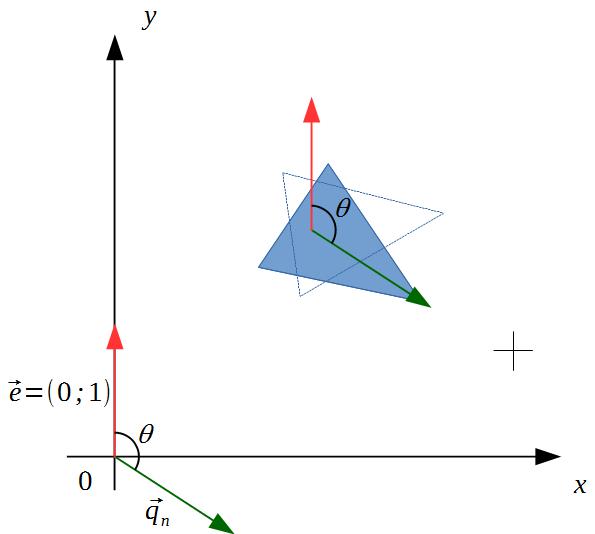
We introduce a unit vector,
The angle
So to calculate the angle We can make one further simplification. Have a look at the picture below:
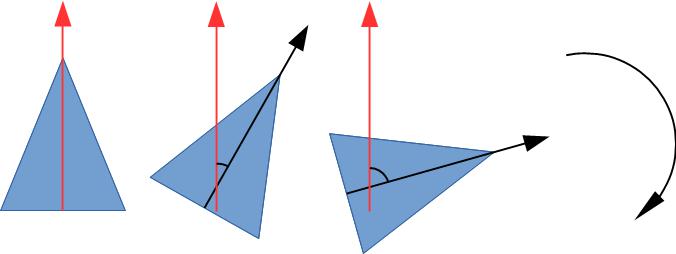
If instead of using vector Now if we set the object’s rotation to
Algorithm Code
//main.cpp

#include "stdafx.h"
#include

float getAngle(float x1, float y1, float x2, float y2)//(x1;y1) - object rotation centre and (x2;y2) - mouse position in current frame
{
	sf::Vector2f up(0, 1);
	sf::Vector2f p0(x1, y1);
	sf::Vector2f p1(x2, y2);
	sf::Vector2f q = p1 - p0;

	float q_length = sqrtf(q.x * q.x + q.y * q.y);

	q.x /= q_length;
	q.y /= q_length;

	float scalar_product = q.y;

	float angle = acos(scalar_product) * 180.0f / 3.1415f;

	if (x2 - x1 < 0.0f)
		return angle;
	else
		return -angle;
}

int main(int argc, char* argv[])
{
	int SCR_WIDTH = 1024;
	int SCR_HEIGHT = 600;

	sf::RenderWindow window;
	window.create(sf::VideoMode(SCR_WIDTH,SCR_HEIGHT),"SFML Intro Window");

	sf::ConvexShape triangle;
	triangle.setPointCount(3);
	triangle.setPoint(0, sf::Vector2f(0,0));
	triangle.setPoint(1, sf::Vector2f(20, 50));
	triangle.setPoint(2, sf::Vector2f(40, 0));
	triangle.setPosition(SCR_WIDTH / 2, SCR_HEIGHT / 2);
	triangle.setOrigin(20, 20);

	float angle = 0.0f;
	float rotation = 0.0f;

	while (window.isOpen())
	{

		sf::Event event;
		while (window.pollEvent(event))
		{
			if (event.type == sf::Event::Closed)
				window.close();
		}

		window.clear(sf::Color(0x6e, 0x82, 0x8e, 0xff));

		{
			sf::Vector2i m_pos_new = sf::Mouse::getPosition(window);
			angle = getAngle(triangle.getPosition().x,
				triangle.getPosition().y,
				m_pos_new.x, m_pos_new.y);
				triangle.setRotation(angle);
		}
		window.draw(triangle);
		window.display();
	}

	return 0;
}
 |
 and mouse position
  . We are not interested in object’s position but we need it because we want to measure how much mouse cursor’s direction differens from object’s direction (facing angle). We are measuring mouse direction with respect to object’s direction; they are both moving in the game so we need some stable reference point, the origin of the coordinate system in this case.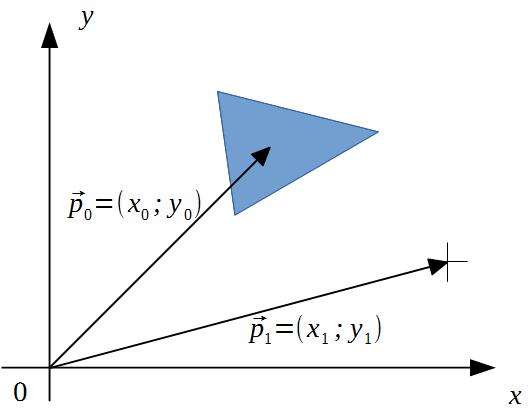
 which represents how much mouse cursor’s direction differs from object’s direction. We’d like this difference to be expressed in degrees but we currently have it as a vector (
 in our case).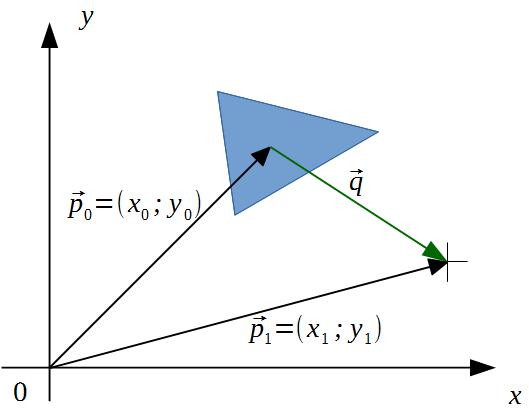
 , to our coordinate system. We move vector
  .
.
 and
and 


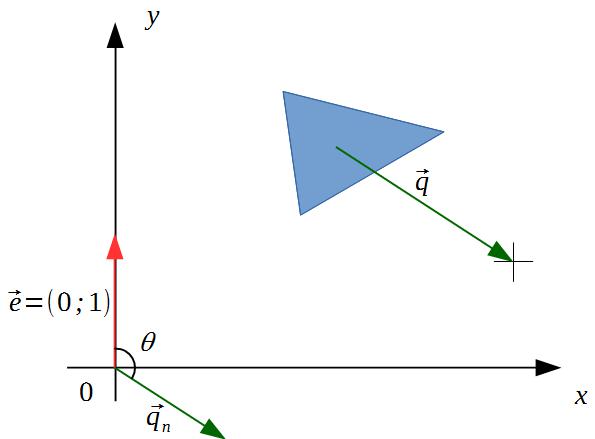
 the expression for the angle becomes even simpler since
  . Remember that normalizing a vector does not change its direction, so angle calculations are unaffected.