Dev Blog 2, The Harpoon Projectile
|
This is the second part of my blog detailing what I have worked on while creating the game Umibozo together with my team, based on the designed created by another team. In Umibozo the player controls a ship equipped with a harpoon. While usually used for fishing, it proves particularly useful when monsters start attacking. In this blog post I will talk about how we designed and implemented the mechanics of the harpoon. The original design explained the harpoon as a simple weapon that aimed towards your mouse and fired a projectile that traveled straight (the game is 2D) and damaged the first target hit. Our group were happy with this and decided to implement it more or less unchanged. Because of the most central game play mechanic of the game, revealing objects with the floodlight, being precise in what target you chose to fire upon is essential. This is because once you have identified your target, you should not be hindered in also hitting that target, since identifying it is the important part when it comes to the aesthetic of revealing a mystery. Because of this, one thing we decided to add to the harpoon was to make the projectile fired be able to pass over objects. This meant that it would only impact objects where it landed in the water, meaning you would have to aim more carefully. This enables the player to more easily hit only the intended target while shooting past those they don’t want to hit. The change also makes aiming more precise, bringing down the pace of the game, which is also something that is in line with the aesthetics.
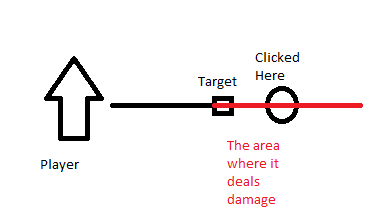
Illustration of how the mechanic works.To achieve this effect in Unity, whenever a projectile is fired, an invisible target is also placed in the game world. Only once it has reached the target does the projectile gain the ability to hit objects, and a short while after reaching the target the projectile is removed. Once this was implemented, I noticed that the aiming didn’t feel very intuitive. When firing towards an enemy by clicking directly on top of it, because of the movement of the enemy towards the player, the projectile would often only become active after it had already passed the enemy. To fix this issue, I placed the target with a certain offset closer to the player, so that the projectile would always become active before reaching the enemy, which resulted in a much better playing experience. Next week I will be writing about my experience working with Scrum.  |