Blog #2: Balancing sounds in Unity
|
Hello and welcome to my second blog post! I’m Léo, the project manager and Scrum Master of Team Wendigo. I am also responsible for sound in our game, “Umibōzu”. In today’s blog, I will talk about balancing sounds in Unity. What I mean by this, is making sure that the volume levels of implemented sound clips in the game are “just right”. The reason this is important is because the sounds should not affect the player to the point that they are disturbing as well as be audible to the player to provide feedback. Good sound design is when the player doesn’t notice the sounds because they blend in fluidly causing the player to be immersed and focus on gameplay. Achieving this is not an easy task. The sounds that were in the game had vastly varying volume levels and quite a few adjustments had to be made. I assumed I could simply adjust all the volume levels in a “master” sound manager with sliders but in reality I had to find the sounds in the script and manually test and adjust the volume. Due to my inexperience in Unity and the fact that I am not a programmer, this proved to be challenging and tedious. Previously, my coder was the one responsible for implementing all assets in the game including sound. There were some inconsistencies when it came to the naming of sound clips in Unity compared to the names in the product backlog, which slightly hindered my progress. Most sound clips are located in our “PlayerController” script. At the beginning of the script, the variable (in this case the sound clip) needs to be declared within the relevant parameters of the script. In code, it looks like this: “public AudioClip PowerupSound;”. By highlighting “PowerupSound” in Visual Studio, I can find the corresponding object called “audiosource” which plays a one-shot of that variable and looks like this in the script: “audiosource.PlayOneShot (PowerupSound, 1.0f);”. All sounds are defaulted to play at “1” which is the original volume of the clip when implemented into Unity. In order to increase the volume, you can change the value to a number greater than 1 and to decrease it, change it to a value lower than 1, as seen here: “audiosource.PlayOneShot (PowerupSound, 1.5f);” (1.5x the original volume). This process was purely trial and error since every time I changed a value, I had to save the script and then listen to it in game and evaluate whether it was acceptable. This became tedious because at times I needed to wait for a certain interaction to happen before I could actually hear the sound I was adjusting. For example, when I was regulating the “power up” volume, I had to wait for the power up to come my way and pick it up before I could actually hear it. If I wasn’t happy with the new adjustment, I had to repeat the described process until I was satisfied. Once I got the hang of it, I felt comfortable changing the script (even though it’s terrifying since you don’t want to mess anything up) and was able to work effectively. 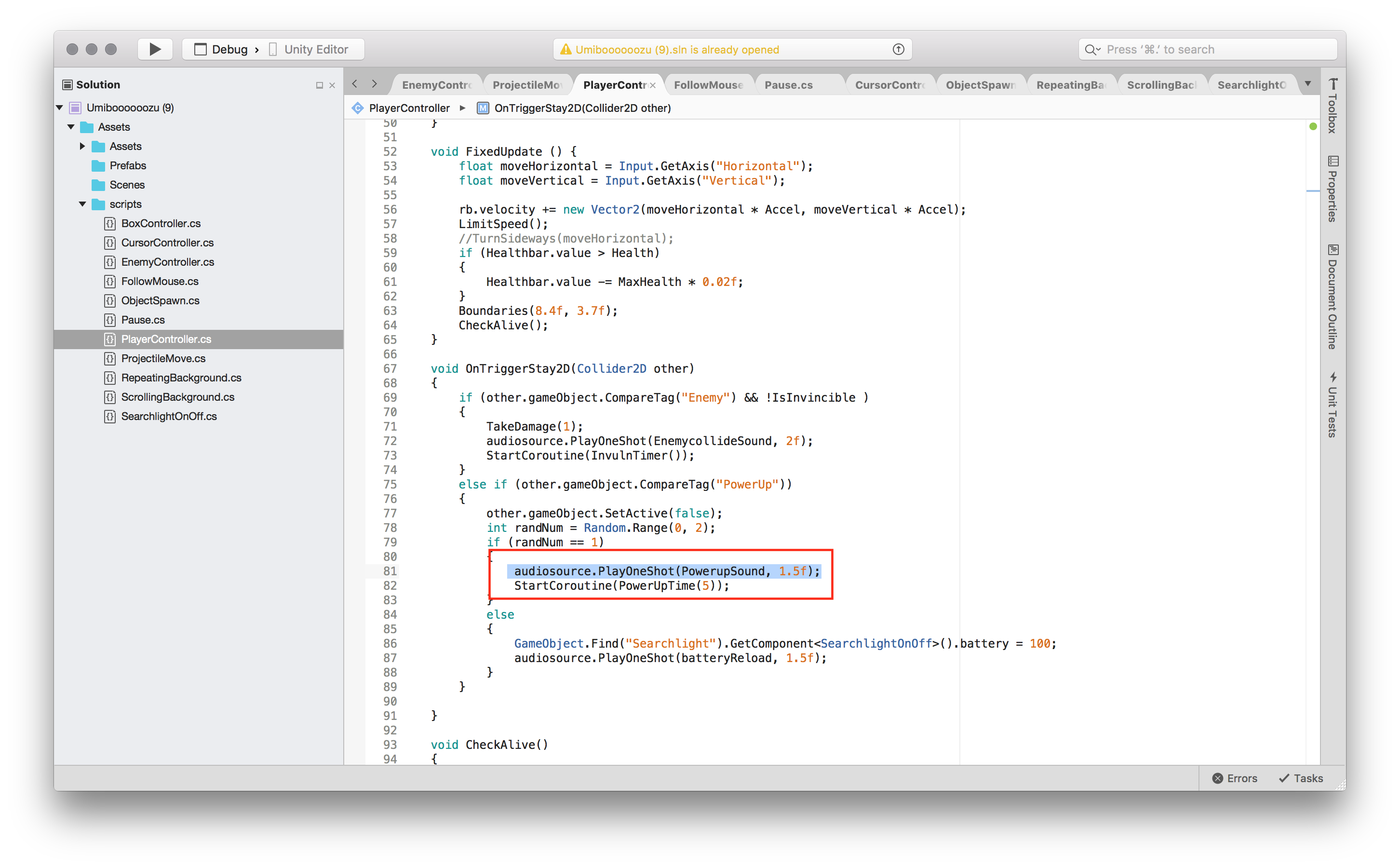 A critical problem is that Unity Collaborate is terrible and should never be used. Uploading and merging my files was almost catastrophic to the game. Luckily, we had a recent backup of the game and were able to recover everything. Since my programmer was the only one implementing assets before, we weren’t completely aware of the risks Collaborate posed to the project. For now, we will continue with the way we were working before and in the meantime I will learn how to set up GitHub for the team so that everybody can implement and test their assets without destroying their hard work. Here is a video of the gameplay and sounds. The sounds you hear in the clip are: ambient sound (ocean, wind howling, deep ambient evolving sound), boat movement (engine, waves caused by boat), harpoon shooting, harpoon missing, harpoon hitting enemy, music, power up pickup, battery recharge pickup, spotlight on/off, and boat taking damage. Overall, I am still not satisfied with the result because there are still a lot of sounds that are too loud but at least I can hear all the sounds. Also, there are a couple of sounds that need to be reworked for the upcoming beta release. Thanks for reading and until next week, cheers! ∼ thedudeleo  |