Creating the first sound effects
|
Hi and welcome to my first blog entry. My name is Michael Degirmen and I am the project manager (Scrum master) and lead sound for Team Gnoll. We are working with the game concept “Behemoth”. Behemoth is a 2d side-scrolling shoot’em up game that we work on as a part of our school course. This blog will mostly be about the management side of the project, as well as the sound design for the game. Since we work with Scrum in our team, my role is more of a coach, but I am confident that I will still be able to share some interesting stories about how I work with my team. My first post is however about my other responsibility within the team. As lead sound I am responsible for creating or finding sound effects and music for the game. For me it is very important that all the parts we put into our game are made by someone in the group. It would feel wrong for me to take credit for something I did not create, and it would not feel like the finished game is entirely the group’s own project if we were to use free assets such as music or sounds. Thus, I have started a small journey towards creating good sound effects and music. I have no prior experience and I try to learn on my own, which is a very challenging but also incredibly inspiring process. Hopefully you as the reader can learn with me as I explain my process for creating sound effects. This post will explain how I made sound effects for the shield that protects the Behemoth. Creating a sound effect for something that has no finished art or even a concept sketch is incredibly challenging for a newbie sound effects maker such as myself. I therefore created multiple version and will present where I am currently. I use Ableton live lite as my digital audio workstation (DAW for short). A DAW is a software for recording, mixing and editing sounds. You can for example record your piano directly into the DAW, put an effect on the piano sound and then export that sound as a WAV-file. The version of Ableton I use is like an extended trial, and has many limitations and not as many features as the more expensive versions. However, for making sound effects it is more than enough.
Ableton live lite I use a lot of different equipment when I make sound effects. The process for this particular sound effect started with me using a MIDI-keyboard plugged into my computer and using it inside my DAW. A MIDI-keyboard looks like this: The MIDI-keyboard I use As you can see, it looks very similar to a regular keyboard. This particular keyboard has no sound of its own. It is just a controller that you plug into a computer through USB. Think of it like a controller for an Xbox. You can use an Xbox controller to control a character and do lots of crazy things inside of a game, but if you were to shut off the game the buttons on the controller would revert to simply being plastic buttons on a controller. When I make sound effects I try to envision what kind of sound is needed and how it should sound like before I choose the instrument. A MIDI-keyboard can be used as a controller for virtual instruments inside of a DAW. Relating it to games, you can think of it like this: The DAW is the console, the virtual instruments are the games and the MIDI-keyboard is the controller. First, I wanted a sound for enemy projectiles hitting the shield. I wanted the sound to be as easy on the ears as possible, while maintaining two key aspects. The first one being the impact of the projectile hitting the shield while the second one is a follow-up sound for the reflection of the projectile. To create it I used Native Instruments Absynth 5 as my virtual instrument.
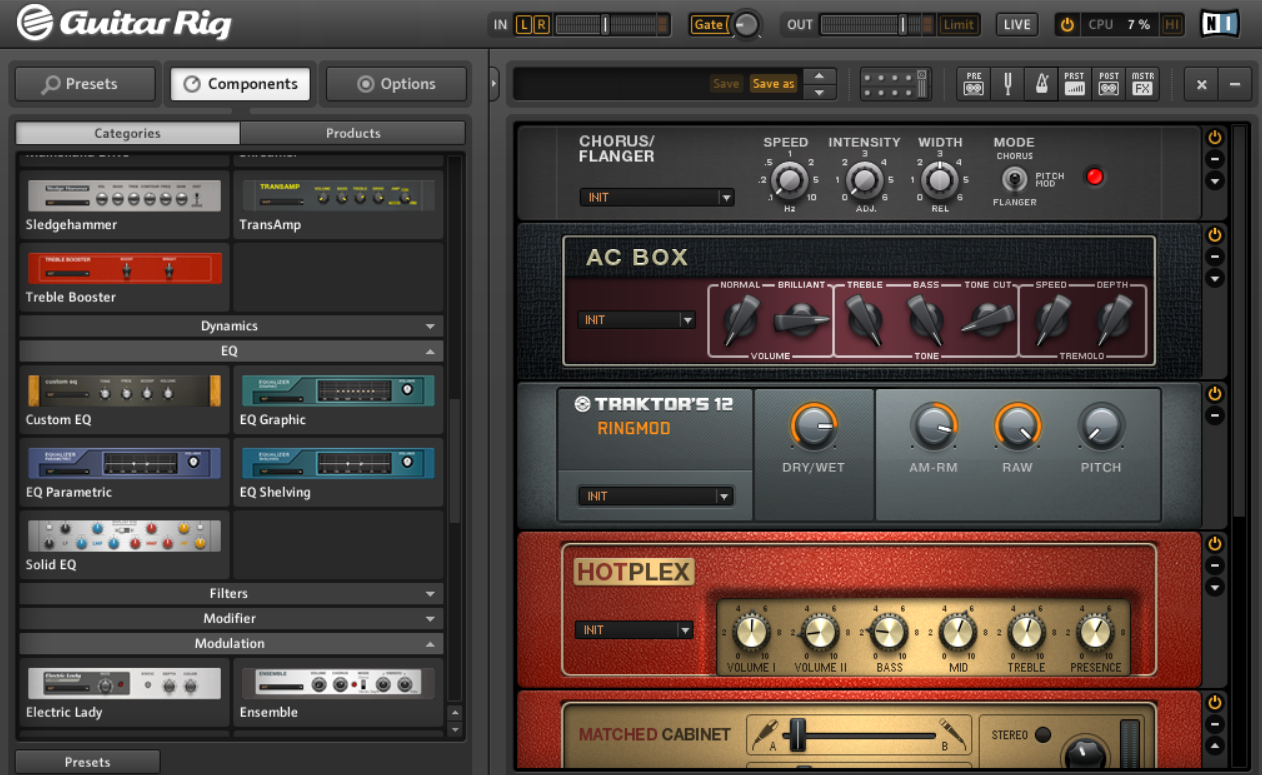
Absynth 5 I browsed through the presets to find a suitable sound to modify. A preset is basically a pre-made sound that the creators of the software made for you. I found a sound that had the dynamics I was looking for (short impact + a sound of it bouncing off). I then messed around a bit with the nobs inside of Absynth 5 (see the picture above). I changed the brightness, bass, distortion and effect. To keep it simple, I modified the sound to sound completely differently, while maintaining the dynamics of the sound from the preset. Using my MIDI-keyboard I played a note and recorded it. I then ran that sound through a virtual guitar amp to make it sound slightly more interesting. The finished sound I was not super pleased with the result of the previous sound. However, it had sparked an idea for how to create something truly interesting. Having created my first sound I kind of intuitively understood the process for creating future sound effects. I started to think really hard about how the shield should behave and what kind of projectiles the enemies would shoot at it. My conclusion was that it had to sound incredibly electric and powerful, like it could burn through the projectiles, like some powerful laser. I was not exactly sure what I wanted the sound to be used for, I just knew I wanted it to be a part of the shield. I got my electric guitar out and plugged it into my DAW using a USB audio interface. A USB audio interface plugs in through USB to your computer, and since computers do not have inputs for guitar cables, you need to plug the guitar into an interface that then plugs into the computer. Inside the DAW I then booted up Native Instruments Guitar rig 5, which would work as a digital amplifier and place for effects for the guitar.
I added tons of effects to my guitar, as well as a regular amplifier. The idea was to create a crazy sound effect, so I stacked suitable effects to reach the sound I had in mind. I then put an Equalizer on the sound as the finishing touch. An equalizer makes the sound move in volume according to a certain pattern. I wanted it to get really loud, real fast and then fade away while maintaining an electric hum, feedback kind of sound. I then took the process to another level by taking a guitar pick and hitting the strings of my guitar in certain spots. Just playing the guitar regularly did not create the dynamics I was hoping for. Using this technique, I created a truly incredible sound that will have multiple uses for the project. For example, as a sound for using a shield power-up that extends the size of the shield. So before I let you hear it, I want to explain that it is not finished yet. When I create sound effects and I find a sound I really like, I play many different versions of it. I then edit out the best ones and process the sound further. What you will hear is the raw version of the sound, recorded directly from my guitar into the DAW through guitar rig. I therefore want to explain that you should only consider the beginning part of each note, as the feedback you might hear after is to be edited out. In other words what you hear is many different variations of the sound. It might be very loud so you might want to lower your volume before listening. Thank you for reading!
Advertisements
(function(){var c=function(){var a=document.getElementById(“crt-330925539”);window.Criteo?(a.parentNode.style.setProperty(“display”,”inline-block”,”important”),a.style.setProperty(“display”,”block”,”important”),window.Criteo.DisplayAcceptableAdIfAdblocked({zoneid:388248,containerid:”crt-330925539″,collapseContainerIfNotAdblocked:!0,callifnotadblocked:function(){a.style.setProperty(“display”,”none”,”important”);a.style.setProperty(“visbility”,”hidden”,”important”)}})):(a.style.setProperty(“display”,”none”,”important”),a.style.setProperty(“visibility”,”hidden”,”important”))};if(window.Criteo)c();else{if(!__ATA.criteo.script){var b=document.createElement(“script”);b.src=”//static.criteo.net/js/ld/publishertag.js”;b.onload=function(){for(var a=0;a<__ATA.criteo.cmd.length;a++){var b=__ATA.criteo.cmd[a];"function"===typeof b&&b()}};(document.head||document.getElementsByTagName("head")[0]).appendChild(b);__ATA.criteo.script=b}__ATA.criteo.cmd.push(c)}})(); (function(){var c=function(){var a=document.getElementById(“crt-1515030616”);window.Criteo?(a.parentNode.style.setProperty(“display”,”inline-block”,”important”),a.style.setProperty(“display”,”block”,”important”),window.Criteo.DisplayAcceptableAdIfAdblocked({zoneid:837497,containerid:”crt-1515030616″,collapseContainerIfNotAdblocked:!0,callifnotadblocked:function(){a.style.setProperty(“display”,”none”,”important”);a.style.setProperty(“visbility”,”hidden”,”important”)}})):(a.style.setProperty(“display”,”none”,”important”),a.style.setProperty(“visibility”,”hidden”,”important”))};if(window.Criteo)c();else{if(!__ATA.criteo.script){var b=document.createElement(“script”);b.src=”//static.criteo.net/js/ld/publishertag.js”;b.onload=function(){for(var a=0;a<__ATA.criteo.cmd.length;a++){var b=__ATA.criteo.cmd[a];"function"===typeof b&&b()}};(document.head||document.getElementsByTagName("head")[0]).appendChild(b);__ATA.criteo.script=b}__ATA.criteo.cmd.push(c)}})();  |