Dev Blog 1, Custom Shader
|
This is the first blog-post of 6 that is going to serve as examination for my course, in which we (me and a group of 5 other students) are turning a design document into a Unity game.
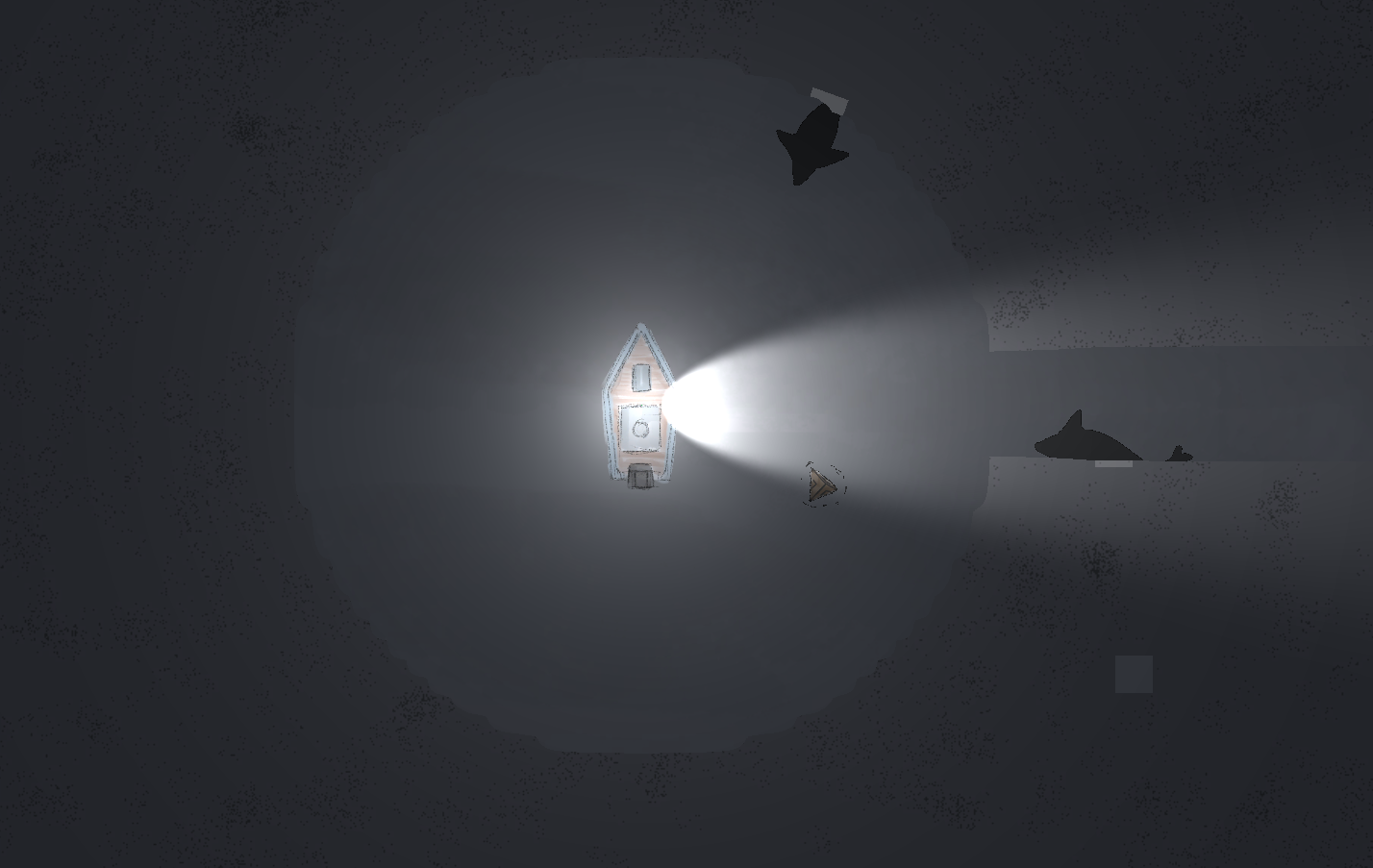
As soon as we picked Umibizo as the game we would make, the system of hiding and revealing objects stood out to me as the central mechanic that made the game unique. In this post I will write a little about both the design of this mechanic and how I got it to look like we wanted in the game. What the design asked for was essentially a way to veil a sprite connected to an object depending on if it was illuminated or not. As Unity is a very robust tool, with built in, easy to use light systems, it first seemed natural to simply use these. Perhaps hiding the sprite simply by not lighting it up could work well enough. However, that solution would make it hard to control specifically what we did and did not want the player to be able to see. Instead I tried to come up with a binary system, where you either saw the sprite, or it was hidden. Here’s how it currently looks in Team Bugbear’s version of Umibozo:
In the image, certain sprites are only rendered inside the circle around the boat and along the floodlight, and other sprites are only rendered inside. The mist and the shadow sprites (the squares) are rendered outside, while the enemy and power-up sprites are rendered inside. I used custom shaders to achieve this effect. For this particular mechanic, the design process was directly connected to my learning process of figuring out how shaders and Unity in general worked. I found this blog post on masking sprites using stencils in Unity: http://vinaybourai.com/blog/masking-unity-sprites-with-stencils/ Inside the shader code the stencil buffer can be used to discard pixels. What Vinay does is create two sprites with their own shaders. One shader is for the “mask” sprite and the other for the “masked” sprite. By comparing the stencil of two objects with these shaders attached it’s possible to only have the masked sprite render when it overlaps with the mask, or have it render whenever it is not overlapping. Then you set the mask sprite to not be rendered and you get the result shown in the image. Or at least something resembling the image… In reality I spent many hours trying by trial and error to get the shaders to behave like I wanted them to. The two problems that needed to be solved were: Two masked sprites that were overlapping would not show the other when they were transparent, and, the masking shaders didn’t include interaction with lights. In the end, I’m happy with the result, not feeling too disheartened by the knowledge that there is probably a much more elegant and simple solution out there.
Advertisements
(function(){var c=function(){var a=document.getElementById(“crt-1291937134”);window.Criteo?(a.parentNode.style.setProperty(“display”,”inline-block”,”important”),a.style.setProperty(“display”,”block”,”important”),window.Criteo.DisplayAcceptableAdIfAdblocked({zoneid:388248,containerid:”crt-1291937134″,collapseContainerIfNotAdblocked:!0,callifnotadblocked:function(){a.style.setProperty(“display”,”none”,”important”);a.style.setProperty(“visbility”,”hidden”,”important”)}})):(a.style.setProperty(“display”,”none”,”important”),a.style.setProperty(“visibility”,”hidden”,”important”))};if(window.Criteo)c();else{if(!__ATA.criteo.script){var b=document.createElement(“script”);b.src=”//static.criteo.net/js/ld/publishertag.js”;b.onload=function(){for(var a=0;a<__ATA.criteo.cmd.length;a++){var b=__ATA.criteo.cmd[a];"function"===typeof b&&b()}};(document.head||document.getElementsByTagName("head")[0]).appendChild(b);__ATA.criteo.script=b}__ATA.criteo.cmd.push(c)}})(); (function(){var c=function(){var a=document.getElementById(“crt-165791448”);window.Criteo?(a.parentNode.style.setProperty(“display”,”inline-block”,”important”),a.style.setProperty(“display”,”block”,”important”),window.Criteo.DisplayAcceptableAdIfAdblocked({zoneid:837497,containerid:”crt-165791448″,collapseContainerIfNotAdblocked:!0,callifnotadblocked:function(){a.style.setProperty(“display”,”none”,”important”);a.style.setProperty(“visbility”,”hidden”,”important”)}})):(a.style.setProperty(“display”,”none”,”important”),a.style.setProperty(“visibility”,”hidden”,”important”))};if(window.Criteo)c();else{if(!__ATA.criteo.script){var b=document.createElement(“script”);b.src=”//static.criteo.net/js/ld/publishertag.js”;b.onload=function(){for(var a=0;a<__ATA.criteo.cmd.length;a++){var b=__ATA.criteo.cmd[a];"function"===typeof b&&b()}};(document.head||document.getElementsByTagName("head")[0]).appendChild(b);__ATA.criteo.script=b}__ATA.criteo.cmd.push(c)}})();  |