Moth game: Clues
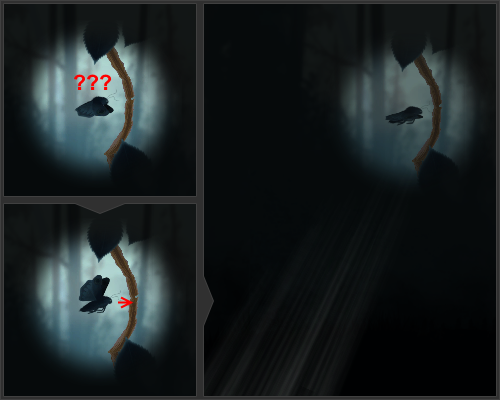
What now?Most of the mechanics in our game are finished, and we’re getting close to the final deadline. What’s left is polishing the experience of the mechanics, so that the player knows what to do and can feel a sense of progression. One particularily confusing situation players would face in our game was encountering breakable and openable branches. This was clear during beta playtesting, where we would see players bump into the branches, not aware of how to break through. Some would eventually look around and find the flower that unlocks the dash mechanic, allowing them to dash through the branch. Some would find the flower, but not understand that they needed stamina to dash. Some would just stop at the branch and ask: “What now?” To answer this, we decided to give the player a visual indicator showing them the right way. We discussed how this could be done, agreeing that an indication directly on the flower might be too obvious, and kill some of the sense of exploration. Instead, we could show the player in what direction they should be looking, but not exactly how far away. This post is about the implementation of the directional clue and the enough-stamina-to-dash indicator. Our other programmer, Alexandru Capsa, writes about how we teach the player how to dash in his blog. Look! Over there!We had two ideas of how to show the player in what direction they should be heading. I thought of it as being a field of “sense rays” pointing away from the player. We also had the idea of adding an arrow shape on the edge of the otherwise circular reveal field around the player. Our producer, Raoul Man, made a sprite for the arrow. We will try out both methods to see which one (or both) we’ll use. The arrow isn’t implemented yet, but the sense rays look like this:
I created the field of sense rays using Unity’s particle system. Each ray is a particle that quickly fades in and then fades out. The particles are emitted from a cone facing to the right. The particle system is activated with a script when the player bumps into a branch. The script will first rotate the particle system so that the emitter cone is pointed towards what the player needs, then it will “play” the particle effect, making the system spawn new particles for half a second. Depending on if the player is bumping into an openable or a breakable branch, the script’s algorithm for finding what is needed will vary slightly. Openable branches can’t be broken through by dashing into them, so the player needs to find a berry that opens that particular branch. The script is attached to every breakable and openable branch, and the algorithm is as follows:
By default, Unity’s particle system uses a circle gradient as the texture for particles. Since I was trying to create a sense of rays, the particles would have to look like lines, and stretching out a gradient circle wouldn’t achieve the effect I was looking for. Instead, I created my own particle sprite by drawing some lines, blurring them a bit, adding a bit of noise, and then fading it in from the left:
One detail I still think can be improved about the way the sense rays work is when they appear. As it is now, they will only show when the player bumps into branches. If a player is particularily careful, that might never happen. A simple fix for that would be to show the rays anyway after some time if the player hangs around without doing anything. Feel the powerThe problem of players not realising that dashing costs stamina became clear already during alpha playtesting. Back then the power-up didn’t have a range limit after which it would be disabled, but since it now does, that would add even more confusion as to when dashing can and can’t be done. We want the game to feel as immersive and uncluttered as possible, so adding HUD elements to the screen was undesirable. The solution was a visual effect on the player character – the moth. Our lead artist, Alexander Sjöberg, created a particle effect animation to indicate that the player is, indeed, powered up. To show the player that they have enough stamina to dash, we thought a glow around the moth would do. Since a glow is quite easy to do in Photoshop, I decided to take care of that part. I would open up the sprite sheet for the moth and apply glow, or so I thought. It turns out the sprites were tightly packed, and any glow effect extending individual sprites beyond their defined border would overlap other sprites or go out of bounds. I ended up spending a lot more time than I thought it would take to resize the sprite sheet, pull the sprites apart, and redefining all the coordinates and pivots for the new glow sprites. However, the satisfying end result makes up for the tedious work: 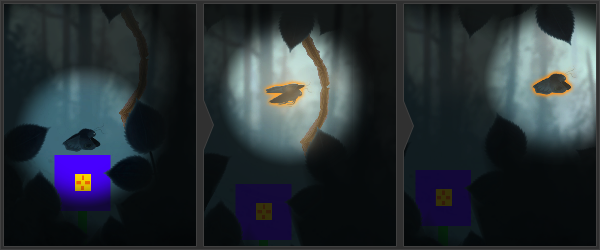
That hideous flower is a placeholder. You didn’t see it. In addition to the glow, I thought it would be nice to show a trail of the same color behind the moth as the player dashes. This would further emphasize the connection between dashing and the mysterious glow. What’s nextThis is the last post in this series that’s part of the blog assignment in the game design course I’m taking. I will write a final wrap-up post after the course ends where I’ll present the game, discuss what I’ve learned, and provide some details I missed in previous posts. After that I will start a course in game production, where I’ll be working with a restructured team, building an arcade game!  |