Moth game: Improving the sonar with procedural mesh generation
|
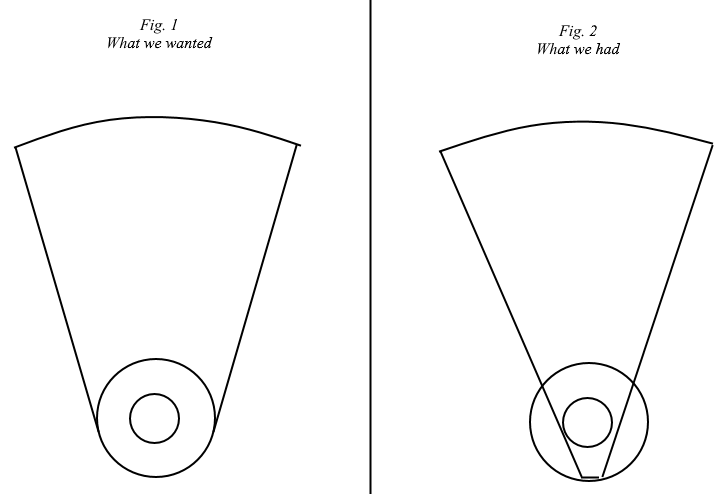
This week we had our first playtest. Among the feedback we received, there was this idea of having the sonar bounce or stop when it collided with obstacles. This would make sense, since that’s usually how sonars work in the real world, but also because of how it impacts the gameplay. If the sonar can be used to see through everything, there won’t be as many options for how to build in surprises in a level. Blocking the sonar opens up an entire realm of new challenges. It also means exploring the level will take more time, because you’ll need to check behind corners instead of just launching a sonar over everything and being done with it. That alone was not the only motivation to redo the sonar however. The initial plan for the sonar was to have it extend from the edges of the player’s visibility field (fig. 1). This wasn’t trivial to achieve using sprites though, and we needed something that would be playable sooner rather than later. Because of this, the first iteration of the sonar would turn out to be a single sprite approximating the shape we wanted (fig. 2).
I had a few different ideas to consider for how to bring the state of our sonar closer to what was in our dreams. Getting the sonar to just be the right shape seemed like an easier task than getting it to stop at things, so my first thought was to do that first, and then figure out the collision. My idea of how to do it was to build the sonar out of several sprite parts. Thinking more about it though, trying to align all those sprites would take some effort. Adding to that not having a clear idea of how to make it collide, other than maybe splitting it up into more parts, made me think about better alternatives. One idea that came to mind, but died shortly after, was shooting out a circle and letting it leave a trail. I didn’t want to do that because the trail would be a bunch of extra objects, and the stepping would produce unpleasant artifacts. The method I settled on was procedurally creating a mesh (a shape made out of lots of triangles), changing it every frame as the sonar expanded outwards. Constructing a mesh in code gives you all the flexibility you could ever need, meaning both the shape of the sonar and collision could be dealth with. The downside is it’s not easy, because you’re making a shape with only triangles, and you need some geometry math translated into code to piece them all together. Fortunately, I had already used this technique when making games with other tools, so I was confident I could do the math and coding to make it work. I was worried if Unity would even let me do it though, since I was looking into physics in Unity earlier, and it didn’t offer any low-level control at all there. Luckily for the sonar though, it turns out Unity offers all kinds of support for low-level rendering. I’m not going to go into all the specifics of how every triangle fits together and what the math means, because that would be a lengthy mess of overly specific nonsense. Instead, here’s a happy little animation showing what’s going on:
This is obviously not how the sonar looks in-game, since all those triangles are filled in, but it does a good job demonstrating what is going on. First, the sonar is created as a circle. To expand the sonar, the vertices (points that the triangles connect to) on the right side are moved outwards and to the right. The circle shape itself is just built up by the triangles connected to the center vertex. The surrounding triangles making up the border around the circle are needed to produce a nice blur effect, fading the sonar at its edges. At the time I’m writing this, the collision is not yet implemented. My plan for how to do it is to track each inner vertex that is being moved, checking them for collision against obstacles. If any vertex hits something, it will be stopped, together with the outer fade border vertex adjacent to it. Depending on if we decide to keep the level static, without moving obstacles, I might also optimize it to only check once for collision along the line each vertex will be travelling. Update (2017-02-21): Collision has now been implemented using the method described above: http://i.imgur.com/OrceMNl.gifv  |