Anima2D and Animating in Unity
|
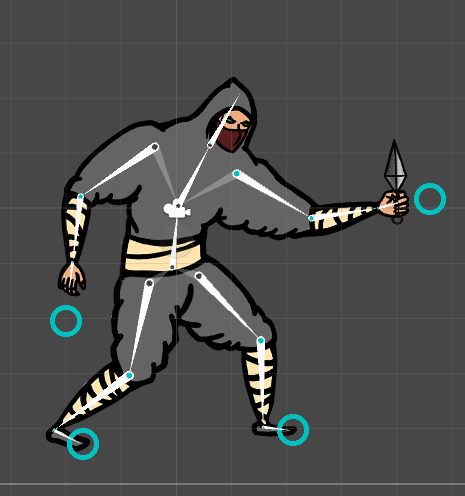
This week has certainly been interesting and challenging. My whole focus has been in first of all learning an animating tool in Unity called Anima2D and secondly making the animations. Everything I’ve done this week I have no previous experience of, so I would say that half of the work hours have been learning how to use the software and how to apply it on my work. Anima2D basically allows the user to set up a bone structure and a mesh map for the sprites. The bone structure will connect all the parts of the character and make them move realistically in conjunction with the other bones. The mesh mapping for the sprites will allow the mapped textures to blend along with the bone movement, making the whole animated movement more realistic and smooth. Here you can see the bone structure of the character. The blue circles aka IK’s are points that move all the bones that are connected to it. You can see the joints in the bones have turned blue from the parts that the IK affects. As you might notice, not all the bones of the limbs are connected to the IK. This is for better control of the limbs. The IK’s will not affect any body part that is not connected.
One big time consumer has been finding out how all the different sprites for the body parts must look for them be able to look natural in multiple positions. For example the body has to have some sort of shoulder/back area drawn for when the arm and shoulder part in front moves away, exposing the back area. I made mistakes on the first try and that cost me a lot of time since I could not just replace the sprites but had to map the new ones again for Anima2D, I actually repeated this process three times and I am still not quite satisfied with the outcome. With the animation rig I created for our game’s main character, who is the ninja I previously presented, I created walking and idle animation cycles for it. Animating with Unity was a challenge since you do not have the same creative freedom to change anything in the sprites unlike with frame to frame animation. I had to specifically plan out how I would use the sprites so I would know what kind of visual requirements they would need to meet in different animations and poses. Unfortunately I haven’t found an efficient way to show the animations in the blog. That I will fix for the next blog post, until then!  |